100+ Nano-Banana-Prompts nach Kategorie: Guide für 2 & Pro
Über 100 getestete Nano-Banana-Prompts zum Kopieren, nach Kategorie: für Nano Banana 2 und Pro, Fotobearbeitung, Text im Bild und echte Preise pro Bild.

Ein Nano-Banana-Prompt ist eine schriftliche Szenenbeschreibung, die Googles Bildmodelle (Nano Banana 2, Nano Banana 2.1, Nano Banana Pro und die günstige Lite-Stufe) in ein Bild verwandeln. Diese Modelle basieren auf Gemini, lesen deinen Prompt also als Sprache und nicht als Sammlung von Schlagwörtern. Allein diese Tatsache verändert, wie du schreiben solltest. Laut Googles Doku zur Bildgenerierung schlagen ausführliche, erzählende Beschreibungen kommagetrennte Tag-Listen durchweg, und unsere eigenen Generierungen bestätigen das jeden Tag.
Die Kurzfassung, falls du nur die Vorlage willst: „A photorealistic [shot type] of [subject] in [setting]. [Lighting description]. Shot from [camera angle] with [lens type].“ Schreib vollständige Sätze. Benenne Lichtquelle und Objektiv so, wie es ein Fotograf tun würde. Unter dieser Vorlage findest du 106 nummerierte Nano-Banana-Prompts zum Kopieren, nach Kategorien sortiert, jeder in einer eigenen Box, damit du ihn direkt in den Generator einfügen kannst.
Das hier ist das Gegenstück für Bilder zu unserem Veo-3.1-Prompt-Guide. Jede Demo wurde auf BananaBanana mit genau dem gezeigten Prompt generiert, im ersten Versuch, sofern ich nichts anderes dazuschreibe.
In diesem Guide:
- Warum erzählende Prompts Keyword-Listen schlagen
- Fotorealistische Prompts: Schreib wie ein Fotograf
- Nano-Banana-2-Prompts nach Kategorie (Prompts 1–53)
- Nano-Banana-Pro-Prompts: Text, Poster und 4K-Details (Prompts 54–79)
- Prompts für die Fotobearbeitung (Prompts 80–106)
- Negativprompts, Seitenverhältnisse und Preise
- FAQ
Warum funktionieren erzählende Prompts besser als Keyword-Listen?
Alte Gewohnheiten halten sich hartnäckig. Wenn du das Prompten mit älteren Diffusion-Tools gelernt hast, schreibst du vermutlich so etwas wie „perfume bottle, product photo, 8k, dramatic lighting, masterpiece“. Nano-Banana-Modelle verstehen das, aber du verschenkst ihre größte Stärke: Sie verstehen Beziehungen zwischen Dingen, nicht nur die Dinge selbst.
„Eine Baristin lacht über etwas außerhalb des Bildes, während hinter ihr Dampf aus der Espressomaschine aufsteigt“ – das ist eine Szene. Die Keyword-Version verliert, wer was tut und wo. Das Modell füllt diese Lücken mit Standardwerten, und genau Standardwerte lassen KI-Bilder nach KI-Bildern aussehen.
Ein funktionierender Nano-Banana-Prompt enthält meist fünf oder sechs Zutaten:
| Zutat | Was sie steuert | Beispiel |
|---|---|---|
| Motiv | Wer oder was im Bild ist | „an elderly watchmaker with wire-rim glasses“ |
| Umgebung | Wo die Szene spielt | „at a cluttered workbench in a narrow shop“ |
| Stil | Gesamtlook | „photorealistic“ / „flat vector illustration“ |
| Licht | Lichtquelle, Richtung, Stimmung | „single warm desk lamp from the left“ |
| Kamera | Winkel und Bildausschnitt | „close-up, shot from slightly above“ |
| Objektiv | Optischer Charakter | „85mm lens, shallow depth of field“ |
Du brauchst nicht jedes Mal alle sechs. Aber jede Zutat, die du weglässt, ist eine Entscheidung, die du wieder dem Modell überlässt.
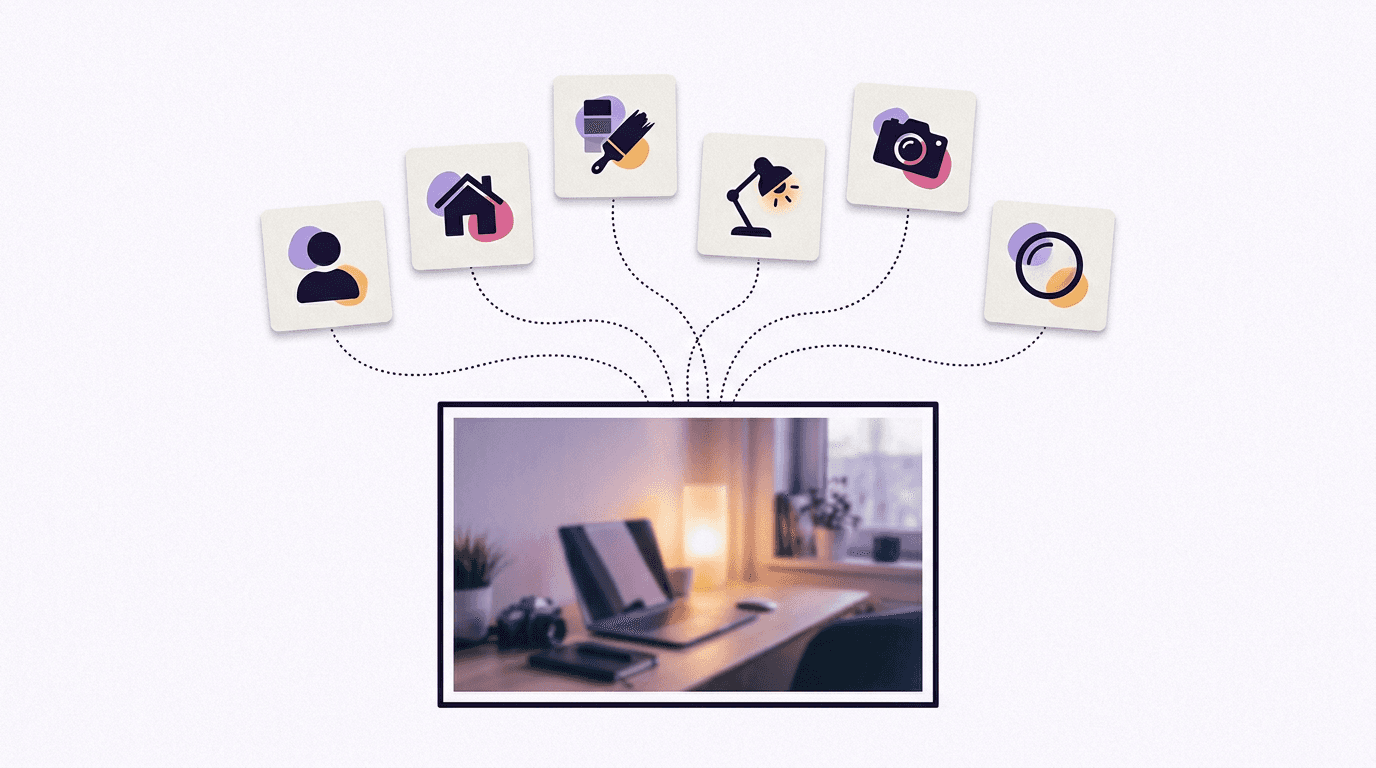
Fotorealistische Prompts: Schreib wie ein Fotograf
Für realistische Fotos ist Kamerasprache das nützlichste Vokabular: Einstellungsgröße, Motiv, Umgebung, Licht, Winkel, Glas. Genau so briefen Fotografen ein Shooting.
So sieht der Unterschied in der Praxis aus. Beide Bilder unten stammen von Nano Banana 2 in 1K-Auflösung, bei uns je $0.06. Zuerst der Prompt, den jeder am ersten Tag schreibt, schlicht „A perfume bottle on a table“:
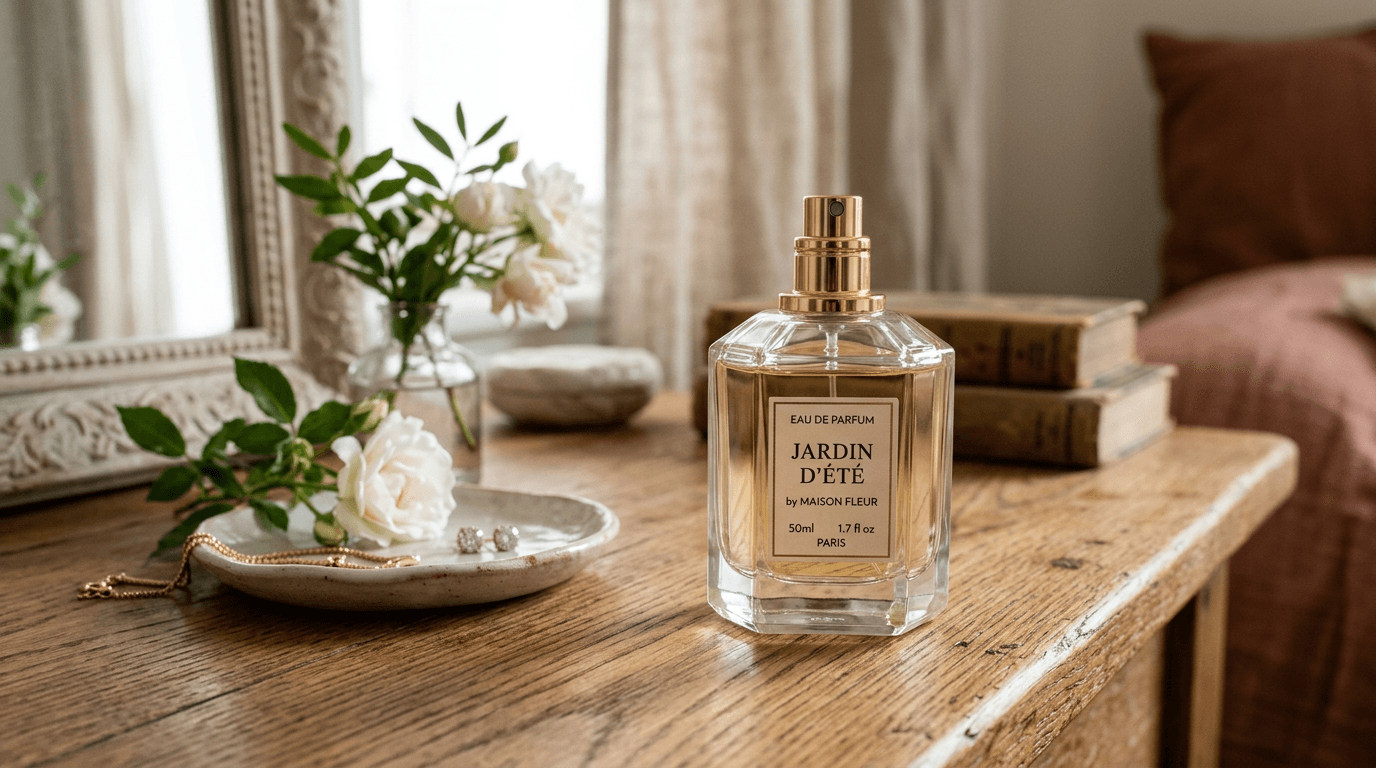
Ehrlich gesagt hübsch. Aber Fensterlicht, Blumen und Schmuckschale hat das Modell entschieden, nicht du, und beim nächsten Durchlauf entscheidet es anders. Jetzt dasselbe Motiv mit ausgefüllten Zutaten:
A photorealistic close-up of an amber glass perfume bottle standing on wet black slate, fine water droplets across the glass. Warm golden backlight from the right, a faint cool rim light from the left. Shot from a low angle with an 85mm macro lens, shallow depth of field, dark blurred background.
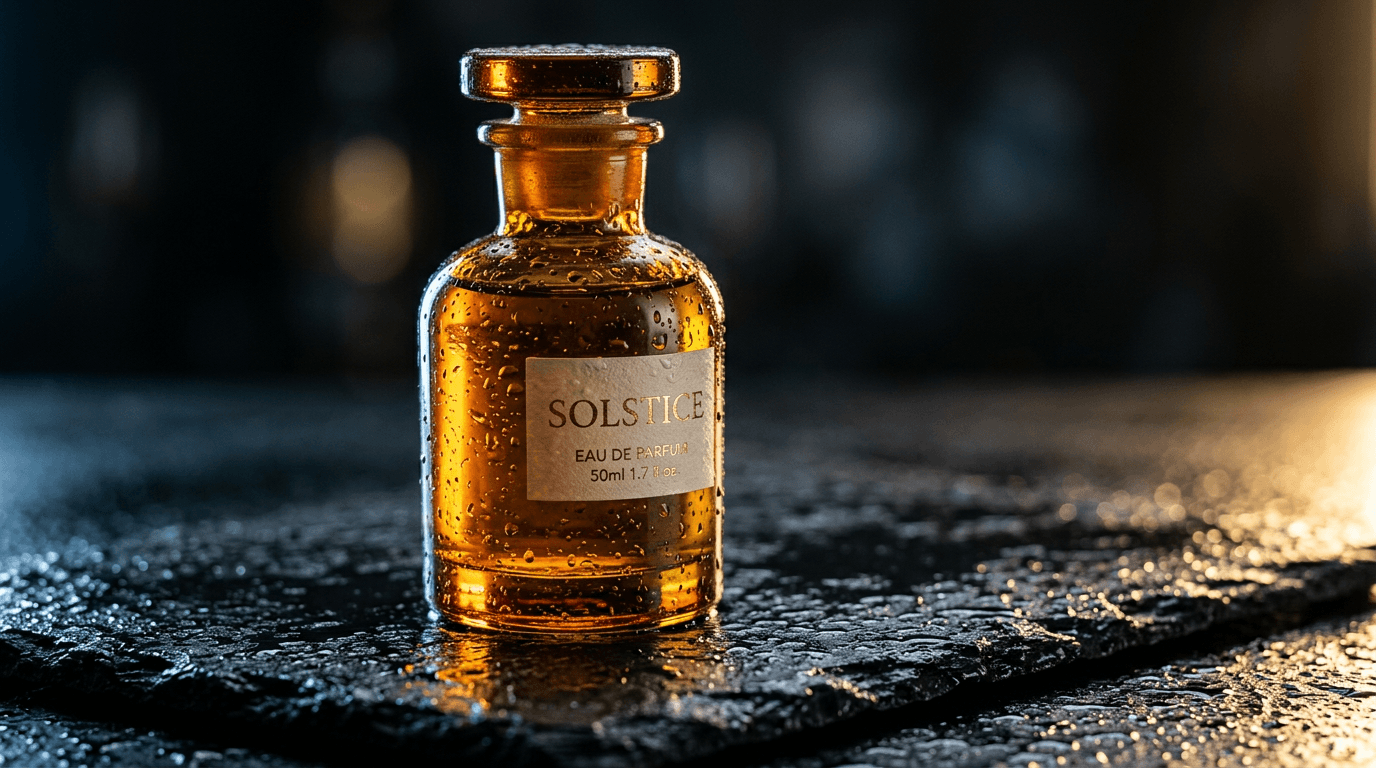
Dasselbe Modell, derselbe Preis. Die Tropfen, das zweifarbige Licht und der niedrige Winkel standen als Wörter im Prompt, nicht als Zufall. Zoom aber mal aufs Etikett: Ich habe nie eins verlangt, und das Modell hat seinen eigenen erfundenen Text falsch geschrieben („EAU DE PARFUIM“). Ungefragter Text ist immer noch die Schwachstelle von Nano Banana 2.
Namen für Lichtsituationen werden zuverlässig verstanden (golden hour, three-point studio lighting, hard noon sun, candlelight); vage Stimmungswörter wie „dramatic“ bewirken so gut wie nichts. Meiner Erfahrung nach ist das Objektiv fast genauso wichtig. Für Produkte geht der Guide zur Produktfotografie noch ein gutes Stück weiter.
Nano-Banana-2-Prompts nach Kategorie
Nano Banana 2 (gemini-3.1-flash-image) ist das Modell für den Alltag: 512px bis 4K, bis zu 14 Referenzbilder (laut Googles Doku 10 Objekte plus 4 Charaktere), $0.06 pro Bild in 1K auf BananaBanana. Google führt inzwischen Nano Banana 2.1 als sein primäres Flash-Bildmodell und bezeichnet Nano Banana 2 als die vorherige Generation. Die Prompts in diesem Abschnitt sollten unverändert auch auf 2.1 laufen, das hier in 1K $0.03 kostet. Wenn du keine 512px-Entwürfe und keinen festen Seed brauchst (2.1 lehnt Seeds ab), würde ich ehrlich gesagt gleich mit 2.1 anfangen.
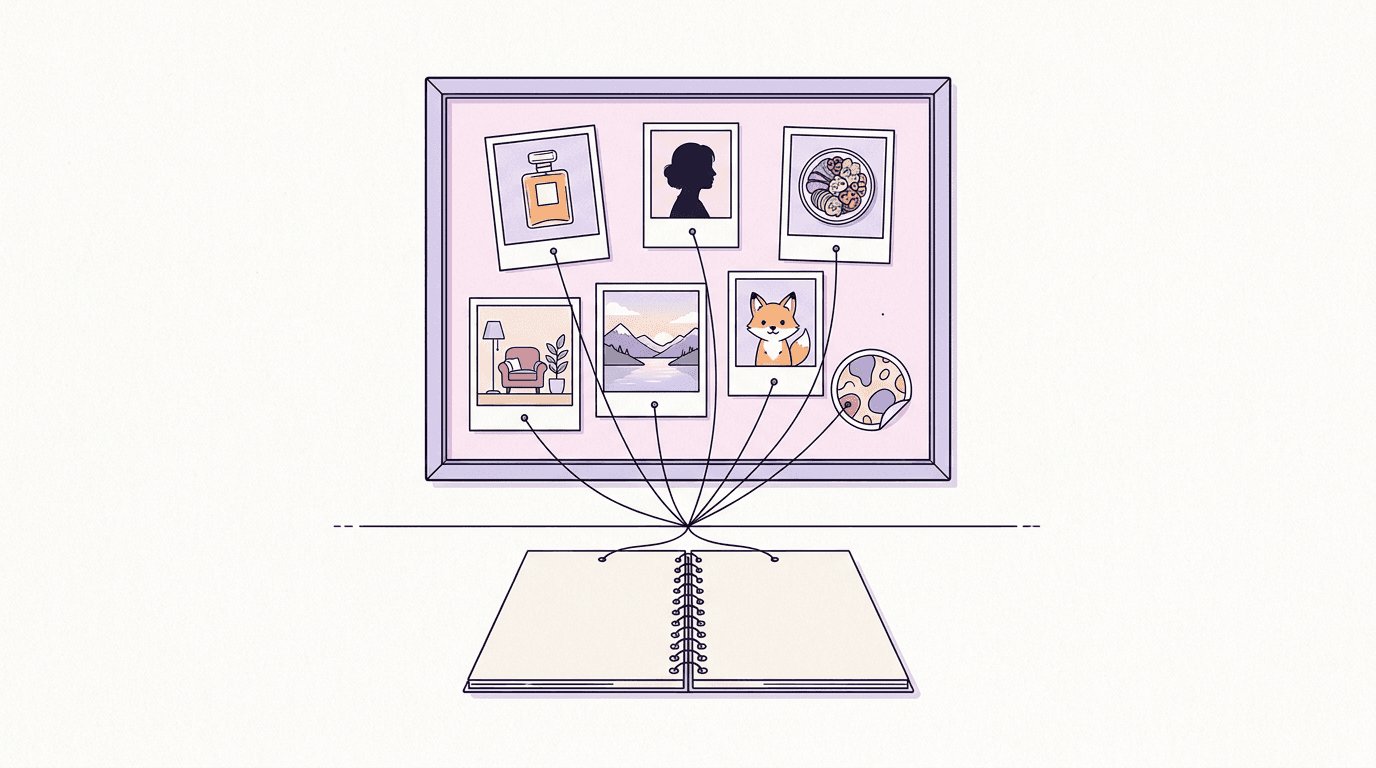
Produktfotografie
1. Serumflasche auf Travertin
A high-resolution, studio-lit product photograph of a frosted glass serum bottle with a black dropper cap, standing on a block of pale travertine. Soft three-point softbox lighting keeps the glass clean and free of hot spots. Shot at eye level with a 100mm macro lens, sharp focus on the dropper, soft beige background.
2. Schwebender Laufschuh
A photorealistic product shot of a white and coral running shoe floating at a slight angle above a pale concrete floor, its laces drifting as if caught mid-bounce. Hard directional light from the upper right casts a crisp shadow below. Shot from a low three-quarter angle with a 50mm lens against a plain light-grey paper backdrop.
3. Earbuds-Case in stillem Wasser
A photorealistic close-up of an open matte-black wireless earbuds case resting on a flat river stone in shallow, perfectly still water, tiny ripples spreading from the stone. Cool morning light from behind traces a thin highlight along the case edges. Shot from just above the waterline with a 90mm macro lens.
4. Kaffeetüte mit verstreuten Bohnen
A studio product photograph of a kraft-paper coffee bag with a blank label, roasted beans spilling from its open top across a dark walnut board. Warm key light from the left, a small reflector filling the shadows on the right. Shot from a slightly raised 30-degree angle with an 85mm lens, shallow depth of field.
5. Armbanduhr in Makro
An ultra-realistic macro photograph of a steel wristwatch with a deep green sunburst dial lying on folded charcoal wool. A single soft light from the top left makes the dial shimmer. The camera looks almost straight down, slightly tilted, to show the dial texture, with sharp focus on the hour markers.
6. Kerze auf dem Nachttisch
A photorealistic lifestyle shot of a lit soy candle in a ribbed amber glass jar on a bedside table, next to two stacked hardcover books and a pair of reading glasses. Warm evening lamp light, gentle bokeh from string lights in the background. Shot at eye level with a 35mm lens.
7. Flat Lay für den Onlineshop
An overhead flat lay of a canvas tote bag on a cream linen sheet, surrounded by a rolled yoga mat, a steel water bottle, a pair of sunglasses and a small succulent. Even, shadowless daylight. Shot straight down with a 35mm lens, with generous empty space at the top for a headline.
8. Hero-Shot mit viel Negativraum
A minimalist composition featuring a single glossy red lipstick positioned in the bottom-right of the frame. The background is a vast, empty blush-pink canvas, creating significant negative space. Soft, subtle lighting from the left.
Porträts und Menschen
9. Porträt im Fensterlicht
A photorealistic portrait of a woman in her thirties with short curly hair and freckles, sitting by a tall window and looking just past the camera with a relaxed half-smile. Soft north-facing window light from the left lets the far side of her face fall into gentle shadow. Shot with an 85mm lens at f/1.8, creamy background.
10. Business-Headshot
A professional headshot of a man in his forties with a trimmed grey beard, wearing a navy blazer over a white crew-neck shirt. Clean light-grey studio backdrop, soft butterfly lighting with a subtle hair light. Head-and-shoulders framing at eye level, 105mm lens, a confident but friendly expression.
11. Straßenporträt zur goldenen Stunde
A candid street portrait of a young man in a denim jacket with headphones around his neck, laughing while he crosses a quiet city street at golden hour. The low sun behind him draws a warm rim light around his hair. Shot from eye level with a 50mm lens, background softly blurred.
12. Holzschnitzer an der Werkbank
A close-up environmental portrait of an elderly woodcarver with deep laugh lines, holding a half-finished bird carving at his workbench. A single warm desk lamp from the left makes the wood shavings glow. Shot slightly from below with a 35mm lens so the cluttered workshop shows behind him.
13. Fitness-Editorial auf dem Dach
A photorealistic editorial shot of a woman in her twenties in a grey athletic set, mid-stretch on a rooftop at sunrise, the city skyline hazy behind her. Cool blue ambient light mixed with a warm sun flare from the right. Full-body framing from a low angle with a 24mm wide-angle lens.
14. Low-Key-Studioporträt
A low-key portrait of a man with dark skin and a close-cropped beard against a black background, lit by a single strip light from the right so only half of his face is visible. Fine skin texture, a small catchlight in his eye. Tight crop, 100mm lens.
15. Gemeinsam backen, ungestellt
A warm candid photo of a grandmother and her granddaughter baking together in a sunny kitchen, flour on their hands, both laughing at a lopsided ball of dough. Morning light from a window behind them. Shot at counter height with a 35mm lens and a little film grain.
Essen und Getränke
16. Shakshuka von oben
A photorealistic overhead shot of shakshuka in a plain, smooth, unbranded black cast-iron pan: three eggs with glossy yolks nested in a bubbling tomato and red pepper sauce, crumbled feta, torn coriander leaves, and a piece of flatbread resting on the rim. Warm morning window light from the left, a linen napkin and a small bowl of chili flakes beside the pan. Shot top-down with a 35mm lens on a weathered blue wooden table.
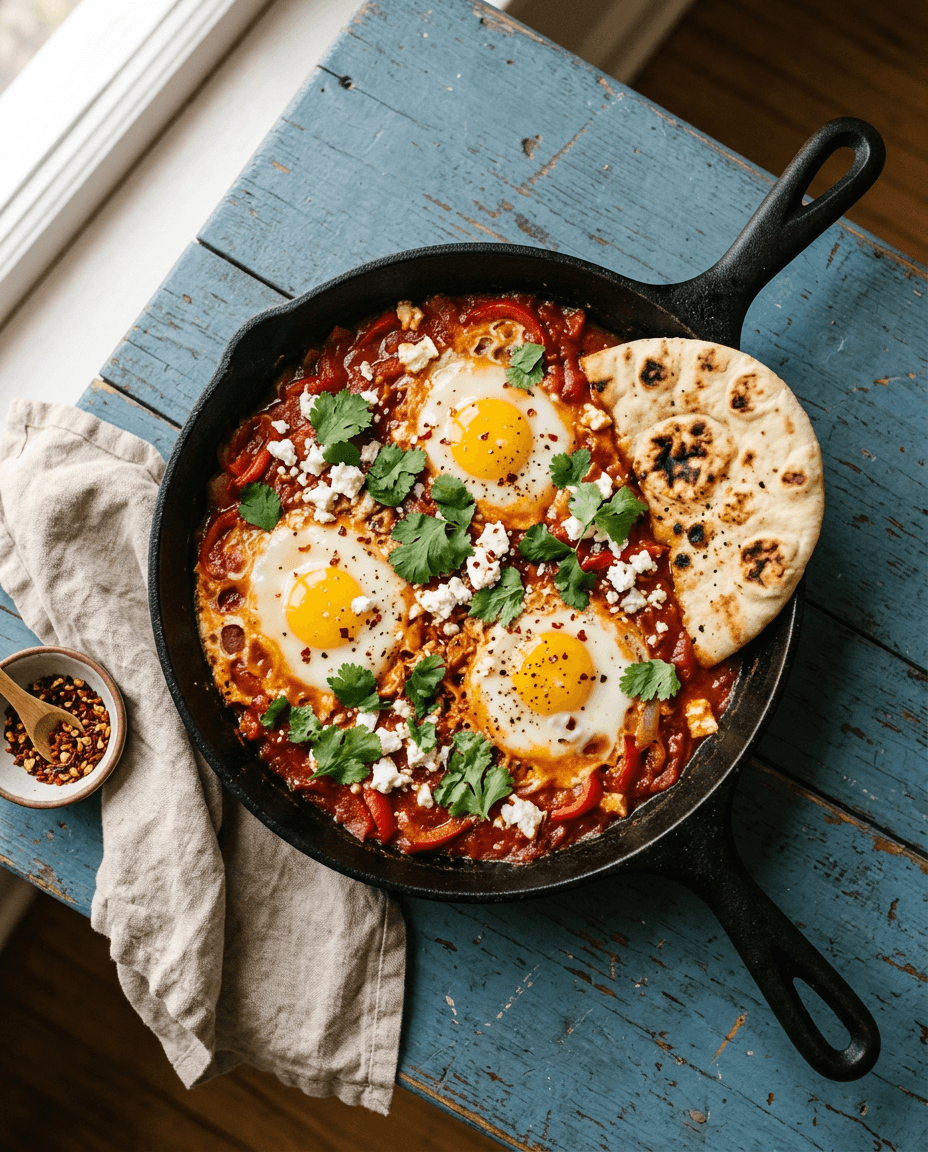
Prompt 16, gerendert von Nano Banana 2 in 1K, 4:5, für $0.06. Es hat drei Durchläufe gebraucht, und der Grund dafür ist die eigentliche Lektion dieses Abschnitts. In meinen ersten beiden Versionen stand nur „a black cast-iron pan“, und beide Male hat das Modell einen echt wirkenden Markennamen in den Griff geprägt. „Plain, smooth, unbranded“ hat das behoben. Schau aber genau hin: Die Pfanne hat jetzt zwei lange Griffe, und so etwas gießt keine Gießerei der Welt.
17. Pancakes mit Honig
A photorealistic close-up of a tall stack of buttermilk pancakes with fresh blueberries, honey pouring from a wooden dipper onto the top and running down the sides. Soft backlight from a window makes the honey glow. Shot from a slightly low angle with a 100mm macro lens, shallow depth of field.
18. Obsttarte auf Marmor
A high-end overhead photograph of a fruit tart on a marble counter: glossy custard topped with sliced strawberries, kiwi and blueberries in concentric rings, a dusting of icing sugar. Bright, soft daylight. Shot top-down with a 50mm lens, a cake server and a folded napkin at the edge of the frame.
19. Streetfood-Grillplatte bei Nacht
A photorealistic shot of a street-food vendor flipping flatbreads on a wide iron griddle at night, steam and smoke rising into the glow of a single bare bulb. Warm tungsten light against a dark blue evening sky. Shot from eye level with a 35mm lens, slight motion blur on the vendor's hands.
20. Smoothie-Bowl
A styled overhead photo of an acai smoothie bowl topped with banana slices, granola, coconut flakes and chia seeds, in a matte white ceramic bowl on a pale wooden table. Bright natural light with crisp shadows. Square framing, 50mm lens.
21. Latte Art in Makro
A macro photograph of a cappuccino with a delicate rosetta latte art pattern in a speckled ceramic cup, a few coffee beans scattered on the saucer. Warm side light from the right reveals the texture of the microfoam. Shot from a 45-degree angle with a 100mm macro lens.
22. Linsensuppe in dunkler Stimmung
A dark, moody food photograph of a bowl of red lentil soup with a swirl of yogurt and a drizzle of chili oil, a chunk of crusty bread beside it, on a rough charcoal surface. A single soft light from the back left leaves deep shadows. Shot from a slightly high angle with an 85mm lens.
Interior und Architektur
23. Skandinavisches Wohnzimmer
A photorealistic wide shot of a Scandinavian living room with a light-grey linen sofa, an oak coffee table, a sheepskin throw and a tall fiddle-leaf fig in the corner. Soft afternoon light streams through sheer curtains. Shot from the doorway at chest height with a 24mm lens.
24. Japandi-Schlafzimmer
A calm Japandi-style bedroom with a low platform bed, crisp white linen, a paper floor lamp and a single branch of dried eucalyptus in a stone vase. Diffused morning light. Shot straight on at bed height with a 28mm lens, symmetrical composition.
25. Konzept für eine neue Küche
An interior design photograph of a modern kitchen with sage-green cabinets, brass handles, a white quartz island and three pendant lights, morning sun crossing the floor. Photorealistic architectural photography style, two-point perspective, 20mm lens.
26. Leseecke unterm Dach
A cozy reading nook under a sloped attic ceiling: a deep armchair in rust velvet, a knitted blanket, a small side table with a cup of tea, and shelves packed with books. Warm lamp light at dusk, blue twilight in the skylight. Shot at eye level with a 35mm lens.
27. Homeoffice
A bright home office with a walnut desk facing a window, an ergonomic chair, a single monitor, a trailing pothos on a shelf and a pegboard of tools on the wall. Overcast daylight, clean and uncluttered. Shot from behind the chair at a slightly high angle with a 24mm lens.
28. Badezimmer im Spa-Stil
A photorealistic shot of a spa-like bathroom with a freestanding stone bathtub, a terrazzo floor, a wall of green glazed tiles and a rolled white towel on a teak stool. Soft light from a frosted window. Shot from a low corner angle with a 20mm lens.
Landschaft und Reisen
29. Bergsee im Morgengrauen
A photorealistic wide view of an alpine lake at dawn, mist lifting off still water that mirrors jagged snow-capped peaks, a single red canoe pulled up on the pebble shore. Soft pink first light. Shot from a low angle near the waterline with a 16mm wide-angle lens.
30. Wüstendünen von oben
An aerial photograph of rippled orange sand dunes at sunrise, a lone camel caravan casting long shadows across the crests. Shot from a drone looking steeply down, with telephoto compression and high contrast.
31. Küstendorf am Hang
A sunny coastal village of white houses with blue doors stacked up a hillside, bougainvillea spilling over the walls, small fishing boats in the harbor below. Late afternoon light. Shot from across the bay with a 70mm lens.
32. Verregnete Stadt bei Nacht
A rain-soaked city street at night, glowing neon shapes above the shopfronts reflected in puddles, a lone cyclist in a yellow raincoat riding through the frame. Cinematic teal and magenta palette. Shot from the curb at knee height with a 35mm lens, slight motion blur on the cyclist.
33. Waldweg im Herbst
A winding path through a beech forest in peak autumn, golden leaves covering the ground, soft fog between the trunks, sunbeams cutting through the canopy. Shot at eye level from the middle of the path with a 24mm lens, deep focus.
34. Hütte unter Polarlichtern
A small wooden cabin with glowing windows on a snowy plain under vivid green and violet northern lights, stars visible above. Long-exposure night photography from a low angle with a 14mm lens, the cabin small in the lower third.
Illustration und Anime
35. Anime-Café an einem Regentag
An anime-style illustration of a girl with a short silver bob reading a book at a café window on a rainy afternoon, raindrops streaking the glass, a steaming cup beside her. Soft cel-shading and a detailed background like a still from a slice-of-life film, warm interior light against cool blue rain.
36. Botanisches Aquarell
A delicate watercolor illustration of a branch of lemon blossoms with two ripe lemons, loose wet-on-wet washes and visible paper texture, on a white background with plenty of breathing room.
37. Seite aus einem Kinderbuch
A whimsical children's book illustration of a small hedgehog carrying a lantern through a moonlit meadow full of fireflies. Soft gouache textures, rounded shapes, a gentle palette of deep blues and warm yellows.
38. Isometrische schwebende Insel
An isometric 3D render of a tiny floating island with a lighthouse, a winding path and a cluster of pine trees, soft clay-like materials, pastel colors, gentle studio lighting, plain light-blue background.
39. Roboter-Barista als Knetfigur
A claymation-style cheerful robot barista with a dented copper body and round glowing eyes, pouring milk into a tiny cup, visible fingerprints in the plasticine, a miniature café set behind it. Soft warm lighting and shallow depth of field, like a frame from a stop-motion film.
40. Retro-futuristisches Mars-Plakat
A retro-futurism travel poster illustration of a glass-domed city on Mars at dusk, a sleek silver monorail curving through red canyons, bold flat shapes and grainy gradients in orange, teal and cream. Pure illustration, with the top band left as open, empty sky.
41. Manga-Strip mit drei Panels
Make a 3 panel comic in a clean black-and-white manga style. Put the character, a determined teenage girl with a ponytail and a bike helmet, in a scene where she races a storm home on her bicycle: panel one shows dark clouds rolling in, panel two shows her pedaling hard, panel three shows her laughing under a porch roof as the rain hits.
Logos, Sticker und Icons
Einfache Zeichen klappen mit Nano Banana 2. Alles, wo ein Markenname ausgeschrieben werden muss, gehört zu Pro (nächster Abschnitt).
42. Katzen-Sticker in der Teetasse
A kawaii-style sticker of a sleepy orange tabby cat curled up inside a teacup, tiny steam swirls above its head. Bold clean outlines, simple cel-shading, soft pastel palette. Thick white die-cut border around the whole shape, plain white background.
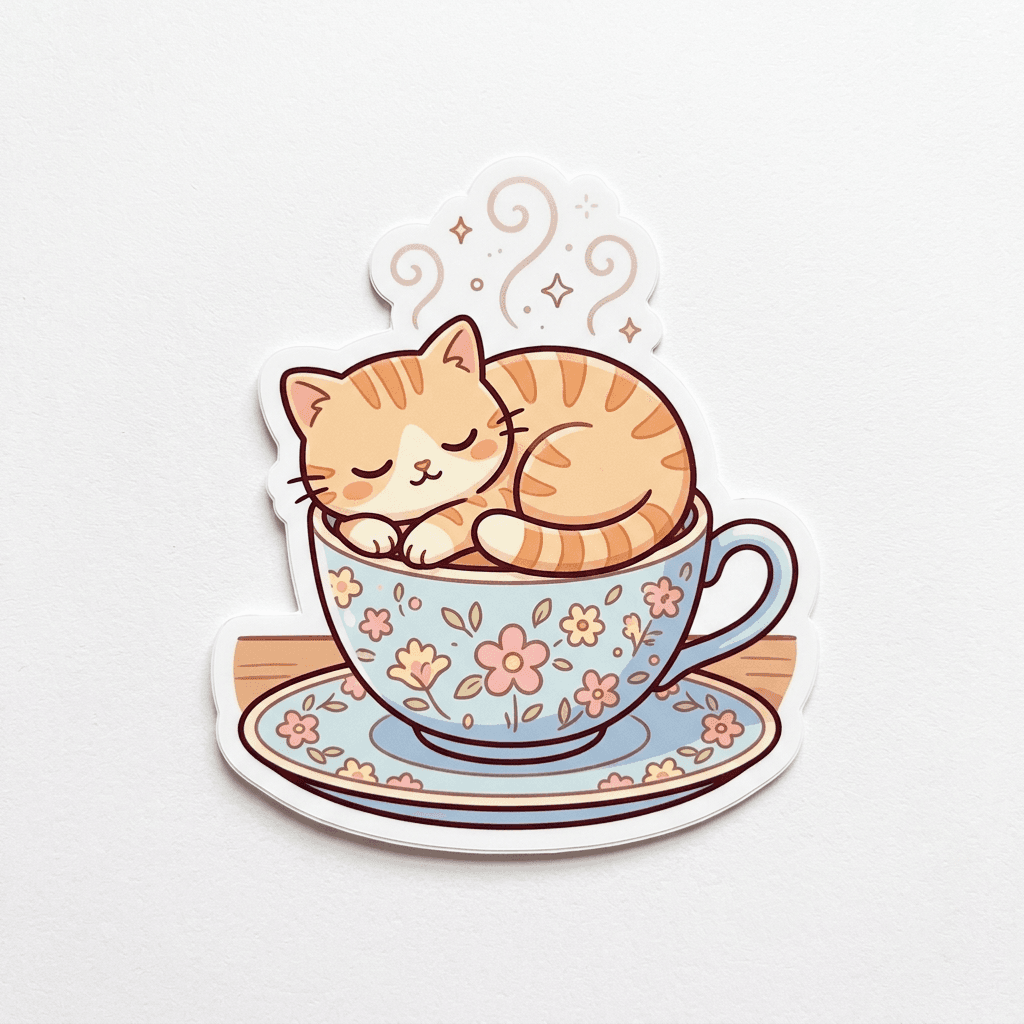
Prompt 42 auf Nano Banana 2, erster Versuch, $0.06. Das Modell hat den Sticker als gedrucktes Objekt auf Papier gezeigt, mit weichem Schatten. Verlangt habe ich das nicht, mir gefällt es trotzdem; für eine flache Druckdatei ergänz „flat digital artwork“.
43. Stickerbogen mit Zimmerpflanzen
A sheet of six die-cut stickers of houseplants with cute faces: a cactus, a monstera, a snake plant, a fern, a succulent and a tiny bonsai. Bold outlines, flat colors and white borders, arranged in a neat grid on a light grey background.
44. Minimalistisches Logo für Hautpflege
Create a logo mark for a high-end, minimalist skincare brand: a single continuous line forming a drop of water inside a circle, solid black on white, flat vector style.
45. Maskottchen für einen Fahrradladen
A friendly mascot for a bicycle repair shop: a round cartoon wrench character with big eyes and a bike chain worn as a scarf, thick outlines, a two-color palette of orange and navy, plain white background.
46. App-Icon mit Papierflieger
A glossy app icon of a paper airplane folded from blue paper, flying across a rounded square with a soft sunrise gradient, subtle 3D depth, centered, with smooth rounded corners.
47. Icon-Set für eine Reise-App
A set of nine line icons for a travel app arranged in a 3x3 grid: suitcase, passport, airplane, map pin, camera, hotel bed, ticket, compass and sun. Consistent 2px strokes with rounded caps, a single teal color on white.
48. Abzeichen für einen Wanderclub
A vintage-style circular badge for a mountain hiking club with a pine tree, crossed hiking poles and a mountain peak, engraved line-art look, cream and forest green, the thick outer ring left plain.
Hintergrundbilder, Muster und Panoramen
49. Ruhiges Handy-Hintergrundbild (9:16)
A vertical phone wallpaper of calm abstract dunes in soft peach, lavender and sand tones, smooth gradients, a small crescent moon high in the sky, plenty of empty space in the middle for app icons.
50. Nahtloses Zitronenmuster
A tileable repeating pattern of small lemons and leaves on a pale blue background, flat illustration style, evenly spaced so the edges match when the tile repeats.
51. Ultrawide-Desktop-Hintergrund (21:9)
An ultrawide desktop wallpaper of a misty valley at blue hour, layered mountain silhouettes fading into the distance, a few lit windows of a tiny village on the valley floor.
52. Sonnenblumen-Panorama (4:1)
A panoramic banner of a sunflower field stretching to the horizon under a big summer sky with towering white clouds, a single wooden windmill on the right third.
53. Textur aus handgeschöpftem Papier
A macro photograph of handmade paper with visible fibers and pressed flower petals, soft even light, warm off-white tones, suitable as a website background.
Nano-Banana-Pro-Prompts: Text, Poster und 4K-Details
Nano Banana Pro (gemini-3-pro-image) ist das Modell, für das du draufzahlst, wenn das Bild im ersten Durchgang stimmen muss: lesbarer Text, dichte Layouts und viele Referenzen gleichzeitig. Laut Googles Doku nimmt es bis zu 6 Objektbilder, 5 Charakterbilder und bis zu 3 Stilreferenzen an; unser Studio begrenzt die Gesamtzahl auf 11. Es rendert in 1K, 2K und 4K (kein 512px), auf BananaBanana für $0.11, $0.11 und $0.20.
Pro zu prompten ist keine andere Sprache: Die Struktur bleibt identisch. Was sich ändert, ist, wie viel du in einem einzigen Prompt verlangen kannst, bevor Dinge zu verrutschen beginnen.
Wie bekommst du lesbaren Text aus Nano Banana Pro?
Textdarstellung ist der Grund, warum es Pro gibt. Googles Doku empfiehlt es für Assets, bei denen die Typografie präzise sein muss. Nano Banana 2 schafft ein, zwei Wörter; Pro schafft Layouts.
Die dokumentierte Vorlage: „Create a [image type] for [brand] with the text '[exact text]' in a [font style]. The design should be [style], with a [color scheme].“ Zwei Gewohnheiten erhöhen die Trefferquote. Setz den exakten Text in Anführungszeichen, und beschreib die Schrift in Alltagssprache („a chunky rounded sans-serif“), statt eine Schriftart zu nennen, die das Modell womöglich nicht kennt. Google merkt außerdem an, dass Gemini am besten arbeitet, wenn du zuerst den Wortlaut festlegst und erst dann nach dem Bild fragst. Schreib also deinen Text, bevor du den Prompt schreibst.
54. Retro-Poster für einen Kaffeestand
Create a retro poster for a coffee stand called Banana Brew with the text 'BANANA BREW' in a chunky rounded sans-serif across the top and the slogan 'cold roast, warm people' in a small handwritten script underneath, flat illustration of a single banana-yellow espresso cup in the center, cream background, amber and dark-ink color scheme.
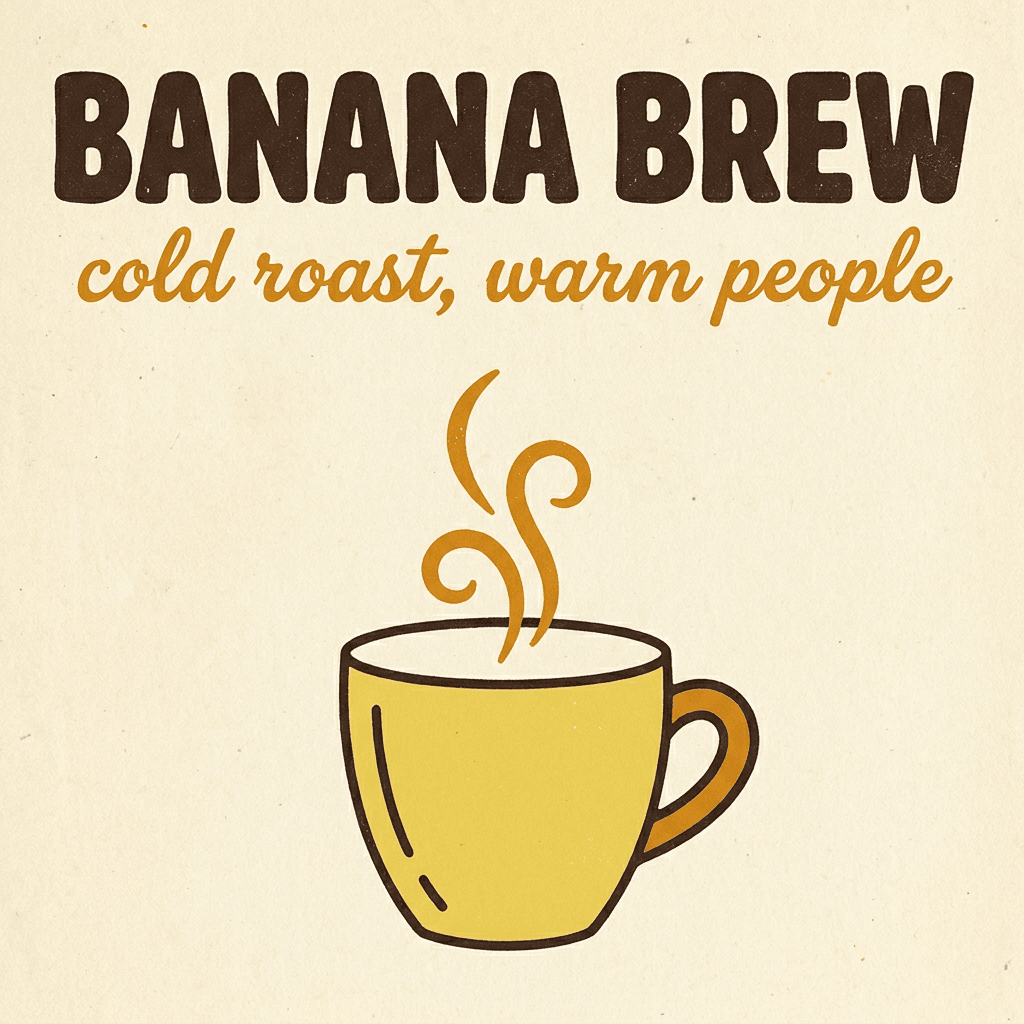
Jedes Zeichen saß im ersten Versuch. Ab ein paar Zeilen ist das nicht mehr garantiert: Bei dichten Speisekarten lässt Pro immer noch gelegentlich einen Buchstaben weg oder verdoppelt ihn, also lies alles mit mehr als etwa zehn Wörtern Korrektur.
55. Kreidetafel-Menü im Café
Create a chalkboard menu for a café called "Morning Hours" with the heading "MORNING HOURS" in a hand-lettered chalk script and three lines below in a clean chalk print: "Flat white 3.50", "Cardamom bun 2.80", "Fresh orange juice 4.00". Wooden frame, a few chalk doodles of coffee beans in the corners.
56. Neonschild auf Backstein
A photorealistic pink neon sign that reads "open late" in a flowing cursive script, mounted on a dark brick wall, with a soft glow and faint reflections on the bricks. Shot straight on with a 35mm lens.
57. Cover für einen Krimi
Create a book cover for a mystery novel titled "The Glass Orchard" with the author name "Mara Ellison" at the bottom. The title sits in a tall, thin, elegant serif across the upper third. Below it, an illustration of a greenhouse at night with one lit pane, in a deep teal and gold color scheme.
58. Flyer für eine Pflanzentauschbörse
Create a flyer for a community plant swap with the headline "PLANT SWAP" in a chunky rounded sans-serif and the line "Saturday 10:00, Riverside Library" underneath in a smaller clean sans-serif, above a playful flat illustration of potted plants trading places. Bright green, cream and coral palette, portrait format.
59. Etikett für ein Honigglas
A photorealistic jar of wildflower honey with a kraft-paper label that reads "WILDFLOWER HONEY" in a small-caps serif and "250 g" underneath, standing on a sunny windowsill. Shot at eye level with an 85mm lens.
Poster, Verpackungen und Anzeigen
60. Konzertplakat für ein Jazztrio
Create a gig poster for a jazz trio called "The Late Tram" with the text "THE LATE TRAM" in bold condensed letters and "Friday, 9 PM" below, a flat screen-print style illustration of a vintage tram under a crescent moon, in a three-color palette of navy, mustard and off-white.
61. Mockup einer Müslipackung
A front-view product mockup of a cereal box for a brand called "Sunny Oats", the name in a bouncy rounded font, a bowl of oats with strawberries on the front and a small round badge reading "high fiber". Studio lighting, white background.
62. Quadratische Anzeige für eine Lauf-App
Create a square social media ad for a running app with the headline "Run your first 5K" in a heavy sans-serif at the top, a photorealistic runner on a park trail at sunrise in the middle, and a rounded button shape at the bottom with the text "Start free". Clean and energetic, orange and white.
63. Sci-Fi-Filmplakat
A cinematic poster for a sci-fi film titled "LOW ORBIT", the title in wide, spaced-out capital letters near the bottom, an astronaut floating above a glowing blue planet, and the tagline "Nobody looks up anymore" in small type above the title.
64. Schachtel für Kamillentee
A flat lay of a tea box design for "Quiet Hour" chamomile tea, the name in a soft rounded serif, botanical line drawings of chamomile flowers, pale yellow and sage palette, shot from above on light linen.
Infografiken und Diagramme
65. Infografik vom Samen zum Baum
Create a clean educational infographic titled "HOW A SEED BECOMES A TREE" in a bold rounded sans-serif across the top. Below it, four steps run left to right, each with a large number, a flat vector illustration and a one-word label underneath: "1 SEED", "2 SPROUT", "3 SAPLING", "4 TREE". Thin dotted arrows connect the steps. Cream background, forest green and warm amber color scheme, generous margins, no other text.
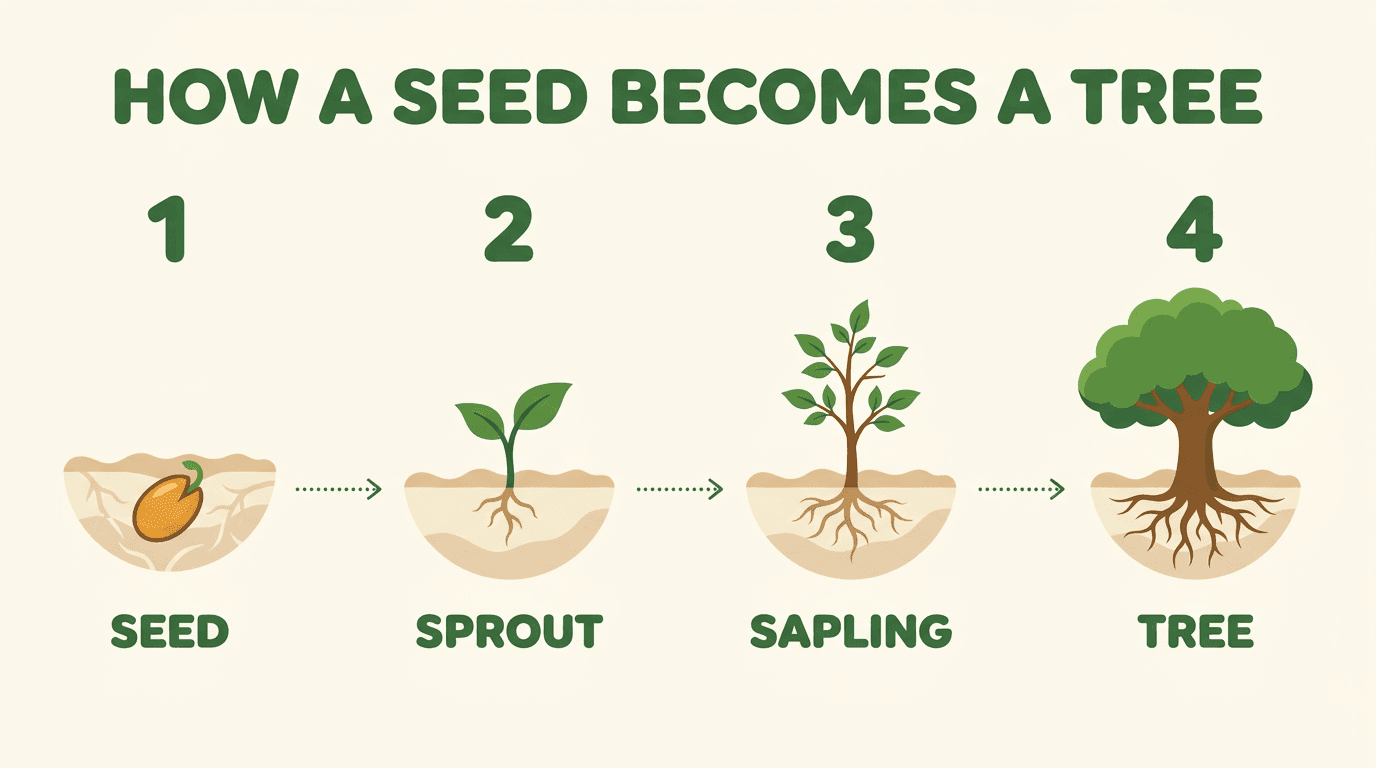
Prompt 65 auf Nano Banana Pro in 1K, $0.11, erster Versuch. Alle zehn Wörter sind richtig geschrieben. Eine Freiheit hat sich das Modell genommen: Aus dem Samen in Schritt 1 ringelt sich schon eine Wurzel, und ein Botaniker würde das vielleicht bereits einen Keimling nennen.
66. Rezeptkarte für einen Smoothie
Create a recipe card infographic for "3-Minute Green Smoothie" with the title at the top and four illustrated ingredients in a row, each labeled: "Spinach", "Banana", "Apple", "Water". Flat vector style, mint and white palette.
67. Flussdiagramm für eine Paketzustellung
A clean flowchart showing how a parcel travels, with four rounded boxes labeled "Order", "Warehouse", "Truck" and "Doorstep", connected by arrows, a minimal icon inside each box, navy on white.
68. Beschriftetes Fahrraddiagramm
A labeled diagram of a bicycle with callout lines pointing to six parts: "Saddle", "Handlebar", "Chain", "Pedal", "Brake", "Wheel". Technical illustration style, thin black lines on white, one accent color for the callouts.
69. Zeitleiste für einen Tag auf dem Bauernhof
A horizontal timeline infographic titled "A Day on the Farm" with five stops: "5:00 Milking", "7:00 Feeding", "12:00 Harvest", "16:00 Market", "20:00 Rest". A small flat illustration above each stop, warm earthy colors.
Detailaufnahmen in 4K
Lass diese Prompts in 4K laufen ($0.20 bei Pro); in 1K verschwindet die feine Textur als Erstes.
70. Libellenflügel in Makro
An ultra-detailed macro photograph of a dragonfly wing resting on a blade of grass, every vein and cell visible, tiny dew drops along the edge refracting the sunrise. Shot with a 100mm macro lens at f/8 with a focus-stacked look.
71. Bibliotheksfassade aus Beton
An architectural photograph of a brutalist concrete library facade at midday, deep geometric shadows, the texture of board-formed concrete visible in every panel. Shot straight on with a tilt-shift lens to keep the lines vertical.
72. Handgewebter Teppich in Nahaufnahme
A close-up of a hand-woven wool rug in terracotta and indigo, individual fibers and knots sharp across the whole frame, soft raking light from the left revealing the weave.
73. Blumenmarkt am Morgen
A wide photograph of a busy outdoor flower market in the morning, dozens of buckets of tulips, peonies and ranunculus, vendors wrapping bouquets in paper, each stall a distinct little world. Soft overcast light, shot from a slightly raised position with a 35mm lens.
Konsistenz mit mehreren Referenzen
Häng die Referenzen an und sprich sie dann nach ihrer Reihenfolge an („the first image“). Für lange Serien mit derselben Figur gibt es den Guide zur Charakterkonsistenz.
74. Dieselbe Person, neue Szene
Use the woman from the first image, keeping her face, hairstyle and freckles exactly the same. Place her in a bright bookshop, reaching for a book on a high shelf, wearing a mustard cardigan. Soft daylight, 50mm lens.
75. Person plus Outfit
Dress the man from the first image in the jacket from the second image. Keep his face, beard and build unchanged. Full-body shot on a city sidewalk at golden hour, 35mm lens.
76. Produkt in einer Lifestyle-Szene
Place the bottle from the first image on the bathroom shelf shown in the second image, matching the shelf's lighting and perspective. Keep the bottle's label, shape and cap exactly as they are.
77. Einen Stil übernehmen
Recreate the scene from the first image in the visual style of the second image: the same composition and objects, but with the second image's color palette, brush texture and lighting mood.
78. Gruppenfoto aus Einzelaufnahmen
Combine the three people from the first three images into one group photo at a picnic table in a park, all smiling at the camera. Keep each person's face, hair and clothing faithful to their reference. Natural afternoon light, 35mm lens.
79. Figur von hinten (Turnaround)
Show the character from the first image from behind, standing in the same pose and outfit, with the same lighting and the same plain background.
Prompts für die Fotobearbeitung: Eine Sache ändern, den Rest behalten
Nano-Banana-Modelle bearbeiten Bilder genauso gut, wie sie sie generieren, aber das Prompt-Muster ist ein anderes. Der übliche Fehler: die ganze Szene neu zu beschreiben. Beschreib nur die Änderung.
Googles Doku nennt das Semantic Masking, und ihre Vorlage solltest du wortwörtlich übernehmen:
Using the provided image, change only the [specific element] to [new element]. Keep everything else in the image exactly the same, preserving the original style, lighting, and composition.
Dieser Schlusssatz leistet echte Arbeit; ohne ihn verschieben Bearbeitungen gern die Farbpalette oder komponieren das Bild neu. Bitte um eine Anpassung nach der anderen. Es fühlt sich langsamer an. Meistens ist es schneller.
Ein Vorbehalt aus der Doku: Lite ist nicht auf mehrere Referenzbilder oder Bearbeitung über mehrere Runden optimiert, also bearbeite mit Nano Banana 2, 2.1 oder Pro.
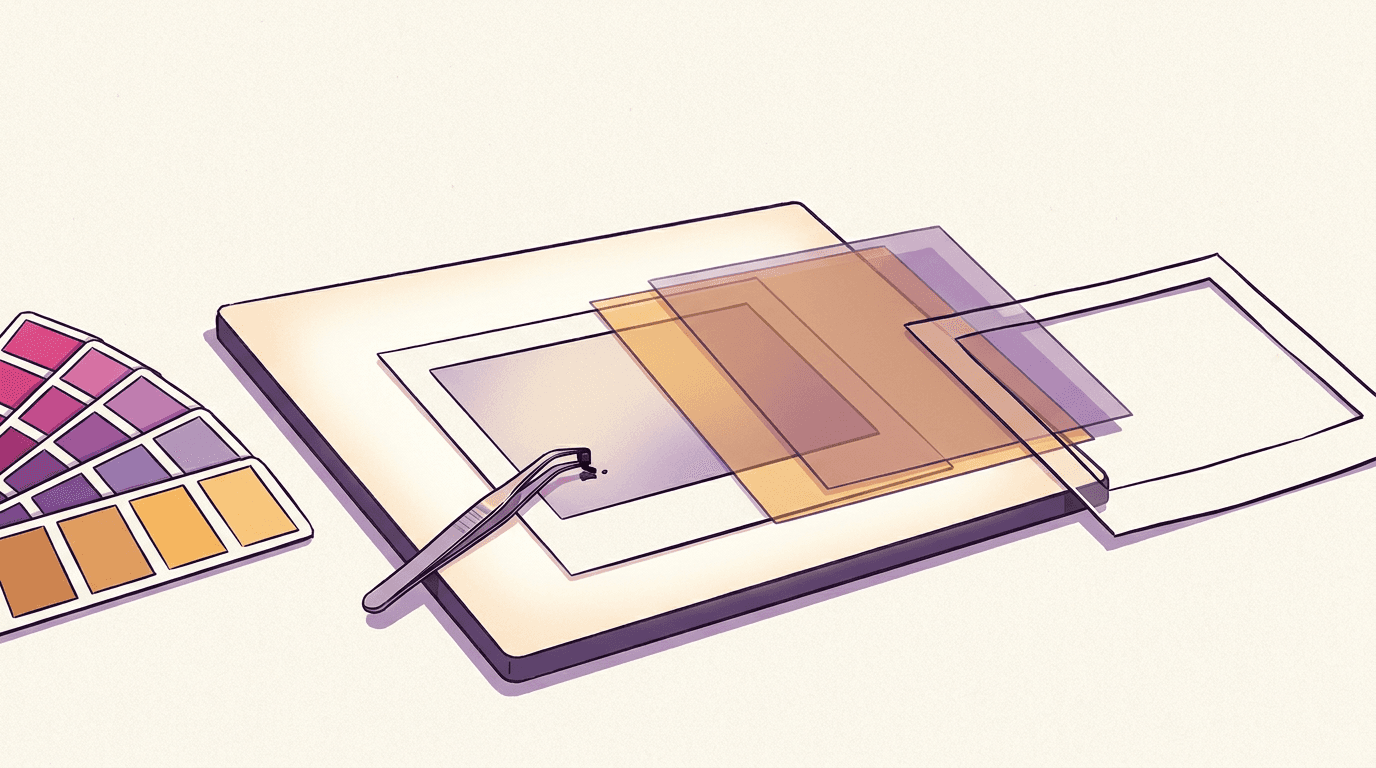
Hier eine echte Demo mit zwei Bearbeitungen. Das Ausgangsbild stammt von Nano Banana 2 (Prompt, gekürzt: eine weiße, matte Keramiktasse auf einer hellen Küchenarbeitsplatte aus Eiche, dahinter eine Sukkulente im Topf, weiches Fensterlicht bei bedecktem Himmel):
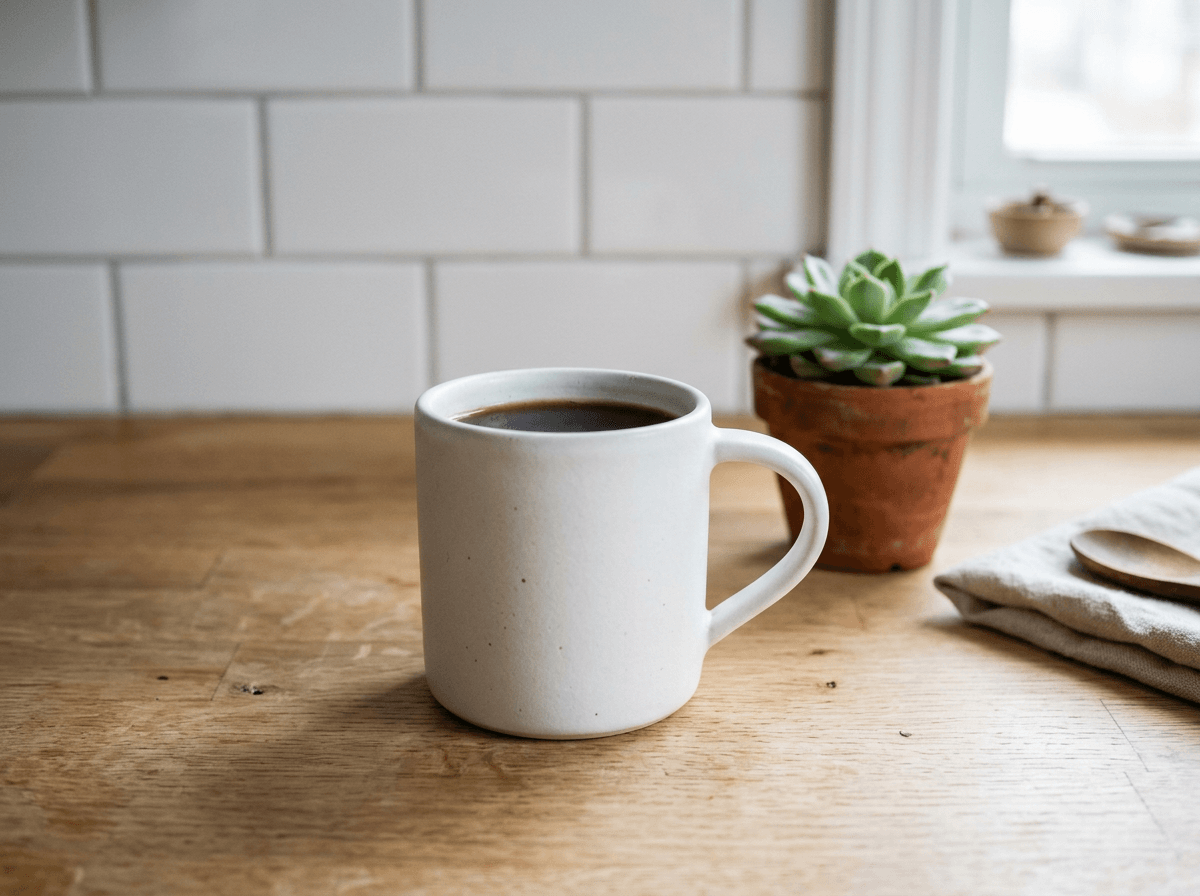
Dann habe ich diese Datei als Referenz angehängt und Prompt 80 auf Nano Banana 2 laufen lassen:
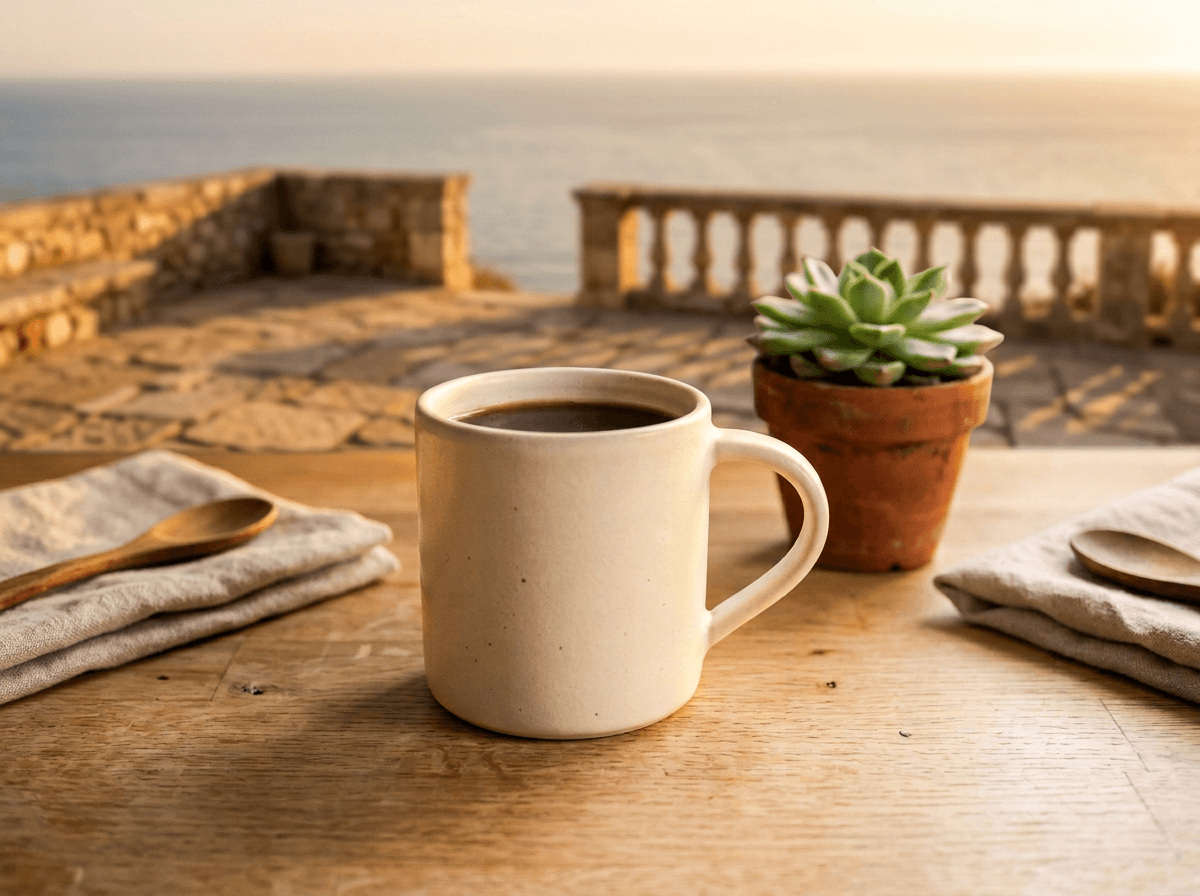
Tasse, Sprenkel und Winkel haben überlebt. Zwei Dinge sind verrutscht: Die Tasse ist wärmer geworden, fast cremefarben (fair, ich hatte tiefe Sonne auf ihr verlangt), und links tauchte ungebeten eine zweite Serviette mit Löffel auf. Prompt 84 ging mit demselben Ausgangsbild an Nano Banana Pro:
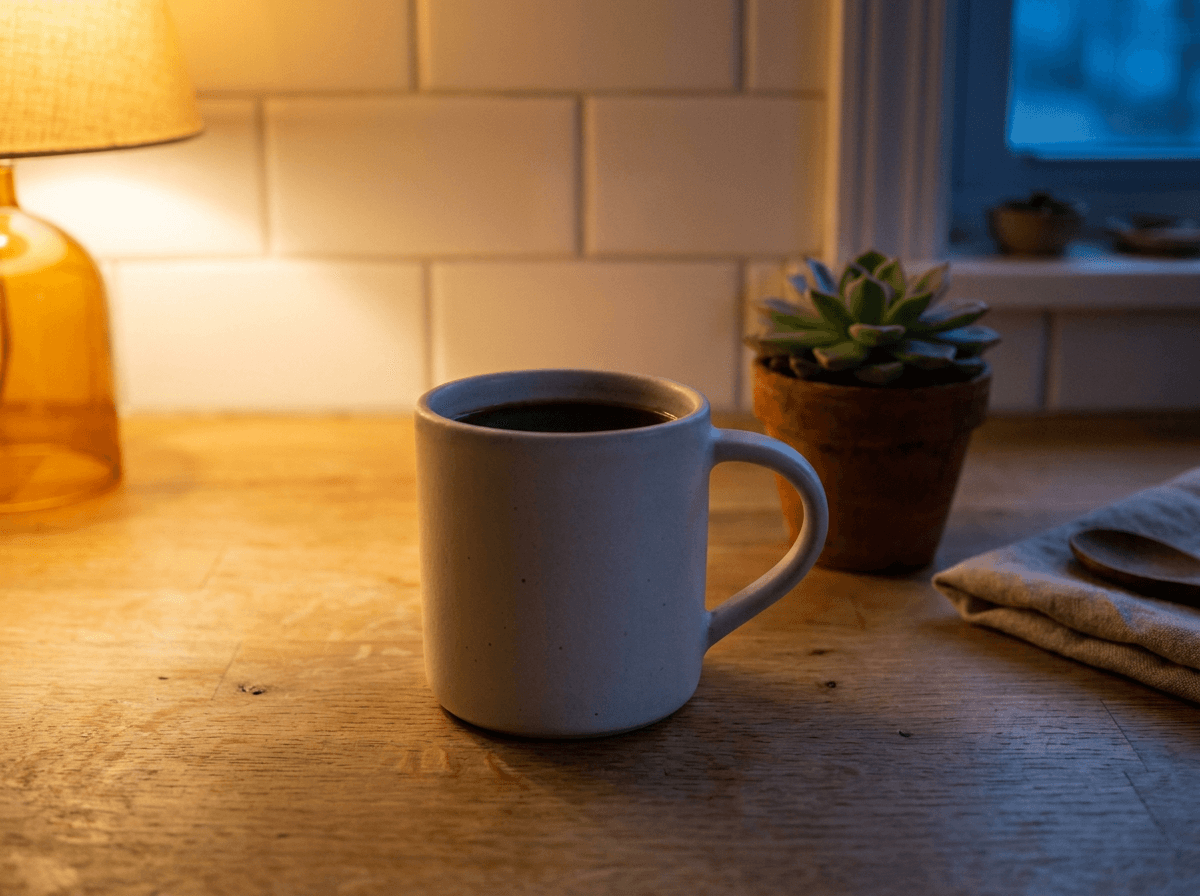
Pro hat jedes Objekt an seinem Platz gelassen, bis hin zum Löffel auf der Serviette. Allerdings hat es die Lampe ins Bild gesetzt, obwohl im Prompt „off-frame“ stand. Beide Bearbeitungen kosten so viel wie ein neues Bild: $0.06 und $0.11 in 1K.
Hintergrund ersetzen
80. Terrasse zur goldenen Stunde (Demo oben)
Using the provided image, change only the background: replace the tiled kitchen wall and window with a sunlit stone terrace overlooking a calm sea at golden hour, the horizon softly blurred. Keep the white mug, its matte glaze and speckles, the coffee, the oak counter and the camera angle exactly the same, and let the warm low sun fall on the mug naturally.
81. Weiße Studiohohlkehle
Using the provided photo of the sneaker, replace the background with a pure white studio sweep and add a soft natural shadow under the sole. Keep the shoe, its colors and the camera angle exactly the same.
82. Büro hinter einem Headshot
Using the provided portrait, change only the background to a softly blurred modern office with warm window light. Keep the person's face, hair, expression and clothing exactly the same.
83. Vom Sommer in den Winter
Using the provided image, change the garden behind the house from summer to a snowy winter morning. Keep the house, the camera angle and the composition exactly the same.
Licht, Tageszeit und Wetter ändern
84. Abendliches Lampenlicht (Demo oben)
Using the provided image, change only the lighting to late evening: the window is dark blue, and a single warm table lamp off-frame on the left casts a pool of amber light across the counter, with long soft shadows behind the mug and the succulent. Keep everything else in the image exactly the same, preserving the objects, their positions, the composition and the camera angle.
85. Richtung goldene Stunde schieben
Using the provided image, make the light warmer and lower, like golden hour about thirty minutes before sunset, with long shadows falling to the right. Keep everything else the same.
86. Abendregen hinzufügen
Using the provided street photo, add a light evening rain: wet pavement with reflections, a few people with umbrellas and a cooler color grade. Keep the buildings and the framing unchanged.
87. Harten Blitz korrigieren
Using the provided photo taken with a harsh on-camera flash, relight it with soft window light from the left and soften the hard shadow behind the subject. Keep the person exactly the same.
Kleidung, Farbe und Material ändern
88. Ein Objekt umfärben
Using the provided image, change only the armchair to deep emerald velvet. Keep its shape, the room and the lighting exactly the same.
89. Outfit tauschen
Using the provided photo, change the man's grey hoodie to a tailored navy wool coat over a white shirt. Keep his face, pose, hands and the background exactly the same.
90. Neue Glasur für ein Produkt
Using the provided product shot, change the mug's glaze from glossy white to a speckled matte terracotta. Keep the shape, the handle, the coffee and the light the same.
91. Haustür neu streichen
Using the provided image of the house, repaint the front door sage green and add two potted olive trees beside it. Ensure the change matches the existing light and perspective.
Objekte entfernen oder hinzufügen
92. Menschenmenge entfernen
Using the provided photo of the square, remove all the people in the background and fill the space with the cobblestones and buildings that would naturally be there. Keep the fountain and the light unchanged.
93. Stromleitungen und Krempel entfernen
Using the provided image, remove the power lines crossing the sky and the trash bin on the left. Keep everything else exactly the same.
94. Kleines Requisit hinzufügen
Using the provided image of my cat, please add a small knitted wizard hat on its head. Ensure the change looks natural, matching the fur, the light and the perspective.
95. Schreibtisch aufräumen
Using the provided desk photo, remove the cables, the sticky notes and the empty cups, leaving a tidy surface. Keep the laptop, the lamp and the plant exactly where they are.
Bild erweitern oder neu zuschneiden
Stell zuerst das Ziel-Seitenverhältnis ein: Der Prompt sagt, womit gefüllt wird, die Einstellung sagt, wie viel Platz es gibt.
96. Vom Hochformat zu 16:9
Using the provided vertical photo, extend the scene to the left and right to fill a wide frame, continuing the beach, the sea and the sky naturally. Keep the person in the center exactly the same.
97. Mehr Himmel oben
Using the provided image, extend the frame upward to show more of the sky and the treetops, keeping the subject at the bottom of the frame unchanged.
98. Produktfoto als 21:9-Banner
Using the provided product photo, extend the background into a wide banner with empty space on the left for a headline, matching the surface, the light and the shadows.
Stil des Bildes ändern
99. Foto als impressionistisches Gemälde
Transform the provided photograph of a city street at night into a loose impressionist oil painting with thick, swirling brushstrokes and a deep blue and yellow palette. Keep the original composition of the buildings and the cars.
100. Haus als Aquarell-Grußkarte
Turn the provided photo of our house into a soft watercolor illustration for a greeting card, with loose washes and white paper showing through. Keep the shape of the house and the tree recognizable.
101. Von der Skizze zum Studio-Render
Turn the provided pencil sketch of a car into a polished photorealistic studio photo of the same car in glossy red paint, keeping the proportions and the design lines from the sketch.
102. Person als Vinylfigur
Turn the person in the provided photo into a collectible vinyl figurine standing on a round base, keeping their hairstyle, glasses and outfit colors, on a softly lit desk.
Gesicht oder Produkt unverändert halten
Googles Rat ist hier unverblümt: Beschreib kritische Details (ein Gesicht, ein Logo) sehr ausführlich. Vage Motive verrutschen.
103. Gesicht mit Details fixieren
Take the woman from the provided photo, with shoulder-length brown hair, blue eyes, a small mole above her lip and a neutral expression, and place her in a professional studio headshot with a soft grey backdrop. Her face, features and skin tone must stay exactly the same.
104. Logo auf ein Shirt setzen
Put the logo from the second image on the black T-shirt worn by the woman in the first image, printed at chest height. Keep the logo's shape and colors exact and let it follow the folds of the fabric.
105. Flasche behalten, Welt austauschen
Using the provided photo of the perfume bottle, keep the bottle, its amber glass, the cap and the label exactly as they are, and replace everything around it with a sunlit marble bathroom counter with a sprig of lavender.
106. Nur den Gesichtsausdruck ändern
Using the provided portrait, keep everything the same but change the person's expression to a warm, genuine smile. Keep the face shape, eyes, hair and lighting unchanged.
Negativprompts, Seitenverhältnisse und was ein Bild kostet
Die Nano-Banana-API hat keinen Parameter für Negativprompts; so etwas wie Veos Feld negativePrompt gibt es für Bilder nicht. Googles Doku empfiehlt stattdessen „semantische Negativprompts“. Schreib nicht „no cars“, sondern „an empty, deserted street“. Die Shakshuka-Pfanne oben ist das Beispiel aus der Praxis: „no logo“ kam nie in den Prompt, „plain, smooth, unbranded“ hat den Job erledigt.
Seitenverhältnisse: Alle vier Google-Modelle hier nehmen die zehn Standardformate an, von 1:1 über 3:2, 4:5, 9:16 und 16:9 bis zum kinoreifen 21:9. Auf BananaBanana gibt es zusätzlich die Panoramaformate 1:4, 4:1, 1:8 und 8:1. Das hohe 9:21 ist das einzige Format, das nur Nano Banana 2.1 rendert. Stärker unterscheiden sich die Auflösungen: Nano Banana 2 läuft von 512px bis 4K, 2.1 und Pro beginnen bei 1K, und Lite liefert nur 1K (mehr dazu im Lite-Guide).
Aktuelle BananaBanana-Preise pro Bild:
| Modell | 512px | 1K | 2K | 4K |
|---|---|---|---|---|
| Nano Banana 2 Lite | — | $0.03 | — | — |
| Nano Banana 2.1 | — | $0.03 | $0.05 | $0.10 |
| Nano Banana 2 | $0.03 | $0.06 | $0.09 | $0.13 |
| Nano Banana Pro | — | $0.11 | $0.11 | $0.20 |
Mein Standard-Workflow: Ich feile mit Lite oder 2.1 in 1K am Prompt, bis die Komposition steht, und lasse den finalen Prompt dann einmal mit Pro in 2K laufen. Das kostet dieselben $0.11 wie 1K und ist das stille Schnäppchen in dieser Tabelle. Neue Konten bekommen $0.20 geschenkt, genug für sechs Lite-Entwürfe. Krypto-Aufladungen ab $50 bringen 5 % Bonus, ab $100 sind es 10 %, und ein aktiver Promo-Code legt weitere 10 % obendrauf (bei jeder Zahlungsmethode), sodass aus $100 Krypto-Aufladung mit Code $120 Guthaben werden. Die vollständige Übersicht findest du bei den Preisen, und die Prompt-Bibliothek zeigt das Ergebnis jedes dieser Modelle direkt neben seinem Prompt.
FAQ
Wie viele Nano-Banana-Prompts stehen in diesem Guide?
106 nummerierte Prompts: 53 für Nano Banana 2 in acht Kategorien, 26 für Nano Banana Pro und 27 für die Fotobearbeitung, jeder in einer eigenen Box zum Kopieren.
Welche Prompt-Struktur funktioniert bei Nano Banana am besten?
Ein paar erzählende Sätze zu Motiv, Umgebung, Stil, Licht, Kamerawinkel und Objektiv: „A photorealistic [shot type] of [subject] in [setting]. [Lighting]. Shot from [angle] with [lens].“ Ganze Sätze schlagen Keyword-Listen, weil die Modelle Beziehungen verstehen, nicht nur Substantive.
Sollte ich Nano Banana 2 und Pro unterschiedlich prompten?
Die Struktur ist identisch. Pro rechtfertigt seinen Preis bei Text, dichten Layouts und Konsistenz über mehrere Referenzen (5 Charaktere, 6 Objekte); Nano Banana 2 erledigt alltäglichen Fotorealismus und Illustrationen für ungefähr den halben 1K-Preis.
Wie bearbeite ich ein Foto mit Nano Banana?
Häng das Foto an und beschreib nur die Änderung: „Using the provided image, change only the [element] to [new element]. Keep everything else in the image exactly the same.“ Mach eine Änderung pro Schritt, und beschreib Gesichter oder Logos ausführlich, wenn sie die Bearbeitung unverändert überstehen müssen.
Unterstützt Nano Banana 2 Negativprompts?
Nein. Die Gemini-Bild-API hat keinen Parameter für Negativprompts. Formuliere stattdessen positiv: Beschreib die Szene, die du willst („an empty street at dawn“), und nicht, was du nicht willst („no cars“).
Wie bringe ich Nano Banana dazu, Text korrekt darzustellen?
Nimm Nano Banana Pro, setz den exakten Wortlaut in Anführungszeichen und beschreib den Schriftstil in Alltagssprache („a chunky rounded sans-serif“). Bleib bei etwa zehn Wörtern pro Bild; längere Layouts musst du weiterhin Korrektur lesen.
Was kostet ein Nano-Banana-Bild?
Auf BananaBanana von $0.03 (Lite in 1K, Nano Banana 2.1 in 1K oder Nano Banana 2 in 512px) bis $0.20 (Pro in 4K). Der Sweet Spot für finale Bilder ist Pro in 2K für $0.11, zum selben Preis wie Pro in 1K.