Guide de prompt Nano Banana : Décrivez des scènes, pas des tags
Guide pratique de prompt pour Nano Banana : structure de scène, langage photo, rendu de texte sur Pro, édition de prompts et tarifs réels par image.

Un prompt Nano Banana est la description écrite d'une scène que les modèles d'image de Google – Nano Banana 2, Nano Banana Pro et la version économique Lite – transforment en image. Ces modèles s'appuient sur Gemini, ce qui signifie qu'ils lisent votre prompt comme du langage naturel plutôt que comme une simple liste de mots-clés. Ce seul fait change complètement la manière d'écrire. Selon la documentation de génération d'images de Google, les descriptions narratives riches l'emportent systématiquement sur les listes de tags séparés par des virgules, et nos propres créations quotidiennes le confirment.
La version courte, si vous voulez uniquement le modèle : « Une photo réaliste [type de plan] de [sujet] dans [décor]. [description de l'éclairage]. Prise sous un [angle de vue] avec un [type d'objectif]. » Écrivez des phrases complètes. Nommez la source de lumière et l'objectif comme le ferait un photographe. Cette seule habitude comble l'essentiel de l'écart entre un rendu générique et une image que vous aimeriez vraiment publier.
Voici le pendant côté image de notre guide de prompt Veo 3.1. Même philosophie, vocabulaire différent : les prompts vidéo s'articulent autour du mouvement et des déplacements de caméra, tandis que les prompts d'image se concentrent sur la lumière, l'objectif et la composition. Chaque démonstration ci-dessous a été générée sur BananaBanana avec le prompt exact indiqué, dès la première tentative, sans aucun nouvel essai.
Pourquoi les prompts narratifs fonctionnent-ils mieux que les listes de mots-clés ?
Les vieilles habitudes de diffusion ont la vie dure. Si vous avez appris à rédiger des prompts sur Stable Diffusion ou Midjourney, vous écrivez probablement des choses comme « perfume bottle, product photo, 8k, dramatic lighting, masterpiece ». Les modèles Nano Banana analysent cela, mais vous passez à côté de leur principal atout : ils comprennent les relations entre les objets, et pas seulement les objets eux-mêmes.
« A barista laughing at something off-frame while steam rises from the espresso machine behind her » est une scène. La version par mots-clés (« barista, laughing, steam, espresso machine ») ne permet plus de savoir qui fait quoi, où se trouve la vapeur ni quelle doit être l'ambiance émotionnelle du plan. Le modèle comble ces lacunes avec des valeurs par défaut, et ce sont précisément ces valeurs par défaut qui donnent aux images IA ce look si artificiel.
Un prompt Nano Banana efficace comporte généralement cinq ou six ingrédients :
| Ingrédient | Ce qu'il contrôle | Exemple de phrase |
|---|---|---|
| Sujet | Qui ou quoi est dans le cadre | "an elderly watchmaker with wire-rim glasses" |
| Décor | Où se déroule la scène | "at a cluttered workbench in a narrow shop" |
| Style | Aspect général | "photorealistic" / "flat vector illustration" |
| Éclairage | Source de lumière, direction, ambiance | "single warm desk lamp from the left" |
| Caméra | Angle et cadrage | "close-up, shot from slightly above" |
| Objectif | Caractère optique | "85mm lens, shallow depth of field" |
Vous n'aurez pas besoin de ces six éléments à chaque fois. Mais chaque ingrédient que vous omettez est une décision que vous déléguez au modèle.
Prompts photoréalistes : écrivez comme un photographe
Pour obtenir des photos réalistes, le vocabulaire le plus efficace est le langage de la caméra, tout comme pour la vidéo. La documentation de Google fournit le modèle cité plus haut, et il correspond exactement à la façon dont les photographes préparent une prise de vue : type de plan, sujet, environnement, lumière, angle, optique.
Voici la différence en pratique. Les deux images ci-dessous ont été générées par Nano Banana 2 en résolution 1K, à $0.06 l'unité selon nos tarifs. Tout d'abord, le prompt que tout le monde écrit au premier jour, simplement « A perfume bottle on a table » :
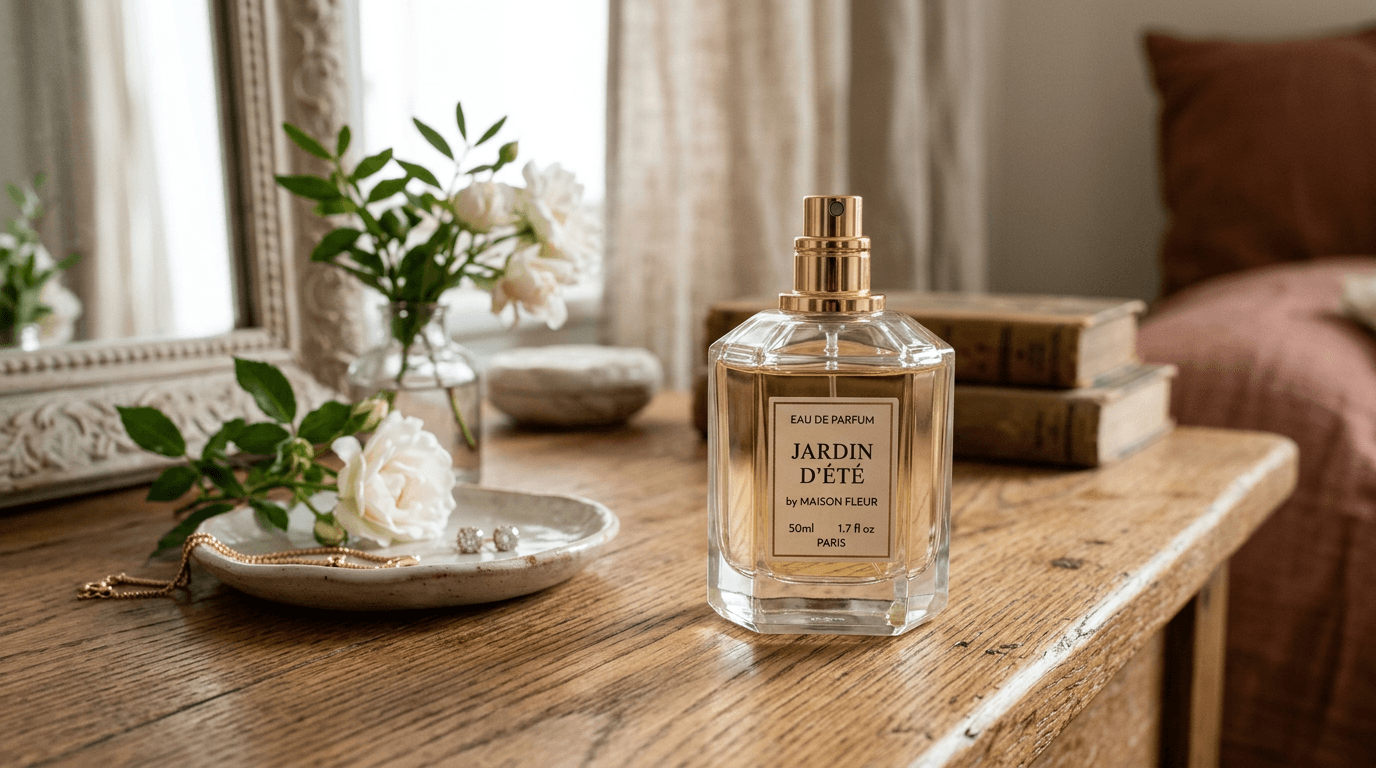
C'est joli, honnêtement. Le modèle a choisi une scène de style de vie lumineuse, une lumière venant de la fenêtre, des fleurs, une coupelle à bijoux, et c'est une très belle photo d'illustration. Mais chacune de ces décisions appartenait au modèle, pas à vous, et le prochain essai en produira d'autres. Maintenant, voici le même sujet avec tous les ingrédients renseignés : « A photorealistic close-up of an amber glass perfume bottle standing on wet black slate, fine water droplets across the glass. Warm golden backlight from the right, a faint cool rim light from the left. Shot from a low angle with an 85mm macro lens, shallow depth of field, dark blurred background » :
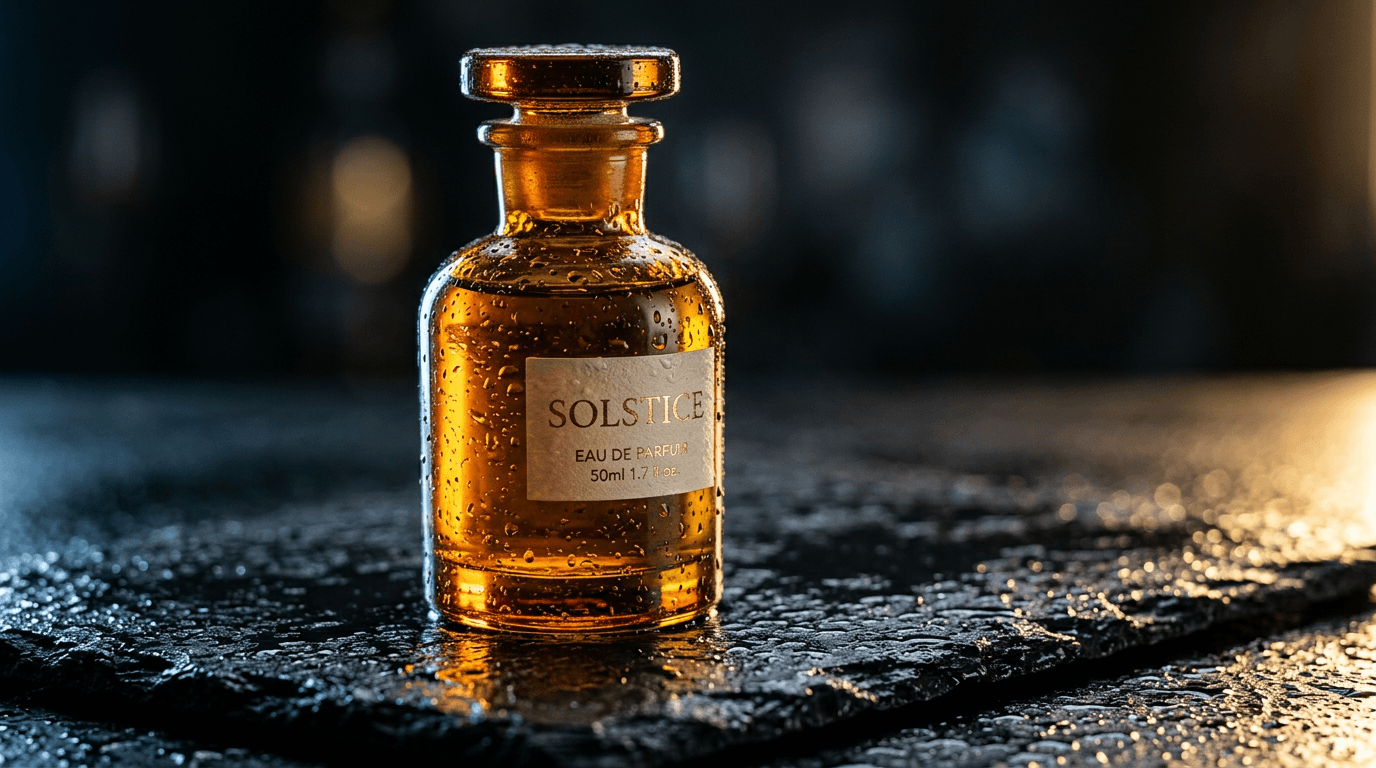
Même modèle, même prix, même rendu de quatre secondes. Les gouttelettes, la lumière bicolore et l'angle bas étaient tous décrits dans le prompt plutôt que d'être le fruit du hasard. Un détail mérite que l'on s'y attarde : l'étiquette. Je n'en ai jamais demandé, le modèle l'a inventée et a mal orthographié son propre texte (« EAU DE PARFUIM »). Le texte non sollicité reste le point faible de Nano Banana 2, ce qui constitue une transition parfaite vers la section suivante.
Les noms d'éclairages méritent d'être mémorisés car ils sont interprétés de manière très fiable : golden hour, overcast softbox, three-point studio lighting, hard noon sun, neon spill, candlelight. Les mots d'ambiance vagues (« beautiful », « dramatic ») n'ont pratiquement aucun effet. Si votre sujet est un produit plutôt qu'une personne, nous poussons ce même vocabulaire beaucoup plus loin dans notre guide de photographie de produit. D'après mon expérience, le choix de l'objectif importe presque autant ; « 85mm macro » et « wide-angle 24mm » produisent des géométries visiblement différentes, ce qui correspond exactement au type de contrôle que les prompts de type tags ne vous permettent jamais d'obtenir.
Comment obtenir du texte lisible avec Nano Banana Pro ?
Le rendu de texte est la raison d'être de Nano Banana Pro. La documentation est très claire à ce sujet : pour des visuels professionnels où la typographie doit être précise, utilisez Pro (gemini-3-pro-image). Nano Banana 2 gère un ou deux mots courts ; Pro gère les mises en page.
Le modèle documenté : « Create a [image type] for [brand] with the text '[exact text]' in a [font style]. The design should be [style], with a [color scheme]. » Deux habitudes permettent d'améliorer le taux de réussite. Mettez le texte exact entre guillemets et décrivez la police de manière conversationnelle (« a chunky rounded sans-serif », « a thin elegant serif ») plutôt que de nommer une police de caractères spécifique que le modèle pourrait ne pas connaître.
Cette affiche a été réalisée par Nano Banana Pro avec le prompt : « Create a retro poster for a coffee stand called Banana Brew with the text 'BANANA BREW' in a chunky rounded sans-serif across the top and the slogan 'cold roast, warm people' in a small handwritten script underneath, flat illustration of a single banana-yellow espresso cup in the center, cream background, amber and dark-ink color scheme » :
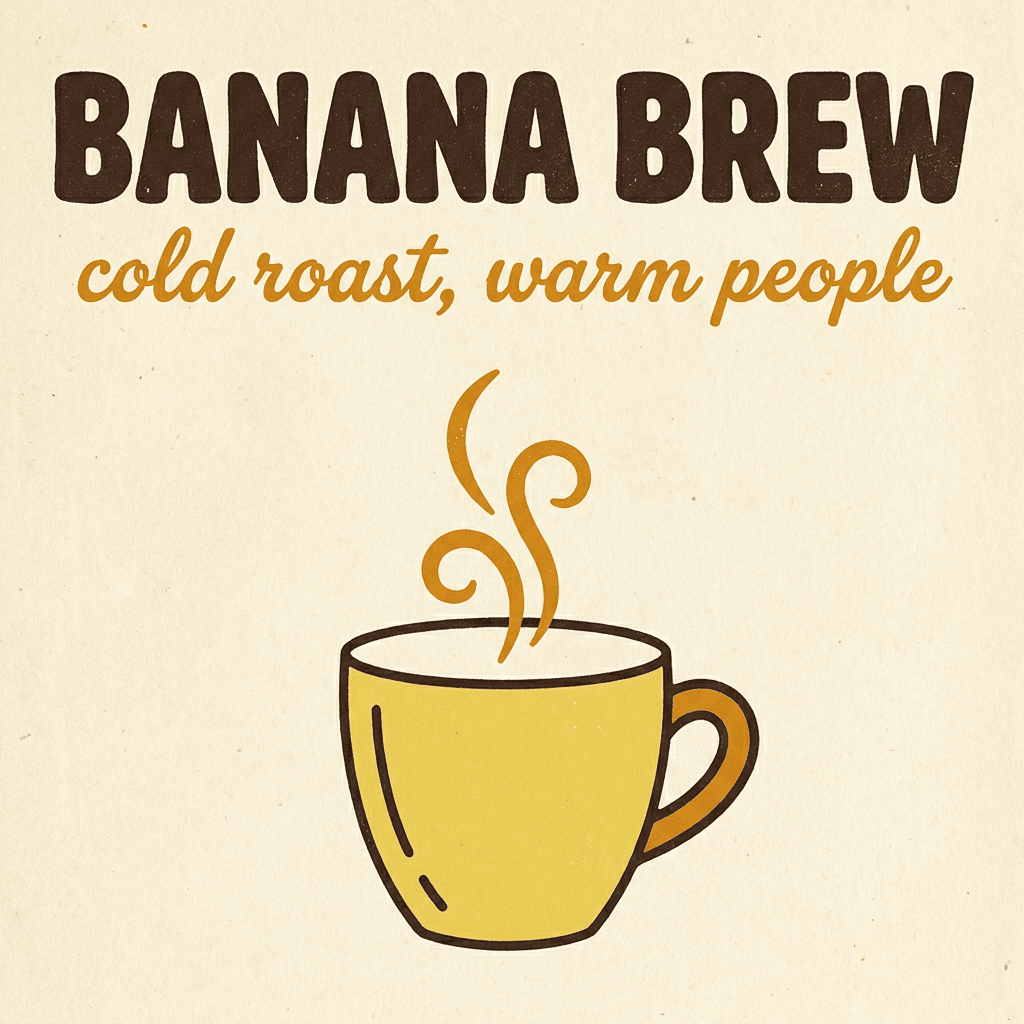
Chaque caractère est apparu correctement dès le premier essai. Pour être tout à fait honnête, cela n'est plus garanti au-delà de deux ou trois lignes ; sur des mises en page denses de type menu, Pro omet ou double encore parfois une lettre. Prenez donc soin de relire tout texte de plus de dix mots avant de l'exploiter.
Édition de prompts : changer un seul élément, garder le reste
Les modèles Nano Banana modifient les images aussi bien qu'ils les génèrent, et la logique des prompts d'édition est suffisamment différente pour induire en erreur. L'erreur classique consiste à redécrire toute la scène. Décrivez uniquement le changement.
La documentation de Google appelle cela le masquage sémantique, et leur modèle mérite d'être copié textuellement : « Using the provided image, change only the [specific element] to [new element]. Keep everything else exactly the same, preserving the original style, lighting, and composition. » Cette phrase de conclusion est essentielle ; sans elle, les modifications ont tendance à altérer la palette de couleurs ou à recomposer le cadrage.
Cette même logique s'applique au flux de travail itératif. Générez, observez, puis demandez un ajustement à la fois : « make the light warmer », « replace the mug with a glass », « same scene at dusk ». Chaque petite étape permet de préserver ce qui vous plaisait, contrairement à un unique grand prompt de correction. Cela semble plus lent. C'est généralement plus rapide, car vous évitez de perdre de superbes images à cause d'une surcorrection.
Les images de référence viennent s'ajouter à cela. Nano Banana 2 accepte jusqu'à 4 références de personnages et 10 références d'objets par requête, tandis que Pro en accepte 5 et 6, d'après la documentation de l'API Gemini. Si vous cherchez à maintenir la cohérence d'un visage sur toute une série, c'est une autre affaire qui possède ses propres astuces, que nous détaillons dans notre guide de cohérence des personnages.
Prompts négatifs, formats et coût d'une image
Voici un fait qui surprend souvent les utilisateurs habitués à d'autres outils : l'API Nano Banana ne possède aucun paramètre de prompt négatif. Il n'existe aucun champ équivalent au negativePrompt de Veo pour les images, et la documentation n'en fait jamais mention. La solution consiste à formuler positivement votre demande. N'écrivez pas « no cars », mais plutôt « an empty, deserted street ». N'écrivez pas « no text », décrivez la composition de manière si complète que le texte indésirable n'ait pas de place pour s'immiscer. Formuler l'absence sous forme de présence ressemble à un jeu sur les mots, mais l'efficacité est mesurable.
Les formats sont généreux : dix options disponibles, du carré 1:1 au cinématographique 21:9, en passant par le 3:2, 4:5, 9:16 et 16:9. Les résolutions proposées sont 512px, 1K, 2K et 4K, avec une seule contrainte que nous avons abordée dans le guide Lite : Nano Banana 2 Lite produit uniquement du 1K.
Tarifs actuels de BananaBanana par image :
| Modèle | 512px | 1K | 2K | 4K |
|---|---|---|---|---|
| Nano Banana 2 Lite | — | $0.03 | — | — |
| Nano Banana 2 | $0.03 | $0.06 | $0.09 | $0.13 |
| Nano Banana Pro | — | $0.11 | $0.11 | $0.20 |
Mon flux de travail habituel imite ce que je fais pour la vidéo : je prépare mes brouillons sur l'offre économique et je finalise sur l'offre supérieure. J'affine le prompt sur la version Lite ou Nano Banana 2 en 1K jusqu'à ce que la composition soit stable, puis je relance une fois le prompt final sur Pro en 2K, ce qui coûte les mêmes $0.11 que le 1K et représente la véritable bonne affaire de ce tableau. La qualité des prompts se transpose presque parfaitement d'une offre à l'autre. Les nouveaux comptes reçoivent $0.20 gratuits, ce qui couvre vos six premiers brouillons sur la version Lite. La grille complète se trouve sur la page des tarifs.
FAQ
Quelle est la meilleure structure de prompt pour Nano Banana ?
Un ensemble de phrases narratives couvrant le sujet, le décor, le style, l'éclairage, l'angle de caméra et l'objectif : « A photorealistic [type de plan] of [sujet] in [décor]. [éclairage]. Shot from [angle] with [objectif]. » Les phrases complètes l'emportent sur les listes de mots-clés car les modèles reposent sur Gemini et analysent les relations, pas seulement les noms.
Est-ce que Nano Banana 2 prend en charge les prompts négatifs ?
Non. Il n'existe pas de paramètre de prompt négatif dans l'API d'image Gemini. Utilisez plutôt une formulation positive : décrivez la scène que vous souhaitez (« an empty street at dawn ») plutôt que l'élément que vous voulez éviter (« no cars »).
Comment faire pour que Nano Banana affiche du texte correctement ?
Utilisez Nano Banana Pro, placez les mots exacts entre guillemets et décrivez le style de la police de façon naturelle (« a chunky rounded sans-serif »). Limitez-vous à moins de dix mots environ par image ; les textes plus longs nécessitent tout de même une relecture.
Dois-je rédiger mes prompts différemment pour Nano Banana 2 et Pro ?
La structure est identique. Pro justifie son tarif par le rendu de texte, les compositions complexes à éléments multiples et les instructions comportant de nombreuses contraintes ; Nano Banana 2 gère le photoréalisme quotidien et l'illustration pour environ la moitié du prix.
Combien coûte une image Nano Banana ?
Sur BananaBanana, de $0.03 (Lite en 1K ou Nano Banana 2 en 512px) à $0.20 (Pro en 4K). Le compromis idéal pour les versions finales est Pro en 2K pour $0.11, soit le même prix que Pro en 1K.