Générer des images dans VS Code : Guide Copilot MCP
Connectez GitHub Copilot à un serveur MCP distant via .vscode/mcp.json : sécurisez votre API key hors de git, setup d''équipe, 5 pièges et images dès $0.03.

Un serveur MCP pour VS Code est une boîte à outils externe que le mode agent de GitHub Copilot peut solliciter directement depuis le chat : grâce à un simple fichier JSON dans votre dépôt, Copilot dispose d'outils dont ses modèles natifs sont dépourvus, y compris la génération d'images. Copilot passe ses journées à coder des composants et à refactoriser des tests, mais aucun modèle sous-jacent ne sait créer de fichier d'image. Ajoutez un serveur de génération et l'instruction "crée une bannière 16:9 pour ce README" devient une simple commande de chat qui se traduit par un véritable fichier enregistré sous assets/.
Voici la configuration complète, si c'est tout ce que vous étiez venu chercher. Créez une API key dans votre profil BananaBanana, puis placez ce qui suit dans le fichier .vscode/mcp.json à la racine du dépôt :
{
  "inputs": [
    {
      "type": "promptString",
      "id": "bb-api-key",
      "description": "BananaBanana API key (bb_live_...)",
      "password": true
    }
  ],
  "servers": {
    "bananabanana": {
      "type": "http",
      "url": "https://bananabanana.pro/api/mcp",
      "headers": {
        "Authorization": "Bearer ${input:bb-api-key}"
      }
    }
  }
}
Démarrez le serveur (VS Code affiche un raccourci Start directement au sein du fichier), collez votre clé à l'invite de commande, et le tour est joué. Comme ce fichier ne contient aucun secret, il est tout à fait sûr de le commiter. Pas de processus local à gérer, pas de compte cloud personnel à créer, pas d'abonnement contraignant : les images sont facturées dès $0.03 depuis votre solde prépayé, et les vidéos dès $0.10. Les deux images de démonstration ci-dessous ont été générées avec une clé active via l'endpoint HTTP exact vers lequel pointe cette configuration, pendant que je rédigeais ce texte ; le détail des appels et la facture de $0.55 se trouvent plus bas.
Pourquoi apprendre à GitHub Copilot à générer des images ?
Parce que vos dépôts ont souvent besoin d'illustrations au moment le moins opportun. Une image de couverture pour le README afin que la page d'accueil du projet ne commence pas par un mur de badges, ou une bannière explicative pour le site de documentation. Au-delà des captures d'écran, chaque création d'image imposait de s'interrompre : ouvrir un onglet de navigateur, écrire un prompt, télécharger le fichier, le renommer, le glisser dans le dossier de travail, puis revenir à l'éditeur de code. Facilement dix minutes de perdues par fichier si tout se passait comme prévu.
Grâce à un serveur MCP, Copilot gère tout ce flux de travail en mode agent. Il formule le prompt, appelle l'outil generate_image, télécharge le fichier produit dans le dossier indiqué et met à jour le lien markdown correspondant. Il ne vous reste plus qu'à valider les modifications de code.
La raison principale réside surtout dans le travail collaboratif, et c'est pourquoi ce guide fait l'objet d'un article dédié plutôt que d'un paragraphe au sein du guide pour Cursor. Le fichier .vscode/mcp.json est propre au projet. En le commitant une seule fois, n'importe quel développeur clonant le dépôt disposera de la boîte à outils d'imagerie dès la première ouverture ; VS Code se chargera de demander à chacun sa propre clé de connexion. Une seule configuration, une clé par personne et aucun secret exposé sous git.
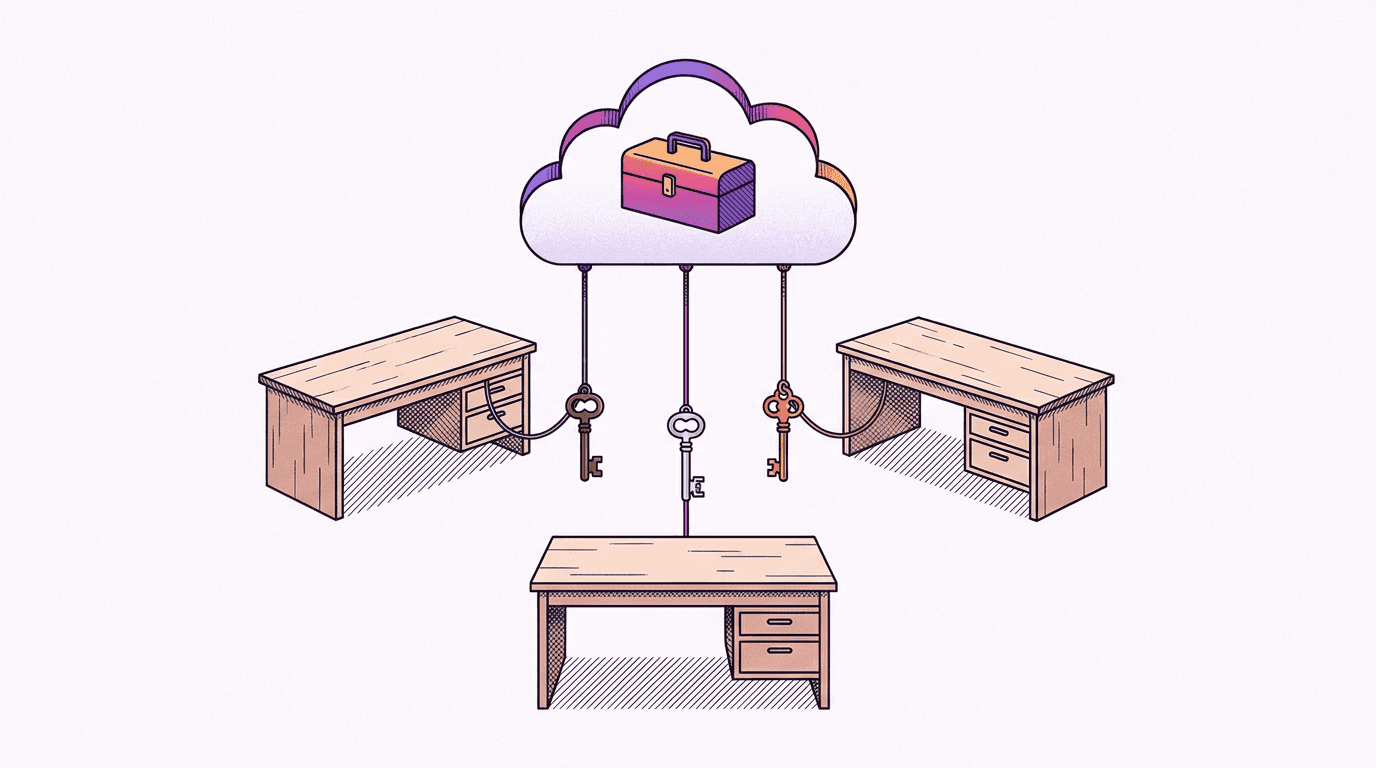
Il existe également des serveurs MCP locaux pour la génération d'images, qui sont parfaits si vous aimez lancer un processus Node local et intégrer votre propre clé de fournisseur en amont soumise à des quotas d'utilisation. L'alternative distante vous épargne tous ces désagréments : le service tourne déjà chez nous, sur le même circuit que le générateur web BananaBanana, et votre unique moyen d'accès est une clé d'API bb_live_ révocable à tout instant.
Comment configurer mcp.json dans VS Code ?
Les détails de cette configuration ont été vérifiés conformément à la documentation officielle MCP pour VS Code en date du 11 juillet 2026. Trois étapes suffisent.
Premièrement, inscrivez-vous et ouvrez Profile → MCP API Keys. Votre clé ne s'affiche qu'une seule fois et est conservée sous forme de hash de notre côté, veillez donc à la copier immédiatement. Les nouveaux comptes bénéficient d'un solde initial de $0.20, ce qui vous permet de générer environ six images d'essai avec notre modèle le plus accessible.
Deuxièmement, définissez la configuration. Deux répertoires conviennent :
.vscode/mcp.jsondans le dépôt (le fichier idéal à archiver dans git) ;- Un fichier de configuration globale
mcp.json(Palette de commandes → MCP: Open User Configuration) qui vous accompagne dans tous vos projets.
L'exemple de code proposé au début s'appuie sur le mécanisme des inputs, qui offre la gestion de données sensibles la plus soignée parmi tous les clients MCP que j'ai configurés. ${input:bb-api-key} indique à VS Code de demander la valeur lors du premier lancement du serveur. L'option "password": true masque les caractères saisis, et l'information est conservée dans le gestionnaire de mots de passe chiffré du système plutôt que dans le fichier. En comparaison avec Cursor, où l'évaluation de ${env:…} dépend de la capacité de l'éditeur à lire les variables de votre terminal (une source fréquente de dysfonctionnement sur les applications lancées depuis l'interface graphique), VS Code contourne brillamment l'obstacle.
Troisièmement, démarrez le serveur : Palette de commandes → MCP: List Servers → bananabanana → Start, ou utilisez le lien d'aide contextuelle inséré dans le fichier JSON. Ouvrez l'interface de discussion de Copilot en mode agent, vérifiez le sélecteur d'outils, et vous y trouverez dix fonctions, de list_models à list_generations. Notre page explicative des serveurs MCP propose un tableau de compatibilité pour tous les clients testés ; c'est précisément la ligne de VS Code que nous détaillons ici :
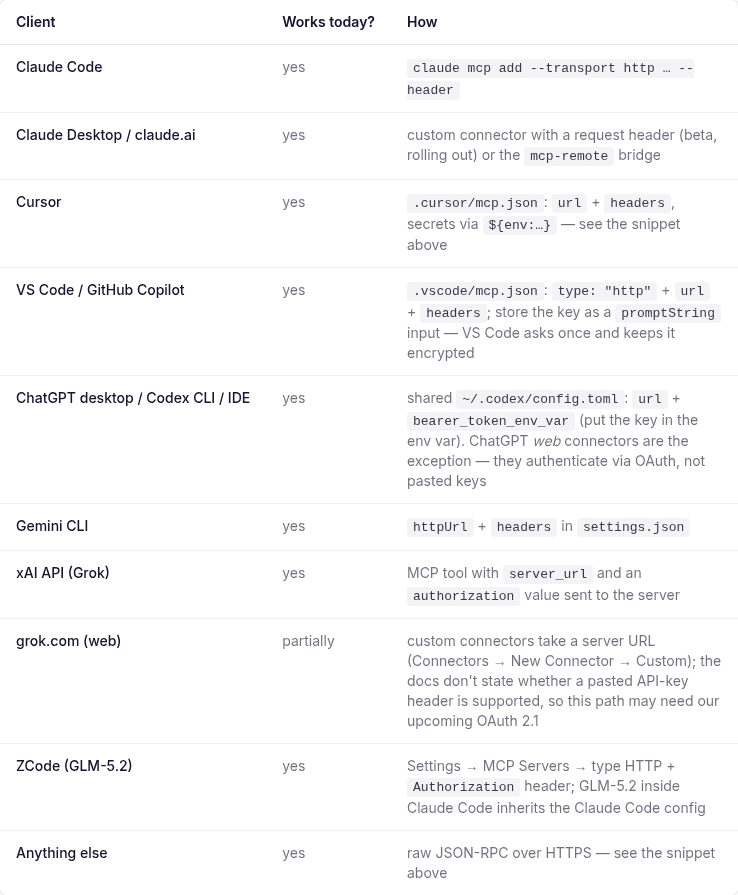
Rien ne s'affiche ? Notre rubrique dédiée aux imprévus passe en revue les trois origines les plus fréquentes, dont l'une concerne les stratégies d'organisation de GitHub que vous ne pourrez pas contourner depuis l'éditeur.
Cas d'usage : Illustrer le README et la documentation directement depuis le dépôt
Le cas d'usage pris comme fil conducteur pour cet article : votre équipe met à disposition un projet CLI open source, et le dépôt requiert un visuel de présentation pour le README ainsi qu'une illustration pour la documentation de démarrage. Dans le chat Copilot (mode agent), demandez votre bannière, et le système rédigera une description de type photographie afin de solliciter l'outil. Voici la trace exacte de la transaction, avec son identifiant réel :
→ generate_image {"prompt": "A wide photorealistic hero banner for a GitHub
   README of an open-source terminal application: a sleek dark laptop on a
   light oak desk showing colorful command-line output, soft morning window
   light from the left, shallow depth of field, 50mm lens, generous clean
   negative space on the right side for a project title, no text, no logos",
   "model": "nano-banana-pro", "aspect_ratio": "16:9"}
← {"job_id": "cmrgq90ou00036k7f86f0y54w", "status": "processing",
   "cost_charged_usd": 0.11, "balance_remaining_usd": 1554.18}
→ get_result {"job_id": "cmrgq90ou00036k7f86f0y54w"}
← {"status": "completed", "files": [{"url": "https://bananabanana.pro/api/files/…"}]}
Comptez une vingtaine de secondes entre la requête et l'écriture du fichier. Voici le rendu tel quel, dès la première tentative :

Un mot d'avertissement en toute franchise avant de publier ce type de visuel : en y regardant de plus près, le texte sur l'écran du terminal est un faux code aux allures authentiques mais vide de sens. À l'échelle d'affichage d'un fichier README, cela passera totalement inaperçu. En revanche, pour une illustration en haute définition dans votre documentation où les détails sautent aux yeux, cela peut se remarquer. L'affichage de textes nets et lisibles dans les interfaces reste une faiblesse pour l'ensemble des modèles photoréalistes ; préférez donc des écrans de taille réduite ou optez pour des représentations abstraites.
L'illustration de démarrage rapide de la documentation s'appuie sur le même principe avec un thème plus apaisé : vue plongeante, clavier mécanique, schéma technique papier avec notes adhésives et tasse de thé. Un seul appel, $0.11 :

Ces deux démonstrations ont été réalisées avec le modèle Nano Banana Pro pour garantir un niveau de qualité maximal à l'affichage. Pour alimenter des pages wiki de projet ou des modèles de tickets d'assistance, je privilégierais sans hésiter nano-banana-2-lite à seulement $0.03 ; notre guide de la version Lite liste les contextes où ce modèle économique s'avère amplement suffisant. Les adresses de téléchargement signées des fichiers restent valides pendant 24 heures, et un simple appel à get_result permet d'obtenir un lien actualisé.
La vidéo est également accessible directement depuis votre conversation. La commande generate_video n'entraîne aucun débit au premier appel : elle fournit d'abord un devis indicatif, et l'assistant doit ensuite exécuter confirm_cost pour approuver le montant communiqué. Une séquence muette en résolution 720p est accessible à partir de $0.10, tandis qu'une génération avec le modèle Omni Flash incluant le son est facturée $0.10 par seconde, soit $0.30 pour une séquence de trois secondes.
Quelques spécificités de VS Code à connaître avant de vous lancer
Voici un recueil d'observations compilées au fil de nos tests de mise en place, classées selon leur fréquence d'apparition.

1. La clé racine est servers et non mcpServers. La majorité des autres éditeurs modernes (Claude, Cursor, Windsurf) exigent la clé mcpServers. Les configurations copiées depuis la documentation de ces logiciels génèrent ainsi des erreurs sous VS Code, où les alertes de conformité du fichier JSON sont faciles à omettre. Le piège inverse guette ceux qui tentent de réutiliser une configuration VS Code ailleurs. Pensez également à conserver l'indication explicite du paramètre type: "http" pour les services déportés.
2. Modifier une variable d'entrée enregistrée s'avère particulièrement fastidieux. La première invite enregistre votre paramètre dans le trousseau sécurisé, sans proposer de bouton d'édition direct par la suite. Pour procéder à une modification : ouvrez .vscode/mcp.json, survolez le serveur pour faire apparaître les icônes d'administration et choisissez l'option de redémarrage avec effacement des saisies, ou supprimez les informations d'identification via l'onglet MCP: List Servers → serveur → disconnect puis effectuez un nouvel enregistrement. La manipulation s'avère plus incertaine avec des liaisons Remote SSH, où les mécanismes de reconnexion souffrent de dysfonctionnements répertoriés sur le suivi des tickets VS Code. Renouveler une clé révoquée vous imposera de nombreuses manipulations non prévues.
3. Sur les formules d'entreprise Copilot Business ou Enterprise, les services MCP restent inactifs tant qu'un administrateur n'a pas validé les habilitations. L'autorisation "MCP servers in Copilot" est désactivée d'office pour les accès professionnels, d'après les guides d'administration de GitHub. Le symptôme de ce blocage est trompeur : le serveur s'active sans erreur, le fichier de configuration est validé, mais les fonctions restent invisibles au sein de la messagerie. Si vous disposez d'un compte individuel Copilot (y compris la version gratuite Free), ce paramétrage ne vous concerne pas.
4. Une limite maximale de 128 outils est imposée pour chaque demande. Les fonctions système, les utilitaires liés à des extensions et chaque serveur MCP actif entrent dans ce calcul, d'après la documentation de référence de l'éditeur. Notre service en expose dix, ce qui est minime, mais l'accumulation de plusieurs serveurs verra les requêtes de l'utilisateur échouer tant que certains modules d'assistance n'auront pas été décochés dans la liste. Bien que VS Code soit capable d'unifier l'excédent derrière des catégories d'outils virtuelles, il reste largement préférable de ne conserver actifs que les serveurs dont vous avez besoin.
5. Les modules d'assistance interviennent en mode agent, et chaque exécution nécessite votre accord. Les outils MCP ne peuvent pas être sollicités par de simples questions ouvertes ; si l'assistant se contente de vous décrire les images au lieu de les produire, vérifiez d'abord la sélection de votre outil de discussion. Le bandeau de validation propose des options d'autorisation temporaires, propres au projet en cours, ou définitives ("always"). Pour les requêtes gratuites à l'image de list_models et get_result, le choix "always" est parfaitement adapté. En ce qui concerne l'action generate_image, nous recommandons de valider chaque demande afin d'éviter toute dépense involontaire de crédit réel ; les processus vidéo disposent de toute façon du garde-fou complémentaire confirm_cost côté serveur.
Quel a été le coût des visuels de cet article ?
Il s'agit des tarifs standards appliqués à la génération, identiques à ceux retournés par l'outil list_models auprès de l'assistant :
| Visuel | Modèle | Prix |
|---|---|---|
| Démo de bannière README, via MCP avec clé active | Nano Banana Pro, 1K | $0.11 |
| Démo de vue plongeante de documentation, via MCP | Nano Banana Pro, 1K | $0.11 |
| Couverture + 2 illustrations éditoriales | Nano Banana Pro, 1K | $0.33 |
| Capture d'écran du tableau de compatibilité | navigateur, sans génération | $0.00 |
| Total | $0.55 |
Pour cet article, l'ensemble des créations a pu être validé dès le premier jet. Cela ne sera pas systématiquement le cas ; prévoyez donc une marge de crédit pour relancer des requêtes complexes, notamment pour l'affichage de textes à l'écran ou de structures géométriques précises, et observez toujours le fichier en pleine résolution avant de l'intégrer à votre branche principale.
Si vous exploitez déjà ce service sur un autre programme d'édition de code, le fichier .vscode/mcp.json documenté plus haut constitue l'unique changement : vous utilisez la même clé d'accès, le même compte de crédit et bénéficiez de votre historique de requêtes commun. Si vous débutez complètement, notre guide pour Claude Code répertorie quatre autres exemples d'utilisation transposables presque mot pour mot. Dès que vous vous sentez prêt, créez une clé et demandez à Copilot de concevoir votre premier visuel de README.
FAQ
Est-ce que VS Code prend en charge les serveurs MCP distants avec un en-tête Authorization ?
Oui, de manière native. Un service déporté se configure en renseignant le paramètre type: "http", la valeur url et un ensemble d'en-têtes optionnels headers dans votre fichier mcp.json, l'emploi de ${input:…} permettant d'éviter l'enregistrement en clair de vos identifiants d'accès (validé d'après la documentation officielle de l'éditeur le 11 juillet 2026). Le programme prend également en charge l'authentification OAuth pour les serveurs distants ; notre service authentifie aussi bien par OAuth 2.1 que par clés Bearer depuis le 1er août 2026.
Est-il sans danger de valider .vscode/mcp.json dans git ?
Oui, à la seule condition que la clé de connexion soit configurée via une référence inputs au lieu d'être spécifiée directement dans le fichier. Le document JSON ainsi partagé n'intègre qu'une balise générique ; VS Code se chargera de solliciter chaque intervenant lors de l'initialisation et conservera cette clé chiffrée sur la machine de l'utilisateur. Cette gestion individualisée est particulièrement bénéfique : chaque clé dispose de son propre journal d'activité et d'un plafond journalier optionnel en dollars (USD) ajustable via l'interface Profile → MCP API Keys. Le retrait d'un collaborateur s'effectue ainsi par une simple révocation en un clic sans affecter le reste de l'équipe.
Pourquoi mes outils MCP ne s'affichent-ils pas dans la messagerie de Copilot ?
On dénombre trois explications principales. Tout d'abord, assurez-vous d'être actif en mode agent, car les autres formes de discussion n'intègrent pas les outils MCP. Ensuite, il se peut que le serveur ne soit pas lancé ; appelez la commande MCP: List Servers pour valider son statut. Enfin, pour les abonnements d'équipe, il se peut que la stratégie "MCP servers in Copilot" soit inactive (ce dysfonctionnement n'affiche aucun message d'erreur et exige l'intervention d'un administrateur de votre compte GitHub d'entreprise). Si les outils s'affichent mais retournent un statut d'erreur 401, cela indique que votre clé est erronée ou qu'elle a été révoquée ; vous pouvez le valider rapidement en exécutant une requête manuelle depuis notre page dédiée aux serveurs MCP.
Est-il nécessaire d'avoir mon propre compte cloud pour générer des images dans VS Code ?
Non. Les solutions basées sur des serveurs MCP locaux communiquent directement avec un fournisseur en amont, ce qui vous impose d'utiliser votre propre clé d'API, d'en suivre les quotas d'utilisation et d'y paramétrer vos informations bancaires. Notre service déporté effectue en revanche ces calculs sur notre pool de clés géré en interne par BananaBanana. Votre unique paramètre d'accès est la clé bb_live_ obtenue sur votre compte : vous payez à l'acte, sans aucun forfait mensuel minimum exigé, le tout débité depuis un compte prépayé commun à notre application web.
Est-ce que GitHub Copilot peut générer des vidéos via ce même serveur ?
Oui, moyennant une étape explicite de validation budgétaire. La commande generate_video produit tout d'abord une estimation, puis l'assistant doit réitérer l'appel avec le paramètre confirm_cost correspondant à la valeur communiquée avant qu'un quelconque débit ne soit opéré. Les tarifs s'échelonnent entre $0.10 pour de courtes séquences muettes en 720p et $4.40 pour des rendus haut de gamme réalisés avec Veo 3.1 incluant du contenu sonore, l'option Omni Flash avec bande son étant quant à elle facturée $0.10 par seconde ($0.30–$1.00 par clip). Le traitement pouvant prendre de une à dix minutes, l'assistant effectue des requêtes successives avec l'outil get_result pendant que vous poursuivez l'édition de vos fichiers de programmation.