Claude Code'da Görsel Oluşturma: 2 Dakikalık MCP Kurulumu
Claude Code veya Claude Desktop'ta uzak MCP ile görsel oluşturun: Yerel kurulum veya Google API anahtarı yok, görseller $0.03'tan başlıyor. Gerçek maliyetler.

Görsel oluşturma destekli bir MCP sunucusu, Claude'un resim çizmesini sağlayan o eksik parçadır: Claude bir istem (prompt) yazar ve generate_image aracını çağırır; sunucu da bu istemi gerçek bir modelde (bizim durumumuzda Google'ın Nano Banana model ailesi) işleyip bir URL döndürür. Claude kendisi çizim yapamaz. Anthropic hiçbir zaman bir görsel modeli sunmadı, bu yüzden Claude Code ve Claude Desktop görselleri mükemmel şekilde analiz edebilir ama kendisi görsel üretemez.
Kısacası, sadece bunun için geldiyseniz: BananaBanana profilinizden bir API anahtarı oluşturun ve ardından terminalinizde şu komutu çalıştırın:
claude mcp add --transport http bananabanana https://bananabanana.pro/api/mcp \
  --header "Authorization: Bearer bb_live_YOUR_KEY"
Kurulum bu kadar basit. Yerel sunucu, Google Cloud hesabı ya da abonelik gerekmez. Görseller ön ödemeli bakiyenizden adet başına $0.03'tan, videolar ise $0.10'dan başlayan fiyatlarla ücretlendirilir. Bu kılavuzun dürüstlüğünden emin olmanız için küçük bir not: Bu makaledeki tüm görseller, metin yazıldığı sırada bu MCP sunucusu aracılığıyla doğrudan Claude Code tarafından oluşturuldu. Bir adet yeniden deneme (reroll) dahil toplam medya maliyeti $1.29 tuttu; fatura detaylarını makalenin sonunda bulabilirsiniz.
Claude neden kendi başına görsel oluşturamıyor?
Anthropic yalnızca metin ve akıl yürütme modelleri geliştiriyor. Görsel yetenekleri ise tek yönlü çalışıyor: Claude ekran görüntülerinizi ve fotoğraflarınızı inceleyebilir, ancak model ailesinde herhangi bir görsel üreteci bulunmuyor ve buna dair duyurulmuş bir plan da yok. ChatGPT yerleşik bir görsel modeliyle gelirken Claude'da bu özellik bulunmuyor.
Topluluğun buna çözümü yerel MCP sunucuları oldu; GitHub'da bunlardan bolca var ve gayet iyi çalışıyorlar. Ancak oradaki 'kurulum' şu anlama geliyor: kendi yerel sürecinizi çalıştırmak, Node veya Python ortamını hazır tutmak, sunucuyu her makinedeki bir yapılandırma dosyasına bağlamak ve asıl zor kısım olan kendi Google API anahtarınızı getirmek. Ücretlendirme ise kendi kotaları ve paneliyle birlikte doğrudan Google hesabınıza yansıyor. Tek bir dizüstü bilgisayarda denemeler yapan bir yazılımcı için bu durum sorun olmayabilir, ancak geri kalan herkes için bu adeta küçük bir altyapı projesine dönüşüyor.
Uzak bir MCP sunucusu ise bu durumu tamamen değiştiriyor. Sunucu zaten bizim tarafımızda çalışıyor; arkasındaki altyapı, BananaBanana generator hizmetini besleyen altyapıyla tamamen aynı. Tek bir anahtarla kimlik doğrulaması yapıyor, ön ödemeli bakiyenizden görsel başına ödeme yapıyorsunuz. Kurulum adımları ise dizüstü bilgisayardaki Claude Code'da, bir iş arkadaşınızın bilgisayarındaki Claude Desktop'ta ve tarayıcıdaki claude.ai üzerinde tamamen aynı. Bakımını yapmanız gereken hiçbir şey yok.
Claude Code görsel oluşturma özellikli bir MCP sunucusuna nasıl bağlanır?
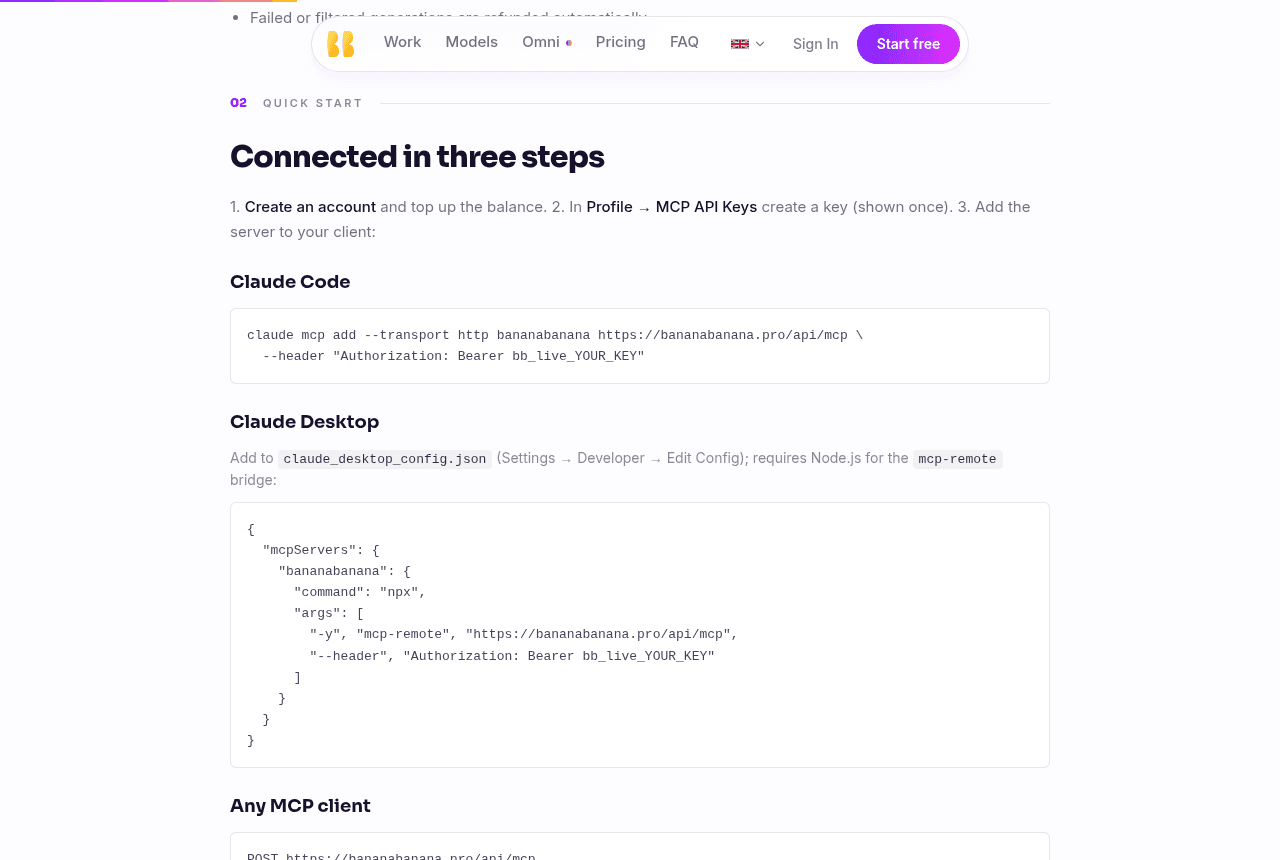
İki dakika, üç adım. İlk olarak kayıt olun ve Profil (Profile) → MCP API Anahtarları (MCP API Keys) sayfasını açın. Bir anahtar oluşturun: Bu anahtar yalnızca bir kez gösterilir, bb_live_ ile başlar ve bizim tarafımızda karma (hash) yöntemiyle saklanır, bu yüzden hemen kopyalayın. Yeni hesaplar $0.20 başlangıç bakiyesiyle gelir; bu bakiye, bakiye yüklemeye karar vermeden önce en ucuz modelde altı adet test görseli oluşturmanız için fazlasıyla yeterlidir.
Claude Code
Bir komut, yukarıda olduğu gibi:
claude mcp add --transport http bananabanana https://bananabanana.pro/api/mcp \
  --header "Authorization: Bearer bb_live_YOUR_KEY"
Parametreler Claude Code MCP belgelerine sayfasında belgelenmiştir; uzak sunucular için önerilen iletişim yöntemi (transport) HTTP'dir. Bağlantının aktif olduğunu doğrulamak için oturum içinde /mcp komutunu çalıştırın: list_models seçeneğinden list_generations seçeneğine kadar on araç görmelisiniz. Artık Claude Code "bu yazı için 16:9 oranında bir ana görsel (hero image) oluştur" talimatını başarıyla yerine getirebilir.
Claude Desktop ve claude.ai
Claude Desktop ve claude.ai'de Ayarlar (Settings) → Bağlayıcılar (Connectors) → Özel bağlayıcı ekle (Add custom connector) yolunu izleyin ve sunucu URL'si olarak https://bananabanana.pro/api/mcp adresini yapıştırın. Anahtar için İstek başlıkları (Request headers) bölümünü açın ve değeri Bearer bb_live_YOUR_KEY olan bir Authorization başlığı ekleyin. "Bearer" kelimesi ve boşluk dahil olmak üzere tüm değeri eksiksiz girin; Anthropic'in bağlayıcı belgelerinde belgesine göre Claude, başlığı tam olarak yazıldığı gibi gönderir ve kendiliğinden herhangi bir önek eklemez.
Dürüst bir uyarı: Bağlayıcılardaki istek başlığı (request-header) kimlik doğrulaması henüz beta aşamasındadır ve Anthropic bunu kademeli olarak kullanıma sunmaktadır, bu nedenle hesabınızda bu bölüm henüz görünmeyebilir. Alternatif çözüm ise Claude Desktop'ın çalıştığı her yerde geçerlidir: Node.js kurulu olmasını gerektiren claude_desktop_config.json (Ayarlar → Geliştirici → Yapılandırmayı Düzenle / Settings → Developer → Edit Config) dosyası üzerinden mcp-remote köprüsü aracılığıyla sunucuyu ekleyin:
{
  "mcpServers": {
    "bananabanana": {
      "command": "npx",
      "args": [
        "-y", "mcp-remote", "https://bananabanana.pro/api/mcp",
        "--header", "Authorization: Bearer bb_live_YOUR_KEY"
      ]
    }
  }
}
Her iki yöntem ve diğer platformlar için ham bir JSON-RPC örneği MCP sunucu sayfasında yer almaktadır:
Claude dışındaki araçlarda da çalışır mı?
Evet. MCP açık bir protokol olduğundan, Streamable HTTP protokolünü destekleyen ve bir Authorization başlığı ekleyebilen her istemci aynı uç noktaya bağlanabilir: Gemini CLI, Z.ai'nin ZCode'u, editör ajanları ve Codex uzak MCP desteği sunduğundan beri, ortak bir config.toml girdisi (url ve bearer_token_env_var değerleriyle, Codex MCP belgelerinde belgesine göre) aracılığıyla ChatGPT masaüstü uygulaması, Codex CLI ve IDE eklentisi de buna dahildir. xAI API, istek başına server_url aracılığıyla MCP sunucularını bağlar. Bu konuda geride kalanlar ise yapıştırılan anahtarlar yerine OAuth etrafında oluşturulan web arayüzleridir — ChatGPT'nin web bağlayıcıları ve muhtemelen grok.com'un URL tabanlı özel bağlayıcıları gibi. Her istemci için güncel kurulum kodlarını barındıran tabloyu MCP sunucu sayfasında paylaşıyoruz; bu makale ise Claude odaklı kalacaktır.
Kullanım Senaryosu 1: Yazdığınız makale için bir ana görsel (hero image)
En sık karşılaşılan senaryolardan biri. Claude Code üzerinde bir blog yazısı taslağı hazırlıyorsunuz ve yazı için bir ana görsele ihtiyacınız var. Şöyle diyorsunuz: "veritabanı önbelleğe alma (database caching) hakkında kütüphane metaforu içeren 16:9 oranında editoryal bir ana görsel oluştur." Claude prompt'u hazırlar ve şu çağrıyı gerçekleştirir:
→ generate_image {"prompt": "Editorial illustration for a developer blog post
   about database caching: a small librarian robot placing three glowing books
   onto a tiny fast bookshelf in the foreground, a huge dim archive hall
   stretching far behind it, soft pastel background, dark ink details, accents
   of violet and warm amber, clean minimal composition, generous negative
   space, no text", "model": "nano-banana-pro", "aspect_ratio": "16:9"}
← {"job_id": "cmxq…", "status": "processing", "cost_charged_usd": 0.11,
   "balance_remaining_usd": 4.89}
→ get_result {"job_id": "cmxq…"}
← {"status": "completed", "files": [{"url": "https://bananabanana.pro/api/files/…"}]}
İşte bu prompt'un ilk denemedeki, yeniden çizim yapılmadan elde edilen tam çıktısı:
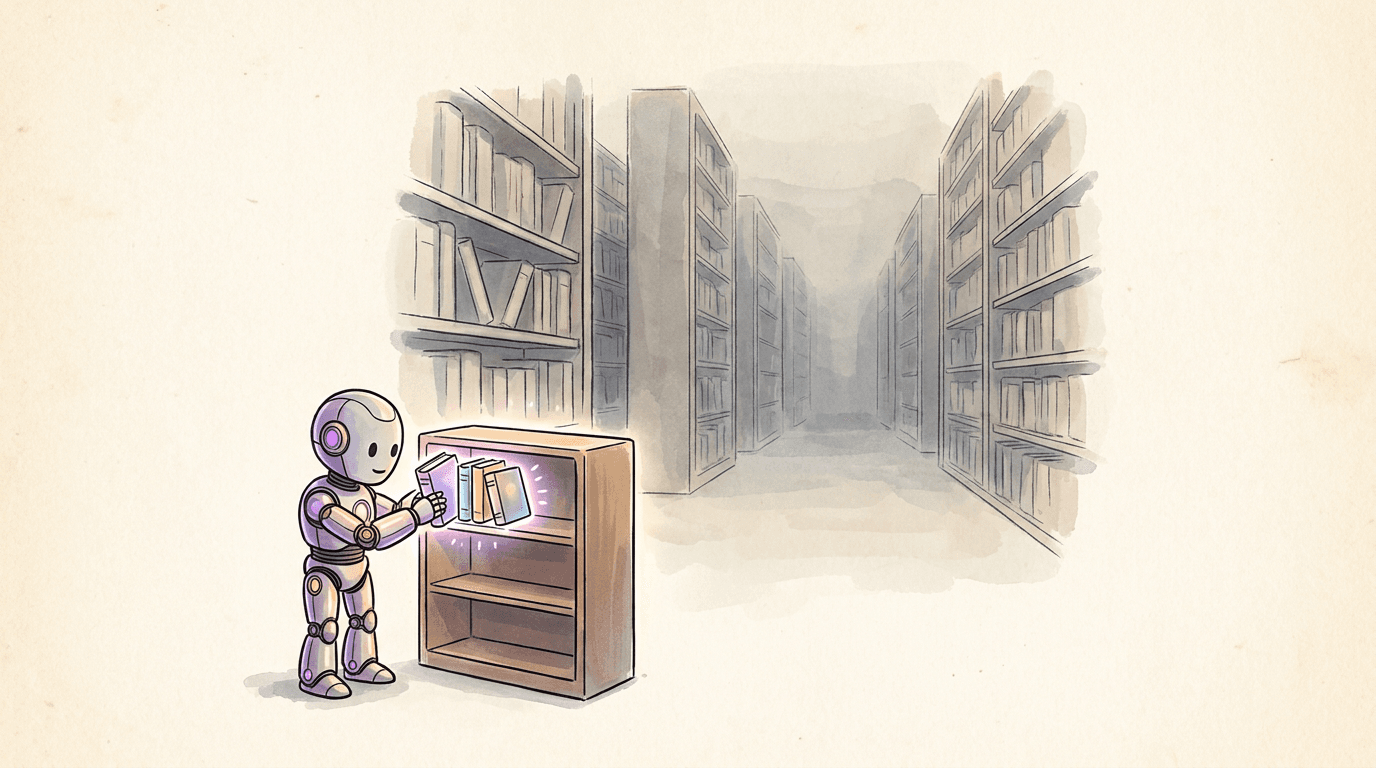
Maliyet: 1K çözünürlükte Nano Banana Pro modelinde $0.11. Ajan, dosyayı imzalı URL'den indirir, depoya (repository) kaydeder ve görsel açıklamasını (alt text) yazar. Bağlantılar 24 saat boyunca geçerliliğini korur; bu süreden sonra get_result yeni bağlantılar oluşturur.
Kullanım Senaryosu 2: Fotoğrafçıya gerek duymadan ürün çekimleri
Pazarlama maketleri (mockup), fotoğrafçılık tarzı prompt yazmanın karşılığını en çok verdiği yerdir. Çekimi bir fotoğrafçının brifing vereceği şekilde tanımlayın: konu, yüzey, ışık kaynağı, lens.
→ generate_image {"prompt": "A photorealistic product photo of a matte
   sage-green ceramic pour-over coffee set on a pale linen tablecloth, soft
   diffused daylight from a window on the left, gentle shadows, shallow depth
   of field, eye-level shot with a 50mm lens, minimal warm styling, no text",
   "model": "nano-banana-pro", "aspect_ratio": "1:1"}

Açık konuşmak gerekirse, bu çekim iki deneme sürdü. İlk görsel ilk bakışta doğru görünüyordu, ancak yakından incelendiğinde bardağın tabağıyla birleşerek kapak benzeri tek bir parça haline geldiği fark ediliyordu. Nesne geometrisi, gerçekçi modellerin hâlâ hata yapabildiği bir alandır ve ürün odaklı çalışmalarda görselleri teslim etmeden önce mutlaka yakınlaştırıp incelemelisiniz. Aynı prompt'un bir kez daha çalıştırılması (reroll) sorunu çözdü: $0.11 yerine iki görsel için toplam $0.22 maliyet oluştu. Benim en çok hoşuma giden kısım çekimin kendisi değil, sonrasında gerçekleşen süreç: edit_image aracı, tamamlanmış bir görselin job_id değerini alıyor ve "arka planı tamamen beyaz yap ve yumuşak bir gölge ekle" gibi bir talimatı uyguluyor. Sahneyi yeniden tanımlamaya gerek kalmadan çok turlu düzenleme yapılabiliyor ve her bir adım tek bir görsel olarak ücretlendiriliyor. Katalog çalışmaları için bu döngü, profesyonel bir araç ile basit bir oyuncak arasındaki farkı belirliyor.
Kullanım Senaryosu 3: Görseller arasında tutarlı bir karakter oluşturma
Marka maskotları, çizgi roman panelleri ve hikaye panolarının (storyboard) tümü, aynı karakterin bir görselden diğerine tutarlı şekilde taşınmasına ihtiyaç duyar. MCP aracılığıyla bunu yapmanın yöntemi bir karakter kartı (character sheet) oluşturmaktır: ajanın her prompt'a yapıştırdığı sabit bir açıklama bloğu. Bizim kullandığımız açıklama şuydu: "yuvarlak mat deniz mavisi (teal) kafası, dost canlısı büyük bir kehribar rengi gözü, görünür pirinç vidaları olan köşeli krem-beyaz gövdesi ve pirinç tokalı kanvas postacı çantası olan küçük bir kurye robotu." İki sahne, iki çağrı, her biri $0.11:


Sonuç konusunda dürüst olacağım: iyi ama kusursuz değil. Çanta, kehribar göz, pirinç vidalı krem rengi gövde başarıyla aktarıldı. Ancak kafa yapısı küre şeklinden kaska doğru kaydı ve alacakaranlık sahnesi daha grafiksel bir çizgi tarzında geldi. Bu, yalnızca metne dayalı sabitlemenin bilinen sınırıdır. Referans görseller bu sorunu tam olarak çözer; hem web generator (Nano Banana Pro modelinde 5 adede kadar karakter referansı) hem de MCP üzerindeki generate_image aracı artık bunları iş kimliği (job id), URL veya data URI olarak kabul ediyor. Karakter tutarlılığı kılavuzumuz, hangi özelliklerin önce değiştiği de dahil olmak üzere her iki yöntemi de kapsamlı bir şekilde ele alıyor.
Kullanım Senaryosu 4: Aynı sohbet içinden bir video klibi üretmek
Video üretimi de aynı sunucu üzerinden gerçekleştirilir, ancak burada ek bir güvenlik önlemi bulunur. Video klipleri görsellere kıyasla daha maliyetlidir (en üst düzey Veo 3.1 işlemesi için $4.40'a kadar çıkabilir), bu nedenle generate_video ilk çağrıda asla ücret almaz. Bunun yerine bir fiyat teklifi döndürür ve ajanın tam tutarı kabul ederek çağrıyı tekrarlaması gerekir:
→ generate_video {"prompt": "Aerial drone shot rising slowly over terraced tea
   fields at sunrise, thin mist drifting in the valleys, golden light catching
   the ridges, smooth cinematic camera motion, wide shot",
   "model": "veo-3.1-fast", "duration": 6, "resolution": "720p"}
← {"status": "confirmation_required", "quoted_cost_usd": 0.52, …}
→ generate_video {…same arguments…, "confirm_cost": 0.52}
← {"job_id": "cmxr…", "status": "processing", "cost_charged_usd": 0.52}
Sonuç olarak, Veo 3.1 Fast modelinden ilk denemede elde edilen, sessiz altı saniyelik 720p video:
Videoların hazırlanması bir ila on dakika sürer, bu nedenle ajan diğer işlerini yaparken get_result aracını belirli aralıklarla sorgular. Sesli bir video istiyorsanız, Omni Flash, ses her zaman açık olmak üzere — çözünürlüğe göre saniye başına $0.03 ila $0.30 arası maliyetle — aynı araç üzerinden çalışır ve süreyi siz belirlersiniz — 3 ila 10 saniye arası herhangi bir uzunlukta olabilir. Ayrıca resimleri girdi olarak da kabul eder: zaten oluşturduğunuz bir görselin job_id'sini (veya herkese açık bir bağlantısını) ilk kare veya son kare olarak geçirin, bir karakteri tutarlı tutmak için en fazla on referans görsel ekleyin ve ajan onları canlandırır.
Bu yazıdaki her görsel bu iş akışıyla oluşturuldu
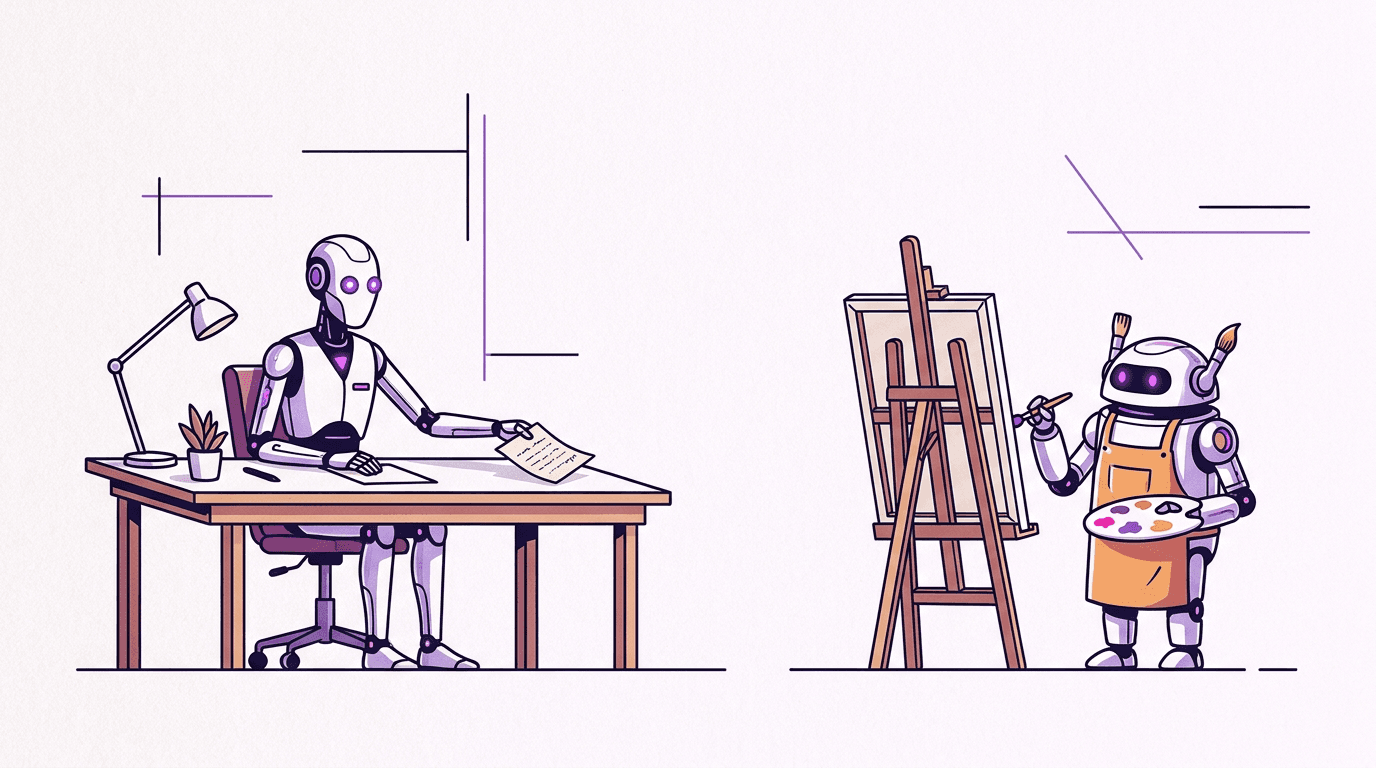
Okuyucu olsaydım kesinlikle kanıt isteyeceğim kısım burası olurdu, bu yüzden size somut iş akışını açıklayayım: Claude Code bu makalenin bir bölümünü yazdı, marka tarzımıza uygun bir illüstrasyon prompt'u tasarladı, görsel üretim aracını çağırdı, yirmi saniye kadar bekledi, gelen görseli kontrol etti ve devam etmeden önce markdown dosyasına görsel açıklamasıyla birlikte ekledi. Burada gördüğünüz medya içerikleri için toplam sekiz görsel üretim çağrısı yapıldı; altı görsel ve video ilk denemede başarıyla oluşturulurken, kahve seti yakın çekim incelemesinde fark edilen birleşik fincan ve tabak hatası nedeniyle bir kez yeniden deneme gerektirdi. Sekiz çağrıda sadece tek bir tekrar yapılması benim beklentilerimin bile üzerindeydi. Yapay zeka tarafından üretilmeyen tek görsel, bir tarayıcı aracıyla çekilen belgeler sayfasının ekran görüntüsüdür.
Görseller kusursuz değil (kurye robotunun kafası, belirttiğimiz gibi kendi kafasına göre takılıyor). Asıl önemli olan, görselleştirme sürecinin artık ayrı bir üretim adımı olmaktan çıkmış olmasıdır. Metni yazan oturumun aynısı görselleri de hazırlıyor ve tüm bu süreç yaklaşık bir otobüs bileti fiyatına mal oluyor.
Bu makaledeki medya içerikleri gerçekte ne kadara mal oldu?
Aşağıdaki tüm harcamalar, list_models aracının ajana bildirdiği rakamlarla birebir aynı olacak şekilde fiyatlandırma sayfamızdaki standart üretim başına fiyatlar üzerinden ücretlendirilmiştir. Herhangi bir personel indirimi uygulanmamıştır.
| Medya İçeriği | Model | Fiyat |
|---|---|---|
| Kapak görseli | Nano Banana Pro, 1K | $0.11 |
| Yazar ve ressam illüstrasyonu | Nano Banana Pro, 1K | $0.11 |
| Önbellek rehberi ana görseli (senaryo 1) | Nano Banana Pro, 1K | $0.11 |
| Kahve seti maketi, 1 yeniden çizim dahil 2 deneme (senaryo 2) | Nano Banana Pro, 1K | $0.22 |
| Kurye robotu serisi, 2 görsel (senaryo 3) | Nano Banana Pro, 1K | $0.22 |
| Çay tarlaları klibi, 6 sn sessiz 720p (senaryo 4) | Veo 3.1 Fast | $0.52 |
| Belgeler ekran görüntüsü | tarayıcı, yapay zeka üretimi değil | $0.00 |
| Toplam | $1.29 |
Görseller halka açık bir sayfada yayınlanacağı için her yerde en üst seviye görsel modelini tercih ettik. Taslak aşamasında $0.03 maliyetli Nano Banana 2 Lite modelini kullanmış olsaydık, faturanın görsel kısmını $0.77'dan $0.21'a düşürebilirdik; Lite rehberimiz kılavuzumuz, ucuz modelin ne zaman yeterli olduğunu açıklıyor.
Denemeye hazır mısınız? BananaBanana MCP sunucusunu bağlayın ve Claude'dan ilk görselinizi üretmesini isteyin.
SSS
BananaBanana MCP sunucusu Claude dışındaki istemcilerle çalışır mı?
Evet; Streamable HTTP protokolünü destekleyen ve bir Authorization başlığı eklemenize izin veren tüm MCP istemcileriyle çalışır: Claude Code, Claude Desktop, Gemini CLI, GLM-5.2 için Z.ai'nin ZCode'u, Cursor veya VS Code gibi editör ajanları ve Codex'in uzak MCP desteği sayesinde url ve bearer_token_env_var içeren tek bir config.toml girdisini paylaşan ChatGPT masaüstü uygulaması, Codex CLI ve IDE eklentisi bunlara dahildir. xAI API, istek başına server_url aracılığıyla MCP sunucularını bağlar. Henüz netleşmeyen kısımlar ise: ChatGPT'nin web bağlayıcıları yapıştırılan anahtarlar yerine OAuth üzerinden kimlik doğrulaması yapar ve grok.com'un özel bağlayıcı penceresi belgelenmiş bir anahtar alanı olmadan yalnızca bir URL kabul eder, bu nedenle her ikisi de diğer istemciler için zaten çalıştırdığımız OAuth 2.1 desteğine ihtiyaç duyabilir. Her istemci için güncel tutulan kurulum kodlarını içeren tablo MCP sunucu sayfasında yer almaktadır; kendi geliştirdiğiniz herhangi bir araç ise zaten doğrudan JSON-RPC üzerinden bağlanabilir.
Bir Google API anahtarına veya Google Cloud hesabına ihtiyacım var mı?
Hayır; zaten bu sunucunun var olmasının temel sebebi de bu. GitHub'daki yerel görsel oluşturma MCP sunucuları doğrudan Gemini API'sini çağırır, bu nedenle kendi Google AI Studio anahtarınıza ihtiyaç duyarlar ve kotalarla faturalandırmayı kendiniz yönetmeniz gerekir. Burada ise üretim işlemleri BananaBanana'nın kendi yönetilen API anahtar havuzu üzerinde çalışır ve tek kimlik bilginiz profilinizdeki bb_live_ anahtarıdır. Google konsoluna hiç dokunmazsınız ve Google size asla fatura kesmez. Bu dürüst bir takastır: Google'ın ham API fiyatlandırmasından ve doğrudan parametre erişiminden feragat eder; karşılığında minimum harcama sınırı olmayan görsel başına fiyatlandırmaya, otomatik anahtar rotasyonuna ve MCP sunucusu ile web arayüzü arasında paylaşılan tek bir bakiye sistemine sahip olursunuz. Sızdırılan bir anahtarı iptal etmek tek bir tıklama alır ve diğer hiçbir şeyi etkilemez.
MCP sunucusunda faturalandırma nasıl çalışır?
Abonelik olmaksızın, ön ödemeli bakiye ve görsel başına fiyatlandırma geçerlidir. Bakiye yüklersiniz ve her üretim işlemi listelenen fiyatı bakiyenizden düşer: görseller modele ve çözünürlüğe bağlı olarak $0.03 ile $0.20 arasında, videolar ise modele, süreye, çözünürlüğe ve sese bağlı olarak $0.10 ile $4.40 arasında değişir. Ajan her fiyatı önceden bilir: list_models güncel rakamları sunar ve her video çağrısı (veya çoklu görsel paketleri) için tek bir cent bile harcanmadan önce mutlaka bir fiyat teklifi alınması ve bunun confirm_cost ile onaylanması gerekir. Her sonuç cost_charged_usd ve balance_remaining_usd değerlerini raporlar, böylece maliyet takibi doğrudan sohbetin bir parçası haline gelir. Başarısız olan üretimler otomatik olarak iade edilir. Kontrolden çıkabilecek bir ajandan endişe ediyorsanız, Profil (Profile) → MCP API Anahtarları (MCP API Keys) bölümünden anahtar başına günlük bir USD sınırı belirleyebilir ve araç, model, maliyet ile prompt önizlemesini kaydeden anahtar bazlı kullanım geçmişini denetleyebilirsiniz.
Görev sırasında bakiyem sıfırlanırsa ne olur?
Bir sonraki ücretli araç çağrısı, bakiye yükleme bağlantısı içeren temiz bir INSUFFICIENT_BALANCE hatasıyla başarısız olur ve ajan bunu size iletir. Bakiye asla eksiye düşmez; aşım ücreti veya sürpriz faturalarla karşılaşmazsınız. Ücretsiz araçlar (list_models, get_account, get_result, list_generations) çalışmaya devam eder, böylece önceden üretilmiş her şeye erişilebilir kalır ve bakiye tükenmeden önce başlayan bir üretim işlemi normal şekilde tamamlanır; çünkü ücretlendirme işlem başlangıcında bir kez yapılır. Pratikte Claude başarısız çağrıyı bakiye yükleme URL'si ile bildirir ve görevin geri kalanına devam eder. Kesin bir duraklama yerine bir güvenlik marjı bırakmak isterseniz, her sonuçtaki balance_remaining_usd değerini takip edebilir veya ajanın toplu işlemlerden önce get_account durumunu kontrol etmesini sağlayabilirsiniz.
İçerik filtresi neleri engeller ve filtrelenen prompt'lar için ödeme yapar mıyım?
Kullanılan Google modelleri kendi güvenlik filtrelerini uygular; bir üretim reddedildiğinde sunucu, Google'ın kendi içindeki yarım düzine farklı varyasyonu yerine tek bir birleşik SAFETY_FILTERED kodu döndürür. Engellenen kategoriler Gemini ve Veo politikalarından bekleyeceğiniz türdedir: reşit olmayanları içeren cinsel içerik, açık şiddet, gerçek kişi deepfake'leri ve benzerleri. Filtreler bazen masum prompt'larda da hatalı engellemelere (false positive) neden olabilir; bu durum bizim kontrolümüz dışındadır ve bunu gizlemeyeceğiz. Faturalandırma son derece basittir: Tamamen filtrelenmiş bir üretim otomatik olarak iade edilir ve Google'ın bazen çıktının yalnızca bir kısmını filtrelediği video üretimlerinde iade orantılı olarak yapılır. Yalnızca teslim aldığınız medya için ödeme yaparsınız. Bir prompt sürekli filtreye takılıyorsa, aynı metni tekrar denemek yerine filtreyi tetikleyen somut ayrıntıyı yeniden ifade edin.
MCP sunucusu aracılığıyla ürettiğim görsellerin mülkiyeti kime ait?
Mülkiyet size aittir. Hizmet terms (kullanım koşulları) sözleşmemiz uyarınca, üretilen görseller ve videolar, ilgili model sağlayıcısının koşullarına tabi olmak kaydıyla kişisel ve ticari kullanımınız içindir; içerikleriniz üzerinde hiçbir hak iddia etmeyiz ve gönderdiğiniz prompt'lar size ait kalır. Pratikte saklama ile ilgili iki önemli ayrıntı mevcuttur: get_result tarafından döndürülen URL'ler 24 saat boyunca geçerli olan imzalı bağlantılardır, bu nedenle sizin için önemli olanları indirin veya yeni bağlantılar almak için get_result aracını tekrar çağırın. Ayrıca üretilen medya içerikleri 30 gün boyunca saklanır ve ardından kalıcı olarak silinir; çünkü MCP sunucusu bir arşiv değil, bir üretim hattıdır. MCP üzerinden üretilen her şey web hesabınızın geçmişinde de yer alır, böylece saklama süresi içinde site üzerinden bunlara göz atabilir ve yeniden indirebilirsiniz.