BananaBanana گائیڈ: 13 AI ماڈلز، قیمتیں، خصوصیات
BananaBanana کا مکمل دورہ: تصویر اور ویڈیو کے لیے تیرہ AI ماڈلز اور ٹیکسٹ ٹو اسپیچ، قیمتیں $0.03 سے، کوئی سبسکرپشن نہیں، کرپٹو یا کارڈ، ریفرلز۔

BananaBanana ایک پے-ایز-یو-گو AI پلیٹ فارم ہے جو تصویر، ویڈیو اور آواز تیار کرتا ہے اور چار کمپنیوں کے تیرہ ماڈلز ایک ہی USD بیلنس کے پیچھے چلاتا ہے: تصویر کے چھ ماڈلز (Nano Banana کے تین ٹائرز، GPT Image 2.5 کے دو ٹائرز اور Qwen Image 3.0 Pro)، ویڈیو کے سات ماڈلز (Veo 3.1 کے تین ٹائرز، Gemini Omni Flash کی دو نسلیں، Wan 3.0 اور Grok Imagine Video 1.5)، اور آواز کے لیے Gemini 3.1 Flash TTS۔ نہ کوئی سبسکرپشن ہے، نہ اکاؤنٹ میں محفوظ کارڈ۔ آپ کرپٹو یا کارڈ سے بیلنس ٹاپ اپ کرتے ہیں اور ہر نتیجے کی قیمت ادا کرتے ہیں۔
اگر آپ آپشنز کا موازنہ کر رہے ہیں تو مختصراً:
- تصاویر کی قیمت $0.03 سے $0.20 فی تصویر ہے، ماڈل اور ریزولیوشن (512px سے 4K) کے حساب سے۔
- بغیر آواز کی ویڈیو Veo 3.1 Lite پر 4 سیکنڈ کے 720p کلپ کے لیے $0.10 سے شروع ہوتی ہے۔
- آواز والی ویڈیو Veo Lite پر $0.18 سے شروع ہوتی ہے، یا Wan 3.0 پر 4 سیکنڈ کے 480p کلپ کے لیے $0.20 سے، جہاں ساؤنڈ ٹریک مفت ہے۔ Gemini Omni Flash فی سیکنڈ بل کرتا ہے: 360p پر $0.03 سے 4K پر $0.30 تک۔
- اسپیچ کی قیمت $0.01 فی 200 حروف ہے، 30 آوازیں، ایک یا دو بولنے والے۔
- ڈپازٹس: $1 سے 20 سے زیادہ کرپٹو کرنسیز اور اسٹیبل کوائنز، یا $20 سے کارڈ، PayPal اور SEPA۔ کوئی سبسکرپشن نہیں، منسوخ کرنے کو کچھ نہیں۔
- کنٹرولز: seed، negative prompt، ریفرنس تصاویر اور کلپس، پہلا اور آخری فریم، کلپ کی توسیع۔ خام API کا زیادہ تر حصہ ایک ویب UI میں، اور ایجنٹس کے لیے یہی ماڈلز MCP کے ذریعے۔
- نئے اکاؤنٹس کو $0.20 کا ابتدائی بیلنس ملتا ہے، اور ناکام جنریشنز کی رقم خود بخود واپس ہو جاتی ہے۔
ہم نے اس پوسٹ کا پہلا ورژن لانچ کے دن شائع کیا تھا، جب پلیٹ فارم پر Google کے سات ماڈلز چلتے تھے اور پوسٹ چھ بلٹ پوائنٹس اور ایک وعدے پر مشتمل تھی۔ یہ ستمبر 2026 کا ایڈیشن ہے: تیرہ ماڈلز، چار کمپنیاں، اور نیچے دیا گیا ہر نمونہ اسی مضمون کے لیے ہماری اپنی پائپ لائن سے تیار کیا گیا ہے۔
آپ BananaBanana پر کیا بنا سکتے ہیں؟
تصاویر، مختصر ویڈیو کلپس اور بولی ہوئی آواز، اور ہر ایک کی تقریباً ہر عملی شکل۔
تصاویر 512px کے فوری ڈرافٹس سے لے کر 4K ایکسپورٹس تک جاتی ہیں، دس ایسپیکٹ ریشوز میں، مربع 1:1 سے سنیمائی 21:9 تک۔ جب کسی پروڈکٹ یا کردار کو پوری سیریز میں ایک جیسا رہنا ہو تو آپ ریفرنس تصاویر لگا سکتے ہیں (Nano Banana 2 اور GPT Image 2.5 پر 14 تک، Qwen پر تین)۔ سستی تصویر چند سیکنڈ لیتی ہے، جبکہ سب سے طاقتور ماڈلز کو تقریباً آدھا منٹ چاہیے۔
ویڈیو اب تین سوچوں میں بٹ چکی ہے۔ Veo 3.1 فیملی آپ کو کنٹرول دیتی ہے: 4، 6، 7 یا 8 سیکنڈ کا بالکل طے شدہ دورانیہ، 4K تک ریزولیوشن، اور ساؤنڈ ٹریک جسے آپ بند کر سکتے ہیں۔ Omni Flash بات چیت والا ماڈل ہے: آواز ہمیشہ ساتھ، 3 سے 10 سیکنڈ جن کا بل فی سیکنڈ بنتا ہے، اور آپ سادہ زبان میں تبدیلیاں بیان کر کے نتیجہ بہتر کرتے ہیں۔ سب سے نئی جوڑی یا لمبا چلتی ہے یا بولتی ہے: Wan 3.0 ایک ہی ٹیک میں 30 سیکنڈ تک بناتا ہے، اور Grok Imagine Video 1.5 آپ کے لکھے ہوئے مکالمے پر ہونٹوں کی حرکت ملا دیتا ہے۔
زیادہ تر ریپر سائٹس سے ایک خاموش سا فرق بھی ہے: ہم ایک اکیلے prompt باکس کے بجائے ہر API کے تقریباً تمام پیرامیٹرز سامنے رکھتے ہیں۔ seed، negative prompt، prompt بہتر بنانے کا سوئچ، دس ایسپیکٹ ریشوز، سبجیکٹ ریفرنسز، پہلا اور آخری فریم، کلپ کی توسیع، آڈیو کا سوئچ۔ اگر آپ نے کبھی کوئی ٹول صرف اس لیے چھوڑا کہ اس نے وہی ایک سیٹنگ چھپا رکھی تھی جس کی آپ کو ضرورت تھی، تو ہمارے ساتھ بھی یہی ہوا تھا، اور اسی لیے ہمارا جنریٹر اسے نہیں چھپاتا۔
ماڈلز کے ارد گرد وہ چیزیں ہیں جو بورنگ مگر اہم ہیں: پروفائل میں جنریشن کی ہسٹری، فراہم کنندہ کے ناکام ہونے پر خودکار ریفنڈ، 15 زبانوں میں ترجمہ شدہ انٹرفیس، اور ایک MCP سرور تاکہ Claude، Cursor یا آپ کا اپنا ایجنٹ انہی ماڈلز کو اسی بیلنس سے استعمال کر سکے۔
Nano Banana تصویر کے ماڈلز: Lite، اسٹینڈرڈ اور Pro
Google کے تینوں تصویری ماڈلز ایک ہی فیملی سے ہیں اور ان کی تقسیم صاف ہے۔ Lite بڑی مقدار کے لیے ہے، Nano Banana 2 ریزولیوشن کی گنجائش کے لیے، اور Pro ان چیزوں کے لیے جنہیں لوگ واقعی غور سے دیکھیں گے۔
| Nano Banana 2 Lite | Nano Banana 2 | Nano Banana Pro | |
|---|---|---|---|
| فی تصویر قیمت | $0.03 (صرف 1K) | 512px پر $0.03، 1K پر $0.06، 2K پر $0.09، 4K پر $0.13 | 1K اور 2K پر $0.11، 4K پر $0.20 |
| ہماری پائپ لائن میں رفتار | تقریباً 4 سیکنڈ | تقریباً 2 سے 4 گنا سست | 20 سے 40 سیکنڈ |
| مضبوط پہلو | ڈرافٹس، بڑی تعداد میں اثاثے | ریزولیوشن، قابل اعتماد متن، ایک prompt پر 4 تصاویر تک | ٹائپوگرافی، پیچیدہ مناظر |
فرق بیان کرنے کے بجائے، یہ رہا ایک ہی prompt تینوں ماڈلز میں: شام کے دھندلکے میں بارش سے بھیگے بازار کے کاؤنٹر پر کیلے کے سوڈا کی ایک حقیقت نما بوتل، جس پر کاغذی لیبل "BANANA SODA" لکھا ہو۔
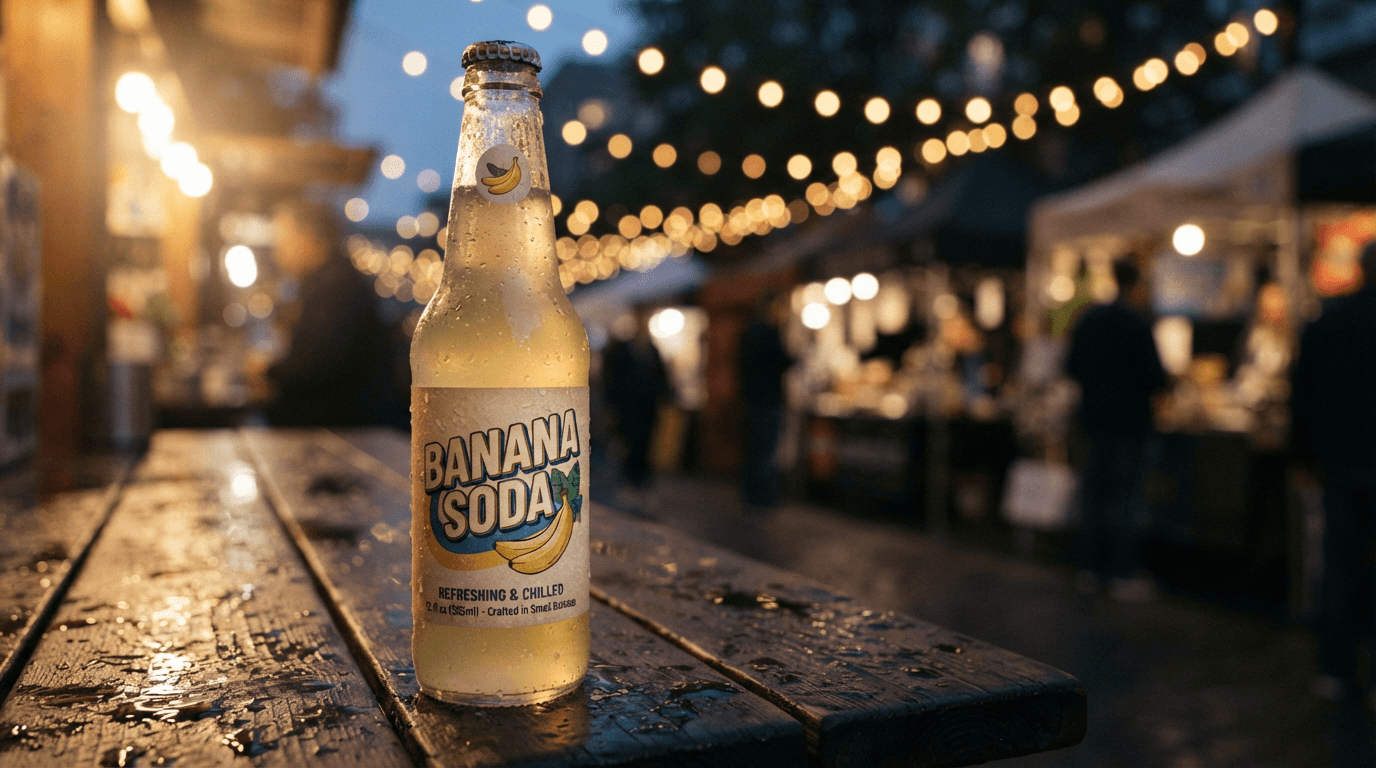
Lite ($0.03) ماحول اور سرخی کے حروف بخوبی پکڑ لیتا ہے، پھر باریک تحریر کے آگے خاموشی سے ہار مان لیتا ہے: لوگو کے نیچے والی چھوٹی سطر محض سجاوٹی بے معنی لکیریں ہیں۔ ایسی تصویر کے لیے جسے کوئی زوم نہیں کرے گا، یہ عموماً کافی ہے۔
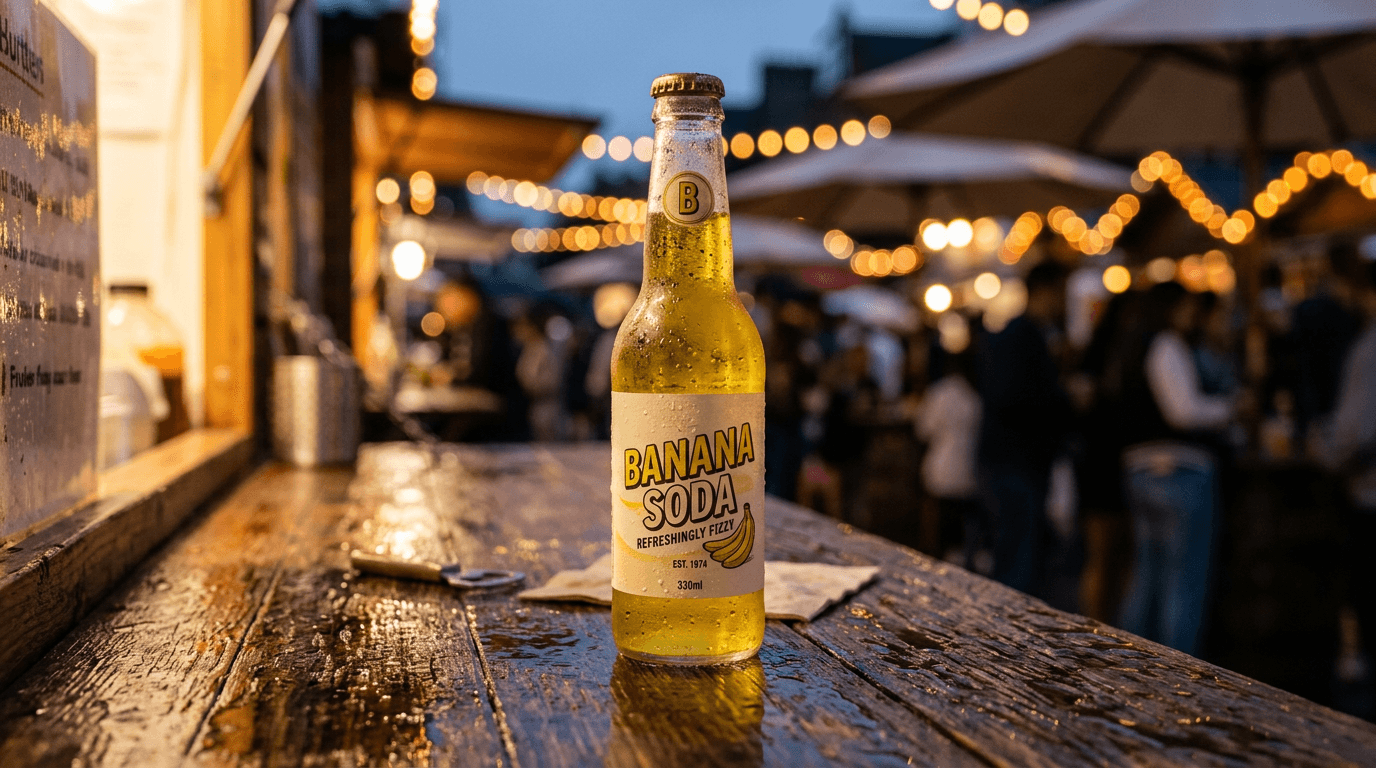
Nano Banana 2 (1K پر $0.06) پورا لیبل پڑھنے کے قابل بناتا ہے، یہاں تک کہ خود گھڑا ہوا "EST. 1974" اور حجم کا نشان بھی، اور گلی کا زیادہ کھلا منظر دکھاتا ہے۔ البتہ پس منظر میں اس نے جو مینو بورڈ جوڑا، وہ بگڑا ہوا ہے۔
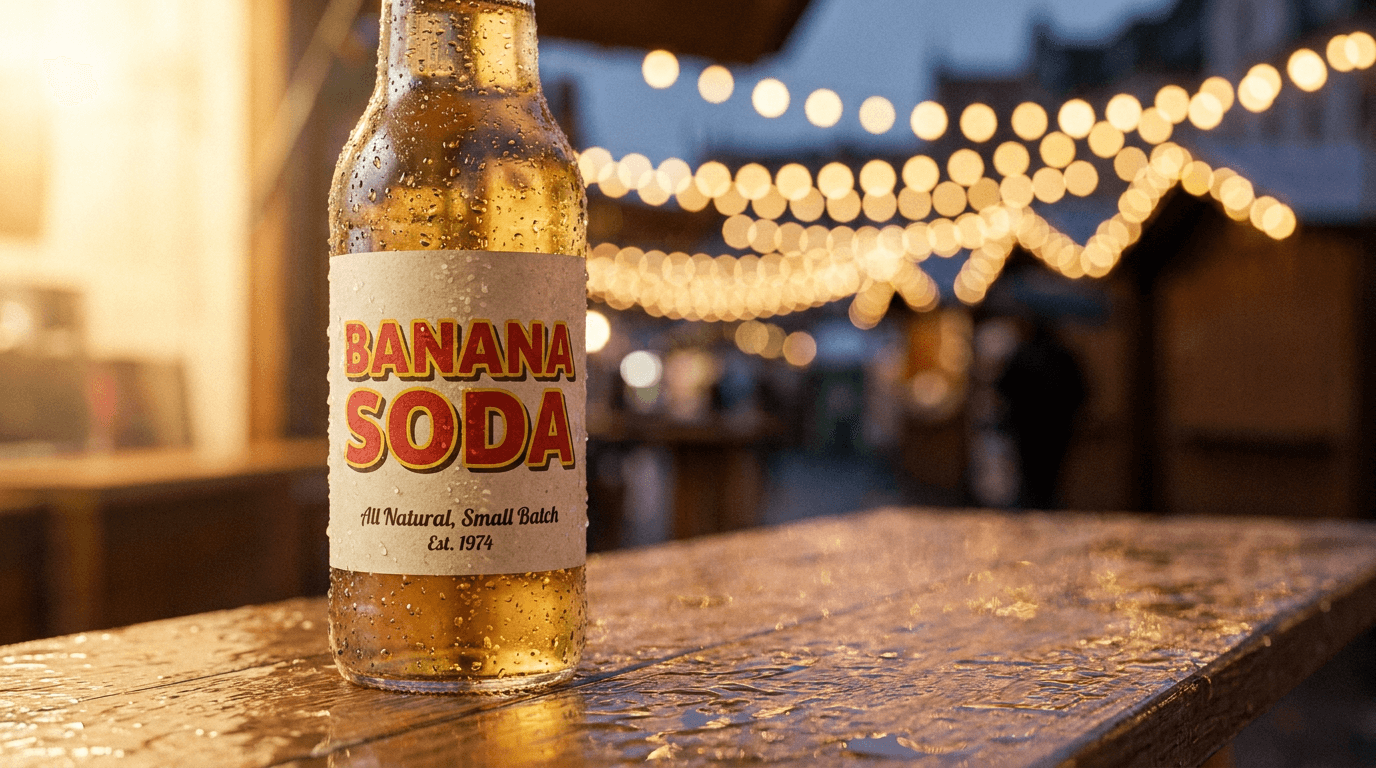
Pro ($0.11) ٹائپوگرافی اور روشنی میں جیتتا ہے: سائے والے صاف ریٹرو حروف، اور نیچے پڑھی جانے والی خوش خط تحریر۔ مزے کی بات: Pro نے بھی اپنی گھڑی ہوئی ٹیگ لائن کے ہجے غلط کر کے "Small Balch" لکھ دیا۔ تصویری ماڈلز متن کے معاملے میں بہت آگے آ چکے ہیں؛ پروف ریڈنگ پھر بھی آپ کا کام ہے۔
ہم نے Lite کو ایک ہفتہ پروڈکشن میں بھی چلایا اور لکھا کہ سستا ماڈل کہاں کافی ہے، اگر آپ بجٹ کا پہلو تفصیل سے دیکھنا چاہیں۔
GPT Image 2.5 اور Qwen Image 3.0 Pro: تصویر کے دوسرے ماڈلز
تین تصویری ماڈلز اب Google سے باہر کے ہیں، اور یہ اس لیے آئے کہ لوگ ایک ہی prompt پر دوسری رائے مانگتے رہتے تھے۔
| GPT Image 2.5 Flare | GPT Image 2.5 Sunburst | Qwen Image 3.0 Pro | |
|---|---|---|---|
| فی تصویر قیمت | 1K پر $0.05، 2K پر $0.11، 4K پر $0.18 | Flare جتنی | 1K پر $0.04، 2K پر $0.08 |
| مزاج | OpenAI کے 2.5 کا تیز ٹائر | درست ٹائر، سست تر | Alibaba کا متن کا ماہر |
| اضافی سہولتیں | 14 ریفرنس تصاویر تک | 14 ریفرنس تصاویر تک | seed، negative prompt، 3 ریفرنسز، تصویر کے اندر 12 زبانوں کا متن |
| کیا نہیں ہے | seed، Relaxed Filter | seed، Relaxed Filter | 4K |
وہی کیلے کے سوڈا والا prompt، دو اور کوششیں۔
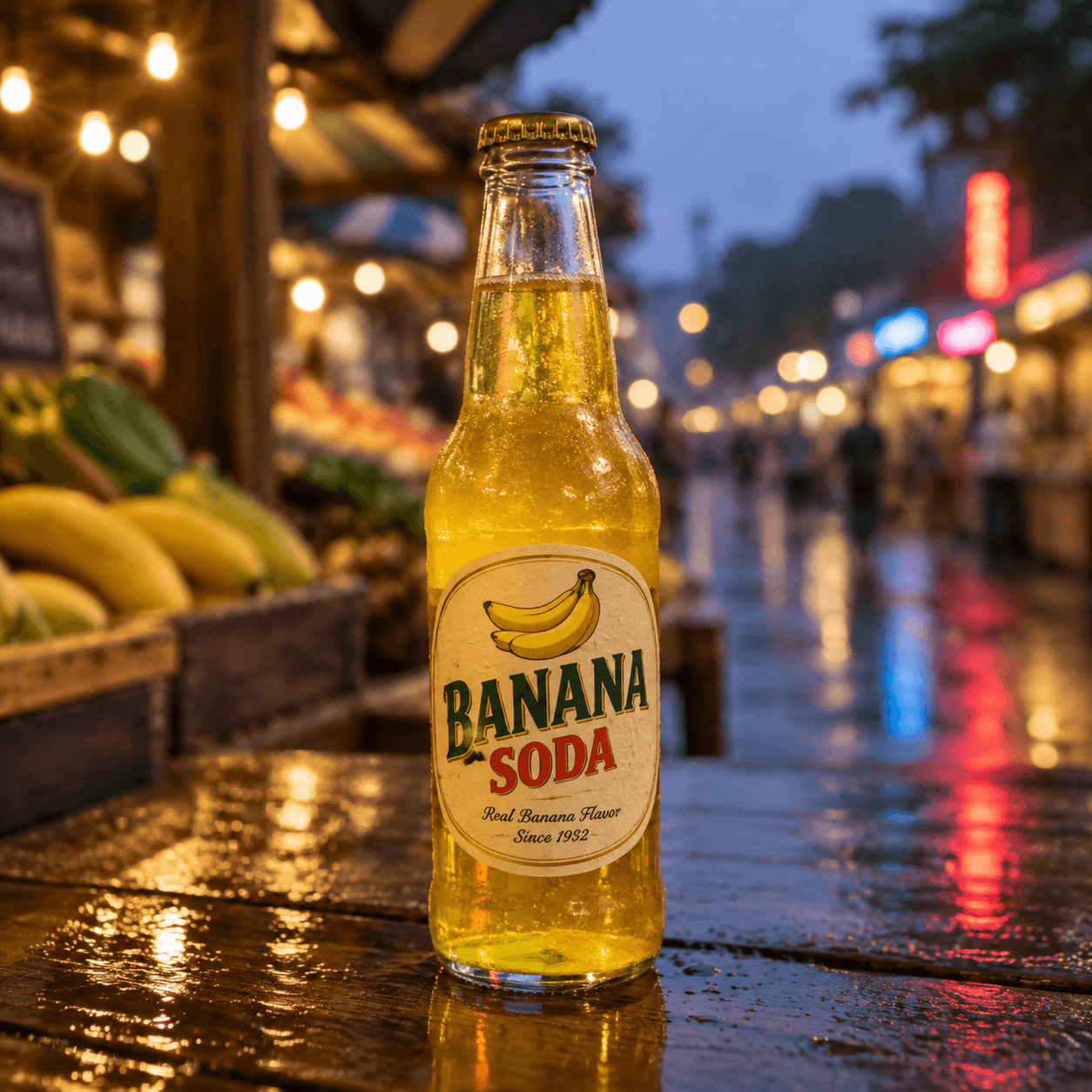
Flare ($0.05) اس پوری لائن اپ میں واحد ماڈل ہے جس نے ہر لفظ درست لکھا، باریک تحریر سمیت: "Real Banana Flavor, Since 1932"، ساتھ میں کیلوں کا ایک چھوٹا گچھا جو کسی نے مانگا نہیں تھا، اور بھیگے بازار کا دھندلا پس منظر جو اصلی تصویر لگتا ہے۔ اس میں 36 سیکنڈ لگے، اور یہی اس درستگی کی قیمت ہے۔ Sunburst اسی ماڈل فیملی کا وہ روپ ہے جو prompt کی اور بھی سختی سے پابندی کرتا ہے؛ میں اسے تب استعمال کرتا ہوں جب لے آؤٹ کو بریف سے ہو بہو ملنا ہو، پہلے ڈرافٹ کے لیے نہیں۔
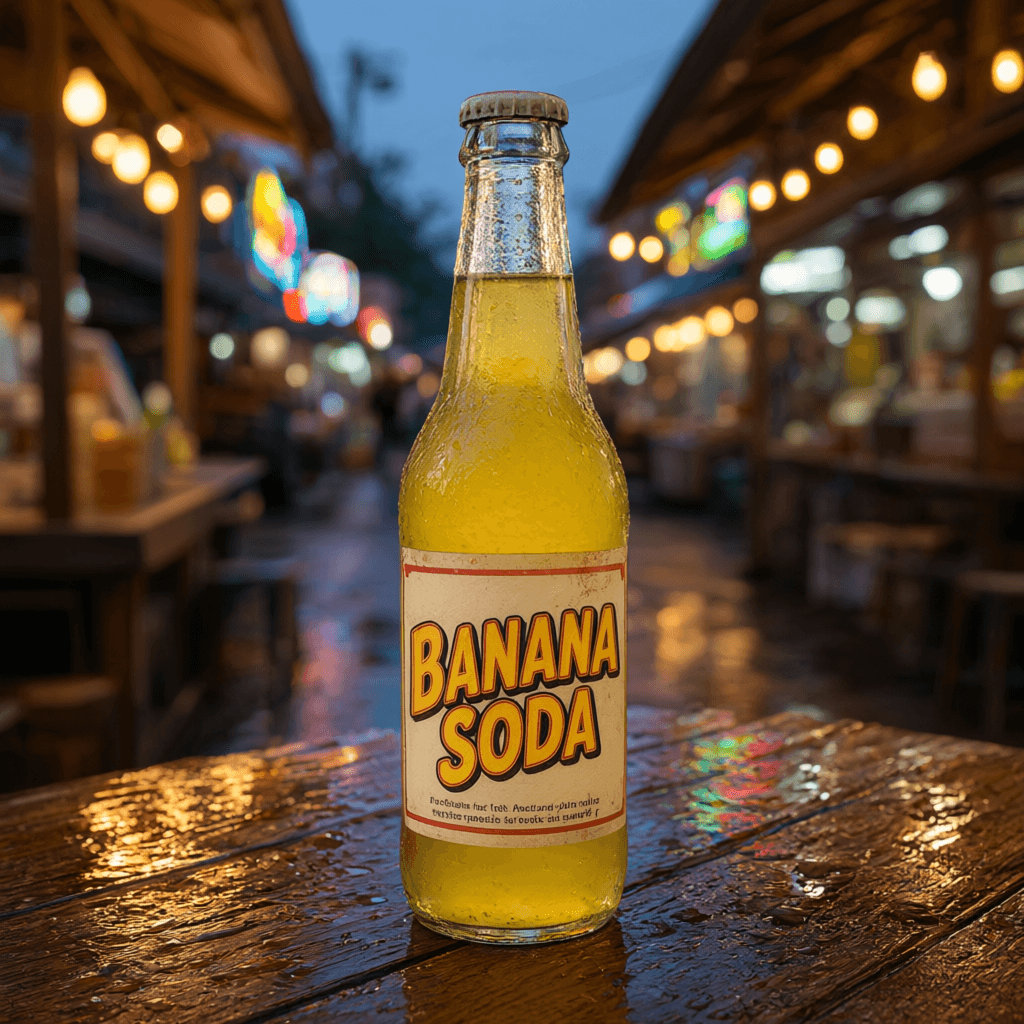
Qwen ($0.04) نو سیکنڈ میں واپس آیا، پانچوں میں سب سے جرات مند سرخی اور سب سے صاف بوتل کے ساتھ، پھر باریک تحریر پر وہی کیا جو Lite نے کیا تھا: دو سطریں قائل کرنے والی بے معنی باتوں کی۔ اس کی اصل طاقت چینی، جاپانی، کوریائی اور دوسری تحریروں میں متن ہے جہاں Google کے ماڈلز اب بھی لڑکھڑاتے ہیں، اور یہاں seed اور negative prompt والا یہ سب سے سستا ماڈل ہے۔ البتہ 4K نہیں ہے۔
Veo 3.1 ویڈیو: Standard، Fast اور Lite
Veo کے تینوں ٹائرز ہمارے جنریٹر پر ایک جیسے کنٹرولز رکھتے ہیں؛ قیمت کا فرق آؤٹ پٹ کا معیار خریدتا ہے، جو زیادہ تر فزکس اور باریک حرکت میں نظر آتا ہے۔ Google کی Veo دستاویزات کے مطابق یہ فیملی مقامی آڈیو، تصویر سے ویڈیو اور 4K تک ریزولیوشن سپورٹ کرتی ہے، اور API کے ذریعے ہمیں بھی یہی نظر آتا ہے، پلیٹ فارم کے ایک نوٹ کے ساتھ: Veo 3.1 Lite کی حد 1080p ہے۔
نیچے کی قیمتیں 4 سیکنڈ سے 8 سیکنڈ کے کلپ تک کی رینج ہیں:
| ماڈل | بغیر آواز، 720p/1080p | آواز کے ساتھ، 720p/1080p | 4K |
|---|---|---|---|
| Veo 3.1 | $0.70–1.40 | $1.50–3.00 | بغیر آواز $1.50–3.00، آواز کے ساتھ $2.20–4.40 |
| Veo 3.1 Fast | $0.35–0.70 | $0.50–1.00 | بغیر آواز $1.10–2.20، آواز کے ساتھ $1.30–2.60 |
| Veo 3.1 Lite | 720p پر $0.10–0.20، 1080p پر $0.17–0.34 | 720p پر $0.18–0.36، 1080p پر $0.28–0.56 | دستیاب نہیں |
اوپر والا کلپ Veo 3.1 Fast کا ہے: سنہری گھڑی میں ناشتے کی میز کی طرف کیمرے کی 6 سیکنڈ کی خاموش ڈولی اِن، جو اسی پوسٹ کے لیے بنائی گئی۔ 720p پر اس کی قیمت $0.52 رہی۔ بھاپ اور پردے کو دیکھیں؛ اسی طرح کی قابل یقین حرکت Veo کو سستے ویڈیو ماڈلز سے الگ کرتی ہے، اور Fast اس کا زیادہ تر حصہ Standard کی ایک تہائی قیمت پر برقرار رکھتا ہے۔
کلپ عموماً چند منٹ میں آ جاتا ہے۔ جب کیپیسٹی پر دباؤ ہو تو پلیٹ فارم خود ہی آپریشن دوبارہ شروع کرتا ہے اور انتظار کے دوران ری ٹرائی کاؤنٹر دکھاتا ہے۔ اگر پھر بھی ڈیلیور نہ ہو سکے تو پیسے واپس۔ یہی پالیسی تب بھی ہے جب سیفٹی فلٹر نتائج نگل جائے: مکمل بلاک پر پوری رقم واپس، جزوی بلاک پر تناسب سے۔
مہینوں انہیں چلانے کے بعد میرا عملی اصول: اسٹوری بورڈز اور سوشل ڈرافٹس کے لیے Lite، روزمرہ کام کے لیے Fast، اور Standard تب جب پانی، کپڑا یا ٹکراؤ درست دکھنا ضروری ہو، یا ڈیلیوری کی شرط 4K ہو۔ Veo کی پہنچ بھی سب سے لمبی ہے: تیار کلپ ہر بار 7 سیکنڈ بڑھایا جا سکتا ہے، مکمل تسلسل کے ساتھ 148 سیکنڈ تک۔
Omni Flash: آواز والی ویڈیو جس میں آپ چیٹ کر کے ترمیم کرتے ہیں
Gemini Omni Flash سب سے الگ ہے۔ Google نے پہلی نسل جون 2026 میں اور Omni 1.1 اگست میں جاری کیا؛ دونوں یہاں چلتے ہیں، اور 1.1 ڈیفالٹ ہے۔ یہ ہمیشہ ساؤنڈ ٹریک بناتا ہے، 3 سے 10 سیکنڈ چلتا ہے جس کی لمبائی آپ پورے سیکنڈز میں خود طے کرتے ہیں، اور فی سیکنڈ بل ہوتا ہے: 360p پر $0.03، 720p پر $0.10، 1080p پر $0.15 اور 4K پر $0.30، یعنی تین سیکنڈ کا ڈرافٹ $0.09 کا اور 720p کے پورے دس سیکنڈ $1.00 کے۔ یہ ان پٹ تصاویر لیتا ہے: ابتدائی فریم، اختیاری آخری فریم، اور کسی کردار یا پروڈکٹ کے لیے تین تک ریفرنس کلپس۔ اگر آپ کو 1.0 کا انداز پسند ہو تو وہ نسل 4، 6، 8 یا 10 سیکنڈ، 720p یا 1080p پر دستیاب رہتی ہے۔
اس کلپ کے لیے آواز کھول لیں۔ پین کیک والا کلپ Omni Flash کی ایک ہی جنریشن ہے: ایک ٹیکسٹ prompt جو پین کیکس کے ڈھیر پر میپل سیرپ گرنے کا منظر بیان کرتا ہے، ایک واضح ہدایت "single continuous shot, no scene cuts" (اگر آپ یہ نہ کہیں تو Omni اضافی شاٹس جوڑنا پسند کرتا ہے)، اور ایک "Audio:" سطر جو خاموش کچن کی فضا میں سیرپ کے ہلکے ٹپکنے کی آواز مانگتی ہے۔ آڈیو پر الگ سے کوئی کام نہیں۔ میں نے پورے 10 سیکنڈ مانگے۔
یہ کلپ بناتے ہوئے prompt لکھنے کا ایک سبق ملا: Omni وہ سب برقرار رکھتا ہے جو پہلے فریم میں پہلے سے ہو رہا ہو، اور بعد میں شروع ہونے والے کاموں کو خاموشی سے چھوڑ دیتا ہے۔ میرے ابتدائی ڈرافٹس نے "کلپ کے تقریباً درمیان" پین کیک پلٹنے کو کہا اور لگاتار تین بار دس سیکنڈ کا کچھ نہیں ملا۔ جو ورژن کامیاب ہوا اس میں سیرپ پہلے ہی فریم سے گرتا ہوا اور پورے کلپ میں جاری بیان کیا گیا ہے۔ عمل کو جاری حالت میں لکھیں، ٹائم لائن کی طرح نہیں۔
جو خصوصیت قیمت وصول کرواتی ہے وہ ترمیم ہے۔ ہر تیار ویڈیو کو ترمیم کا بٹن ملتا ہے، صرف Omni والی کو نہیں: تبدیلی بیان کریں ("اسے رات کا منظر بنا دو، باقی سب ویسا ہی رکھو")، سیکنڈز کی قیمت دوبارہ ادا کریں، اور ماڈل اصل کا زیادہ تر حصہ برقرار رکھتے ہوئے آپ کی درستی کے ساتھ کلپ دوبارہ بناتا ہے۔ آپ کی اپنی اپ لوڈز بھی چلتی ہیں، یعنی Veo کا کلپ یا فون کی ویڈیو Omni سے نئے انداز میں ڈھالی جا سکتی ہے؛ نتیجہ ہمیشہ ماخذ جتنی ہی لمبائی کا آتا ہے۔ Omni 1.1 کلپ کو بڑھاتا بھی ہے: ہر قدم آخری کلپ میں 3 سے 10 سیکنڈ جوڑتا ہے، کل تقریباً 40 سیکنڈ تک۔ ہم نے اس ماڈل کو ایک الگ Omni Flash API ریویو میں کھول کر دیکھا ہے، اور 1.1 میں کیا بدلا اس پر ایک مخصوص صفحہ بھی ہے۔
Wan 3.0 اور Grok Imagine Video 1.5: لمبے ٹیک اور بولتے کلپس
یہ دونوں ستمبر میں آئے اور وہ خلا پُر کرتے ہیں جو Google کے ماڈلز چھوڑ دیتے ہیں۔
| Wan 3.0 | Grok Imagine Video 1.5 | |
|---|---|---|
| دورانیہ | 4، 6، 8، 10، 15، 20 یا 30 سیکنڈ | 4 سے 15 سیکنڈ تک کوئی بھی پورا عدد |
| قیمت | 480p پر $0.05/s، 720p پر $0.10/s، 1080p پر $0.20/s | 720p پر $0.14/s، 1080p پر $0.25/s |
| سب سے سستا کلپ | $0.20 (4 سیکنڈ، 480p، آواز شامل) | $0.56 (4 سیکنڈ، 720p) |
| آڈیو | ڈیفالٹ طور پر آن، مفت، بند کی جا سکتی ہے | ہمیشہ آن، ہونٹوں سے ہم آہنگ مکالمے کے ساتھ |
| ان پٹس | پہلا اور آخری فریم، 10 ریفرنس تصاویر تک، 5 ریفرنس کلپس تک | پہلا فریم یا 7 ریفرنسز تک (ریفرنسز صرف 720p پر) |
| ایسپیکٹ ریشوز | 16:9، 9:16 | 16:9، 9:16، 1:1، 3:2، 2:3 |
Wan 3.0 پلیٹ فارم کا واحد ماڈل ہے جو ایک ہی پاس میں آدھا منٹ بناتا ہے، اور اس کا ساؤنڈ ٹریک الگ سے کچھ نہیں لیتا، جس سے یہ یہاں آواز والی ویڈیو کا سب سے سستا راستہ بن جاتا ہے۔ مسئلہ اوپر والے سرے پر ہے: 1080p کے 30 سیکنڈ $6.00 کے ہیں، جو ہماری بیچی جانے والی سب سے مہنگی اکیلی جنریشن ہے۔ ریفرنس کلپس کا بھی بل بنتا ہے، یعنی 15 سیکنڈ کا ریفرنس اور 15 سیکنڈ کا آؤٹ پٹ 30 سیکنڈ جتنا پڑتا ہے۔
لالٹین والی کشتی اسی پوسٹ کے لیے Wan 3.0 کی جنریشن ہے: 720p پر دس سیکنڈ، $1.00، ایک prompt جس میں شام کے وقت جگنوؤں کے ساتھ جنگل کی ندی کے ساتھ ساتھ ایک مسلسل ٹریکنگ شاٹ مانگا گیا، اور پانی اور جھینگروں کے لیے ایک "Audio:" سطر۔ اس نے پورا ٹیک بغیر کٹ کے دیا، اور بالکل یہی وہ چیز ہے جس سے Omni کو باتوں سے روکنا پڑتا ہے۔ میرے ذوق کے لیے موم بتی کا شعلہ کچھ زیادہ ہی ساکن ہے۔ آواز کھولیں؛ ندی کی آواز جنریٹ کی گئی ہے، کسی اسٹاک لائبریری سے نہیں لی گئی۔
Grok بولنے والا ہے۔ باریسٹا والا کلپ 720p پر چھ سیکنڈ کا ہے ($0.84): میں نے اس کا جملہ prompt کے اندر کوٹیشن میں لکھا، اور ماڈل نے بولتا ہوا چہرہ لوٹایا جس کے ہونٹ الفاظ سے ملتے ہیں۔ UGC طرز کے اشتہار اسی خصوصیت پر بنتے ہیں، اور اس کے گرد ہماری AI UGC ویڈیو کی الگ گائیڈ موجود ہے۔ لاگز سے دو ایماندار نوٹس: ریفرنس تصاویر صرف 720p پر کام کرتی ہیں (پہلا فریم 1080p پر بھی چلتا ہے)، اور یہ کلپ اصلی 720 قطاروں کے بجائے 1280×704 پر واپس آیا۔ فون پر کوئی محسوس نہیں کرے گا۔ پکسل گننے والا کلائنٹ شاید کر لے۔
ٹیکسٹ ٹو اسپیچ: 30 آوازیں، ہر 200 حروف پر ایک سینٹ
Gemini 3.1 Flash TTS متن کو 24 kHz کی WAV فائل میں بدلتا ہے، ہر شروع کیے گئے 200 حروف پر $0.01 میں، یعنی تقریباً 900 حروف کی 60 سیکنڈ کی ریڈنگ پانچ سینٹ کی پڑتی ہے۔ آپ 30 میں سے ایک آواز چنتے ہیں یا ٹھیک دو بولنے والوں کا مکالمہ بناتے ہیں، اور ادائیگی کو سادہ الفاظ میں ہدایت دیتے ہیں: "گرم جوش، بغیر جلدی، ہلکی سی مسکراہٹ"، ساتھ میں جہاں چاہیں [whispers] یا [laughs] جیسے ان لائن ٹیگز۔ یہ اسی جنریٹر میں چلتا ہے جس میں تصاویر اور ویڈیو، اور MCP پر generate_speech کے نام سے۔
یہ ایک ہی جنریشن ہے: 150 حروف، Kore آواز، اور ایک سطر کا اسٹائل نوٹ جو اشتہاری انداز کے بجائے پرسکون راوی مانگتا ہے۔ قیمت ایک سینٹ۔ میں اسے آڈیو بک کے لیے استعمال نہیں کروں گا، مگر کسی پروڈکٹ کلپ کے وائس اوور کے لیے یہ کسی فری لانسر کے ان باکس کھولنے کے انتظار سے بہتر ہے۔
ادائیگیاں اور ریفنڈز کیسے کام کرتے ہیں؟
آپ کا بیلنس USD میں ہے اور صرف تب کم ہوتا ہے جب جنریشن کامیاب ہو۔ ویب پر کرپٹو ڈپازٹس 0xProcessing پروسیس کرتا ہے: BTC، ETH، SOL، TON، BNB، LTC، TRX، XRP، DOGE اور BCH، اور ساتھ میں USDT، USDC، DAI اور TUSD اسٹیبل کوائنز ERC-20، BEP-20، Solana، TON اور Base نیٹ ورکس پر۔ یہ 20 سے زیادہ آپشنز ہیں، اور عملی طور پر ہمارے زیادہ تر صارفین TON یا Solana جیسے سستے نیٹ ورکس پر اسٹیبل کوائنز چنتے ہیں۔ اگر آپ اپنی پہلی ٹرانسفر بھیج رہے ہیں تو کرپٹو ڈپازٹ کی مکمل رہنمائی موجود ہے۔ کارڈز، PayPal بیلنس اور SEPA ٹرانسفرز اس کے بجائے PayPal Checkout سے گزرتے ہیں، فی ادائیگی $20 سے۔
سائن اپ کے لیے صرف ای میل چاہیے اور ساتھ $0.20 کا کریڈٹ ملتا ہے، جو کچھ بھی طے کرنے سے پہلے Lite کی چھ تصاویر کے لیے کافی ہے۔ اگر کسی نے آپ کو پرومو کوڈ دیا ہے تو اسے ایک بار ایکٹیویٹ کریں، اور آپ کے ہر ڈپازٹ پر +10% بونس اوپر سے ملے گا۔ ڈپازٹ کی رقم بھی اپنا بونس دیتی ہے، کرپٹو ٹاپ اپس پر: $50+ پر 5% اور $100+ پر 10%، اور دونوں بونس جمع ہوتے ہیں: فعال کوڈ کے ساتھ $100 کرپٹو میں ڈالیں تو $120 کریڈٹ ہوتے ہیں۔
کچھ بھی محفوظ نہیں رہتا
کارڈ سے ادائیگی ممکن ہے، مگر کارڈ ہمارے پلیٹ فارم کو چھوتا تک نہیں: آپ PayPal کا بٹن دباتے ہیں اور تفصیلات PayPal کی اپنی ونڈو میں درج ہوتی ہیں۔ بعد میں کچھ محفوظ نہیں ہوتا، اور کچھ خود بخود رینیو نہیں ہوتا۔ اگر آپ نے کبھی کسی ایک پروجیکٹ کے لیے AI ٹول کی سبسکرپشن لی اور پھر چار بیکار مہینوں کا بل بھرا کیونکہ منسوخی تین مینیو اندر چھپی تھی، تو آپ جانتے ہیں کہ یہ کیوں اہم ہے۔ جمع شدہ بیلنس خرچ ہونے تک آپ کا ہے؛ ختم ہو جائے تو کوئی چیز صرف موجود ہونے کے پیسے نہیں کاٹتی رہتی۔ سودا صاف لفظوں میں: کارڈ کا راستہ فی ادائیگی $20 سے شروع ہوتا ہے، جبکہ کرپٹو تقریباً $1 سے۔ TON پر $10 کی اسٹیبل کوائن ٹرانسفر پر فیس چند سینٹ آتی ہے اور پہلی بار تقریباً پانچ منٹ لگتے ہیں، اس کے بعد چند سیکنڈ۔
ہم نے الگ پوسٹس میں تفصیل دی ہے کہ آپ کو کبھی محفوظ کارڈ کی ضرورت کیوں نہیں اور فی تصویر ادائیگی کا سبسکرپشنز سے موازنہ۔ ریفنڈ کی منطق یہاں واضح کرنا ضروری ہے، کیونکہ جنریٹیو APIs جتنا بتایا جاتا ہے اس سے زیادہ ناکام ہوتی ہیں۔ جو جنریشن ناکام حالت پر ختم ہو، اس کی پوری قیمت خود بخود واپس ہو جاتی ہے۔ کوئی سپورٹ ٹکٹ نہیں۔ قیمتوں کی مکمل فہرستیں قیمتوں کے صفحے پر ہیں۔
ریفرل پروگرام: ہر ڈپازٹ کا 5% سے 15%
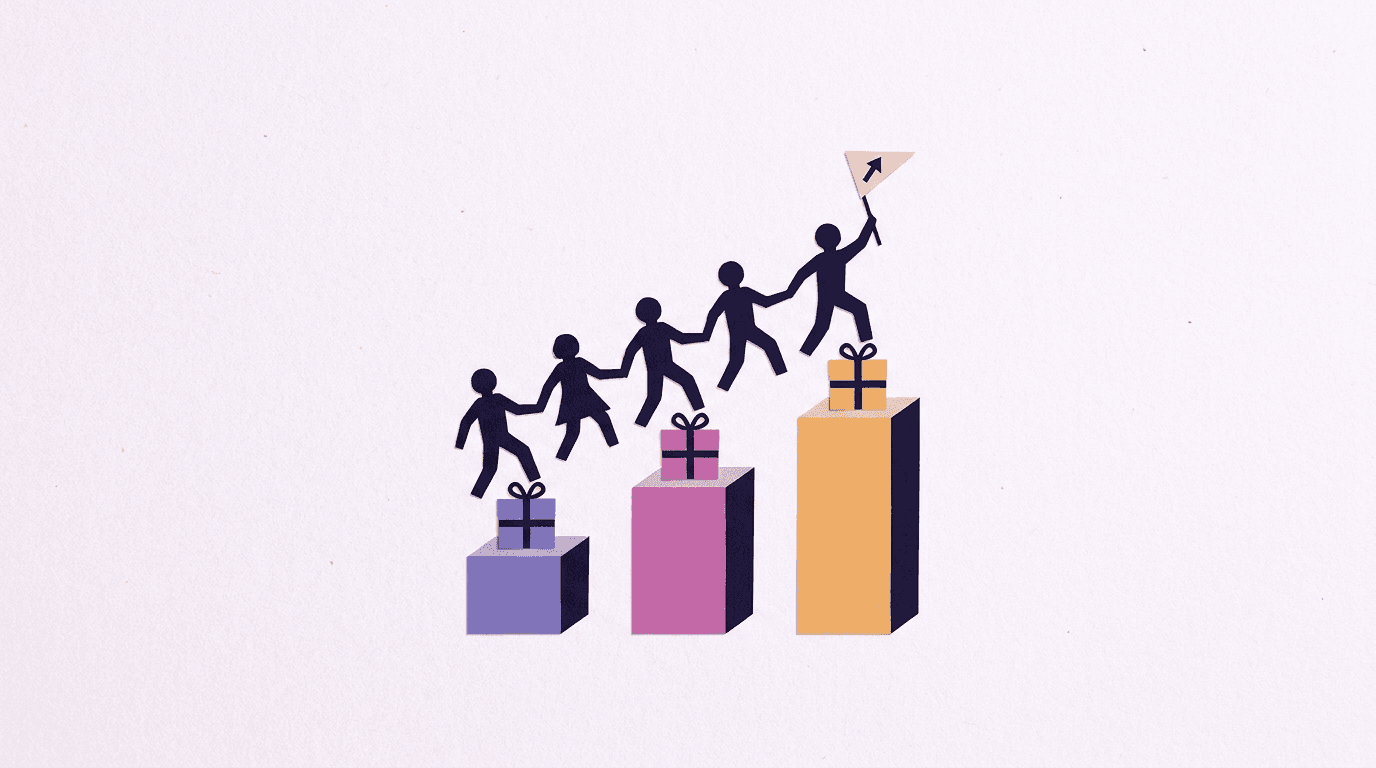
آپ اپنی پروفائل میں تین تک پرومو کوڈز بنا سکتے ہیں۔ جو بھی آپ کا کوڈ ایکٹیویٹ کرے اسے اپنے ہر ڈپازٹ پر +10% ملتا ہے، اور آپ ان ڈپازٹس پر کمیشن کماتے ہیں: شروع میں 5%، جب آپ کے ریفرلز کے کل ٹاپ اپس $1,000 سے بڑھ جائیں تو 10%، اور $2,000 کے بعد 15%۔ کوڈ خریدار کے اکاؤنٹ سے جڑا رہتا ہے، اس لیے بونس اور آپ کا کمیشن ہر ڈپازٹ پر خود بخود لگتے ہیں، صرف پہلے پر نہیں۔
دو ایماندار وضاحتیں۔ آپ اپنا کوڈ خود ایکٹیویٹ نہیں کر سکتے، اور آپ ہی کے نیٹ ورک سے ہونے والے سائن اپس کمیشن میں شمار نہیں ہوتے؛ فراڈ کی جانچ جان بوجھ کر سخت رکھی گئی ہے۔
سوالات و جوابات (FAQ)
BananaBanana پر AI تصویر بنانے کی قیمت کتنی ہے؟
$0.03 فی تصویر سے (1K پر Nano Banana 2 Lite، یا 512px پر Nano Banana 2) لے کر Nano Banana Pro پر 4K تصویر کے $0.20 تک۔ GPT Image 2.5 کی قیمت $0.05 سے $0.18 اور Qwen Image 3.0 Pro کی $0.04 سے $0.08 ہے۔ کوئی سبسکرپشن نہیں؛ آپ پہلے سے جمع بیلنس سے فی تصویر ادائیگی کرتے ہیں۔
کیا کوئی فری ٹرائل ہے؟
ہر نیا اکاؤنٹ $0.20 کے کریڈٹ سے شروع ہوتا ہے، جو سب سے سستے ماڈل پر چھ تصاویر یا Wan 3.0 پر آواز کے ساتھ 4 سیکنڈ کا ایک کلپ پورا کرتا ہے۔ رجسٹریشن کے لیے کارڈ کی تفصیلات نہیں چاہییں، صرف ای میل۔
کیا مجھے کریڈٹ کارڈ یا سبسکرپشن کی ضرورت ہے؟
شروع کرنے کے لیے کارڈ نہیں چاہیے: آپ ای میل سے رجسٹر ہوتے ہیں اور $0.20 کا بیلنس ملتا ہے۔ اس کے بعد جب چاہیں USD بیلنس ٹاپ اپ کریں، تقریباً $1 سے کرپٹو کے ذریعے یا $20 سے کارڈ، PayPal یا SEPA کے ذریعے، اور ہر جنریشن کی قیمت دیں۔ کوئی سبسکرپشن پلان نہیں، استعمال نہ ہونے والا بیلنس ایکسپائر نہیں ہوتا، اور کوئی چیز آپ سے خود بخود پیسے نہیں کاٹ سکتی۔
BananaBanana کون سی کرپٹو کرنسیز قبول کرتا ہے؟
BTC، ETH، SOL، TON، BNB، LTC، TRX، XRP، DOGE، BCH، اور اسٹیبل کوائنز USDT، USDC، DAI اور TUSD، ERC-20، BEP-20، Solana، TON اور Base نیٹ ورکس پر۔
کیا میں آواز کے ساتھ AI ویڈیو بنا سکتا ہوں؟
ہاں، چار طریقوں سے۔ Veo 3.1 ماڈلز میں آڈیو کا سوئچ ہے (آواز کے ساتھ 4 سیکنڈ کا کلپ Veo Lite پر $0.18 سے شروع)، Wan 3.0 اپنا ساؤنڈ ٹریک $0.20 سے مفت شامل کرتا ہے، Gemini Omni Flash ہمیشہ آڈیو بناتا ہے $0.03 فی سیکنڈ سے، اور Grok Imagine Video 1.5 آپ کے لکھے مکالمے پر ہونٹ ہم آہنگ کرتا ہے، $0.56 فی کلپ سے۔
اگر کوئی جنریشن ناکام ہو جائے تو کیا ہوتا ہے؟
پوری قیمت خود بخود آپ کے بیلنس میں واپس آ جاتی ہے۔ ویڈیو کے لیے پلیٹ فارم پہلے کیپیسٹی کی غلطیوں پر خود دوبارہ کوشش کرتا ہے؛ اگر سیفٹی فلٹر آؤٹ پٹ کا کچھ حصہ روک دے تو نہ دیا گیا حصہ تناسب سے واپس ہوتا ہے۔