Windsurf MCP Setup: Generate Images in Cascade
Add one remote MCP server to Windsurf and generate images from the agent chat: mcp_config.json, the new Devin agent config split, quirks, prices from $0.03.

An MCP server in Windsurf is an external toolbox the agent can call mid-conversation: you declare it once in mcp_config.json, and Cascade picks up abilities the underlying model doesn't ship with. Image generation is the obvious gap. Windsurf will happily scaffold a settings screen, wire the routes and write the tests, then leave you three grey rectangles where the illustrations go.
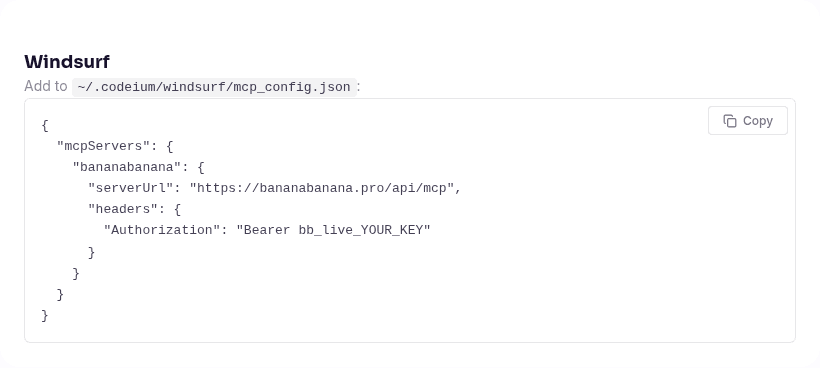
Short version, if that's all you came for. Create a key in your BananaBanana profile, then add this to ~/.codeium/windsurf/mcp_config.json:
{
  "mcpServers": {
    "bananabanana": {
      "serverUrl": "https://bananabanana.pro/api/mcp",
      "headers": {
        "Authorization": "Bearer ${env:BB_API_KEY}"
      }
    }
  }
}
Export BB_API_KEY=bb_live_YOUR_KEY, reload the MCP servers, and ten tools show up in Cascade. Images bill from $0.03 apiece off a prepaid balance, video from $0.10, no subscription and no cloud project of your own. One caveat before you paste: if you're on a recent build, that file might not be the one your agent reads anymore. More on that in a second.
Why give Cascade an image generator?
Because the moment you need an image is almost never a good moment to leave the editor. You're three files deep in an onboarding flow, the empty state needs artwork, and the alternative is a browser tab, a prompt, a download, a rename, a drag into public/, and then a hunt for where you left off.
One instruction replaces the whole detour. Cascade writes the prompt, calls generate_image, pulls the file into the right folder and writes the <img> tag with alt text. You review a diff.
There's a second argument that matters more for this particular client. Cascade is built around building whole features, not single edits, so the assets it needs come in sets: three empty states, six category thumbnails, a placeholder avatar pack. Doing sets by hand is where the browser-tab workflow really falls apart.
The alternative to a hosted server is running a local image MCP server, which means a Node or Python process on your machine plus your own upstream provider key, with quotas and billing on your own account. A remote server skips both. The endpoint already runs on our side, on the same pipeline as the web generator, and your only credential is one bb_live_ string you can revoke from the profile page.

Where does Windsurf keep MCP config now?
Here's the part that trips people up in August 2026, and it's worth checking before you edit anything. Windsurf is now Cognition's Devin Desktop: windsurf.com redirects to devin.ai/desktop, and the old docs.windsurf.com/windsurf/cascade/mcp URL 307s to docs.devin.ai/desktop/cascade/mcp. The app is still Windsurf on disk, the deeplink scheme is still windsurf://, and the config folder is still ~/.codeium/windsurf/. Only the branding moved.
What did change is that there are now two agents with two config systems, and the Cascade MCP docs say so in a warning box at the top: the mcp_config.json file applies to the legacy Cascade agent, while the Devin Local agent, which is the default for new tabs, reads the Devin CLI config instead. Checked August 20, 2026.
So pick your file by which agent you're actually talking to.
Legacy Cascade reads ~/.codeium/windsurf/mcp_config.json (%USERPROFILE%\.codeium\windsurf\mcp_config.json on Windows). Remote servers there take a serverUrl or url field plus headers, which is the snippet at the top of this article.
Devin Local agent reads the CLI config files: ~/.config/devin/mcp_config.json for user scope, .devin/mcp_config.json for a project shared through git, and .devin/mcp_config.local.json for personal values, which is gitignored automatically. The field names differ slightly:
{
  "mcpServers": {
    "bananabanana": {
      "url": "https://bananabanana.pro/api/mcp",
      "transport": "http",
      "headers": {
        "Authorization": "Bearer ${env:BB_API_KEY}"
      }
    }
  }
}
Or skip the editor: devin mcp add bananabanana https://bananabanana.pro/api/mcp creates the entry in local scope, and you add the headers block afterwards. devin mcp list and devin mcp get bananabanana tell you what the CLI actually loaded, which beats guessing.
Either way, the endpoint is https://bananabanana.pro/api/mcp. Not /mcp, which is the human documentation page. A POST there returns HTML and a very confused agent. Our MCP server page carries the same snippets plus a compatibility table for every client we've verified:
Once it connects, list_models and get_account are free calls, so ask Cascade to run one of them as a smoke test. get_account comes back with your balance, the key's name and its daily cap, which is a cheaper way to confirm auth than burning an image on it.
Use case: a set of empty states for the app Cascade just built
The scenario I built these demos around. Cascade scaffolds a small internal tool, the three empty states land as placeholder divs with grey backgrounds, and instead of opening a design tool you hand the agent a style sentence and let it produce the set.
The style sentence is the whole trick. Empty states only work as a group, so the palette, the line weight and the amount of white space have to survive from one image to the next. Write the clause once, tell the agent to reuse it verbatim on every call, and vary only the subject:
→ generate_image {"prompt": "A flat vector illustration for an app empty
   state: an open cardboard box floating above a soft shadow with three small
   paper envelopes drifting out of it, muted teal and warm coral palette on an
   off-white background, thin confident outlines, generous negative space,
   centered composition, no text", "model": "nano-banana-pro",
   "aspect_ratio": "4:3"}
← {"job_id": "…", "status": "processing", "cost_charged_usd": 0.11}

Then the same sentence with a different subject for the no-results screen:

Close enough to ship as a pair, which is the bar for placeholder art. If you need them tighter than that, generate_image takes a seed, and repeating the seed with the same style clause pulls the results closer together. For characters or a mascot that has to survive across a dozen images, prompting technique matters more than the client does, and the character consistency guide covers that properly.
Two honest notes. I ran these on Nano Banana Pro at $0.11 because they ship on this page and I wanted the detail. For placeholders that will be replaced by a designer in two weeks, nano-banana-2-lite at $0.03 is the sane pick, and our Lite guide explains where the cheap model stops being good enough. It's also the tool's default model, so the agent lands there unless you say otherwise.
Video works from the same chat. generate_video never charges on the first call: it returns a quote, and the agent has to repeat the call with confirm_cost set to that exact number before anything starts. Silent 720p Veo 3.1 Lite begins at $0.10 for four seconds; Omni Flash bills $0.10 per second with sound always on, so $0.30 buys a three-second take.
Windsurf quirks worth knowing before you ship
Five things I'd tell a teammate, collected while setting the above up.

1. An unset environment variable fails silently. The docs are explicit: ${env:VAR_NAME} is replaced with the variable's value, and if the variable isn't set, it resolves to an empty string. Not an error, not a warning. The header goes out as a bare Bearer , our server answers 401, and the whole thing looks like a broken server rather than a missing export. GUI-launched apps don't read your shell profile either, so an export in .zshrc is invisible unless you launched Windsurf from a terminal. If list_models comes back with an auth error, check the variable before you check anything else.
2. ${file:…} is the better trick, and it's Windsurf-specific. The same config supports ${file:/path/to/file}, replaced with the trimmed contents of that file, tilde paths included. So "Authorization": "Bearer ${file:~/.secrets/bb_key.txt}" works with no environment variable at all, which sidesteps the entire GUI-launch problem. I'd use this over ${env:…} in Windsurf. Cursor and VS Code don't offer it.
3. Cascade caps out at 100 tools. That's a hard ceiling across every MCP you have connected, per the docs, and each server's settings page lets you toggle individual tools off. We add ten. If you're already running a few large servers (GitHub's alone is dozens), turn off what you won't use: generate_speech, edit_video and list_generations are easy cuts if you only want stills.
4. The one-click deeplink doesn't carry your key, which is a feature. Windsurf supports windsurf://windsurf-mcp-registry?serverName=<name> links that open a marketplace page for review before install. Note what's missing: no encoded configuration, so unlike install links that base64 a whole config block, there's nothing here that could leak a credential into a shared URL. We're not in the marketplace, so this one's manual JSON anyway.
5. On a team plan, the server ID is load-bearing. Once an admin allowlists even a single MCP server, every non-allowlisted server is blocked for the team, and the allowlisted Server ID has to match the key name in your mcp_config.json case-sensitively. Which is to say: if your admin approved bananabanana and your file says BananaBanana, it won't connect and the error won't explain why. Enterprise teams can also point Windsurf at their own MCP registry URLs instead of the default marketplace.
One product-side limitation while we're being honest about rough edges: generate_speech returns audio as a URL rather than something Cascade can play inline, so you'll be opening the file yourself. Images come back with a small inline preview alongside the link, which is the more useful behaviour of the two.
What about OAuth instead of an API key?
Both paths exist, and the honest answer is that they belong to different agents.
The Devin CLI (so, the Local agent) has real OAuth support: devin mcp login <name> opens a browser flow, stores the tokens locally and refreshes them automatically, and it uses dynamic client registration so you don't have to pre-register anything. Our server is an OAuth 2.1 authorization server with DCR and RFC 8707 resource indicators, so on paper the two line up. The Cascade docs also state that OAuth is supported for each transport type.
I exercised the API-key path against the endpoint for this article (initialize, get_account, list_models on a real bb_live_ key) and not the browser flow, so treat OAuth here as "should work, unverified by me". If you try it and it misbehaves, the config knob you want is oauthResource, which overrides the RFC 8707 resource parameter, since our endpoint accepts https://bananabanana.pro/api/mcp as its audience.
There's also a practical reason I default to the key. Keys are free and you can hold several, each with its own usage log (tool, model, cost, prompt preview) and an optional daily USD cap in Profile → MCP API Keys. That cap is the thing I'd actually configure before handing an autonomous agent a tool that spends money.
While we're on permissions: the Devin CLI config understands per-tool rules with mcp__<server>__<tool> matchers, which pairs nicely with a paid server.
{
  "permissions": {
    "allow": ["mcp__bananabanana__list_models", "mcp__bananabanana__get_result"],
    "ask": ["mcp__bananabanana__generate_video"]
  }
}
Free lookups run without interrupting you, and anything that starts a render stops and asks.
What did this article's demo media cost?
Standard per-generation prices, the same numbers list_models reports to the agent:
| Asset | Model | Price |
|---|---|---|
| Empty state, inbox | Nano Banana Pro, 1K | $0.11 |
| Empty state, no results | Nano Banana Pro, 1K | $0.11 |
| Cover + 2 editorial illustrations | Nano Banana Pro, 1K | $0.33 |
| Docs-page screenshot | browser, not a generation | $0.00 |
| Total | $0.55 |
Both empty states landed on the first call, which is partly luck and partly that flat vector subjects are forgiving. Photoreal product shots are where you should budget a reroll.
If you already run this server in another editor, the Windsurf config above is the only new part: same key, same balance, same generation history. The Cursor walkthrough and the VS Code setup cover the same server from those two clients, and every use case transfers almost verbatim. Ready? Create a key and ask Cascade for the first one.
FAQ
Does Windsurf support remote MCP servers with an Authorization header?
Yes. Remote HTTP servers in mcp_config.json take a serverUrl (or url) field plus an optional headers object, and Cascade supports stdio, Streamable HTTP and SSE transports. Both serverUrl and headers accept ${env:VAR} and ${file:/path} interpolation, so the key never has to sit in the file as plain text. That's the config this guide uses, checked against the official docs on August 20, 2026.
Which config file does my Windsurf agent actually read?
Depends on the agent. The legacy Cascade agent reads ~/.codeium/windsurf/mcp_config.json. The Devin Local agent, the default for new tabs on recent builds, reads the Devin CLI files instead: ~/.config/devin/mcp_config.json, .devin/mcp_config.json, or .devin/mcp_config.local.json for personal keys. If your server refuses to appear after a config edit, this split is the first thing to check, because the file you edited may simply not be the one in play.
Do I need my own cloud account to generate images in Windsurf?
No. Locally-run image MCP servers need an upstream provider key, with quotas and billing on your own account. The remote server runs generation on our managed key pool, so your only credential is the bb_live_ key from your profile. New accounts start with $0.20 on the balance, which is six images on the cheapest model before you pay anything.
Can Cascade generate video through the same server?
Yes, with a mandatory confirmation step. generate_video returns a quote on the first call and charges nothing; the agent must repeat the call with confirm_cost matching that amount before a render starts. Prices run from $0.10 for a four-second silent 720p Veo 3.1 Lite clip up to $4.40 for a top-end Veo 3.1 render with audio, and Omni Flash bills $0.10 per second with sound always on. Clips take one to ten minutes, so the agent polls get_result while it keeps working.
Why does my MCP server show an auth error in Windsurf?
Nine times out of ten it's the credential, not the config. An unset ${env:BB_API_KEY} resolves to an empty string rather than raising an error, so the request goes out with an empty bearer token and comes back 401. Check that the variable is visible to the Windsurf process (GUI launches don't read your shell profile), or switch to ${file:~/.secrets/bb_key.txt} and skip the problem. If the key is right but tools still don't appear, confirm the URL ends in /api/mcp and that a team allowlist isn't blocking the server ID.