Generator Gambar AI Tanpa Langganan: Bayar per Gambar
Cara kerja generator gambar AI bayar per penggunaan: mulai $0.03 per gambar, kredit tanpa kedaluwarsa, hitungan jujur vs langganan dan kredit gratis harian.

Generator gambar AI tanpa langganan mengenakan biaya per hasil gambar dari saldo prabayar Anda, bukan dari biaya bulanan tetap. BananaBanana beroperasi sepenuhnya dengan model tersebut: Anda membeli kredit AI satu kali (saldo dalam USD, diisi mulai dari $1 lewat crypto atau $20 lewat kartu), lalu membayar $0.03 hingga $0.20 per gambar atau $0.10 hingga $6.00 per klip video. Tidak ada tingkatan paket (tier), tidak ada perpanjangan otomatis, dan tidak ada alur pembatalan karena tidak ada paket yang perlu dibatalkan.
Jawaban singkatnya, jika Anda hanya ingin membandingkan opsi yang ada:
- Gambar: Masing-masing $0.03–$0.20 di tiga model Nano Banana (512px hingga 4K).
- Video: Klip tanpa suara mulai dari $0.10, klip bersuara mulai dari $0.18, pada beberapa model termasuk Veo 3.1.
- Kredit tidak pernah kedaluwarsa. Saldo $10 dari bulan Januari tetap bernilai $10 di bulan Juli.
- Tanpa menyimpan kartu kredit/debit. Deposit menggunakan kripto mulai $1 (mendukung 20+ koin dan stablecoin) atau kartu, PayPal, dan SEPA mulai $20; akun baru langsung mendapatkan saldo gratis $0.20.
- Kendala jujurnya: jalur kartu dimulai dari $20, jadi isi saldo terkecil tetap hanya lewat kripto.
Saya akan memandu Anda memahami berapa biaya sebenarnya dari model bayar per penggunaan (pay-per-use) ini, bagaimana perbandingannya dengan kredit gratis harian, dan yang tidak kalah pentingnya, kapan model langganan bulanan bisa lebih menguntungkan untuk Anda. Karena jawabannya: tidak selalu.
Apa arti dari "kredit AI, bukan langganan bulanan"?
Ada tiga model penagihan yang mendominasi alat pembuat gambar AI saat ini, dan perilakunya sangat berbeda ketika Anda sedang tidak membuat gambar setiap hari.
Model langganan bulanan (subscription) menagih biaya dalam jumlah tetap setiap bulan dan memberikan kuota: waktu penggunaan GPU, "fast generations", atau alokasi kredit. Jika Anda melewatkan satu bulan tanpa pemakaian, uang Anda akan tetap hangus begitu saja. Pada sebagian besar platform langganan, kuota bulanan yang tidak terpakai juga tidak akan diakumulasikan ke bulan berikutnya, sehingga bulan yang sepi aktivitas secara tidak langsung menyubsidi keuntungan platform tersebut.
Paket kredit kedaluwarsa (expiring credit packs) terlihat mirip seperti model pay-as-you-go, namun sebenarnya tidak sepenuhnya sama. Anda membeli paket kredit, lalu kredit tersebut akan hangus setelah 30 atau 90 hari. Selalu baca ketentuan detailnya; tanggal kedaluwarsa ini sering kali disembunyikan di halaman FAQ.
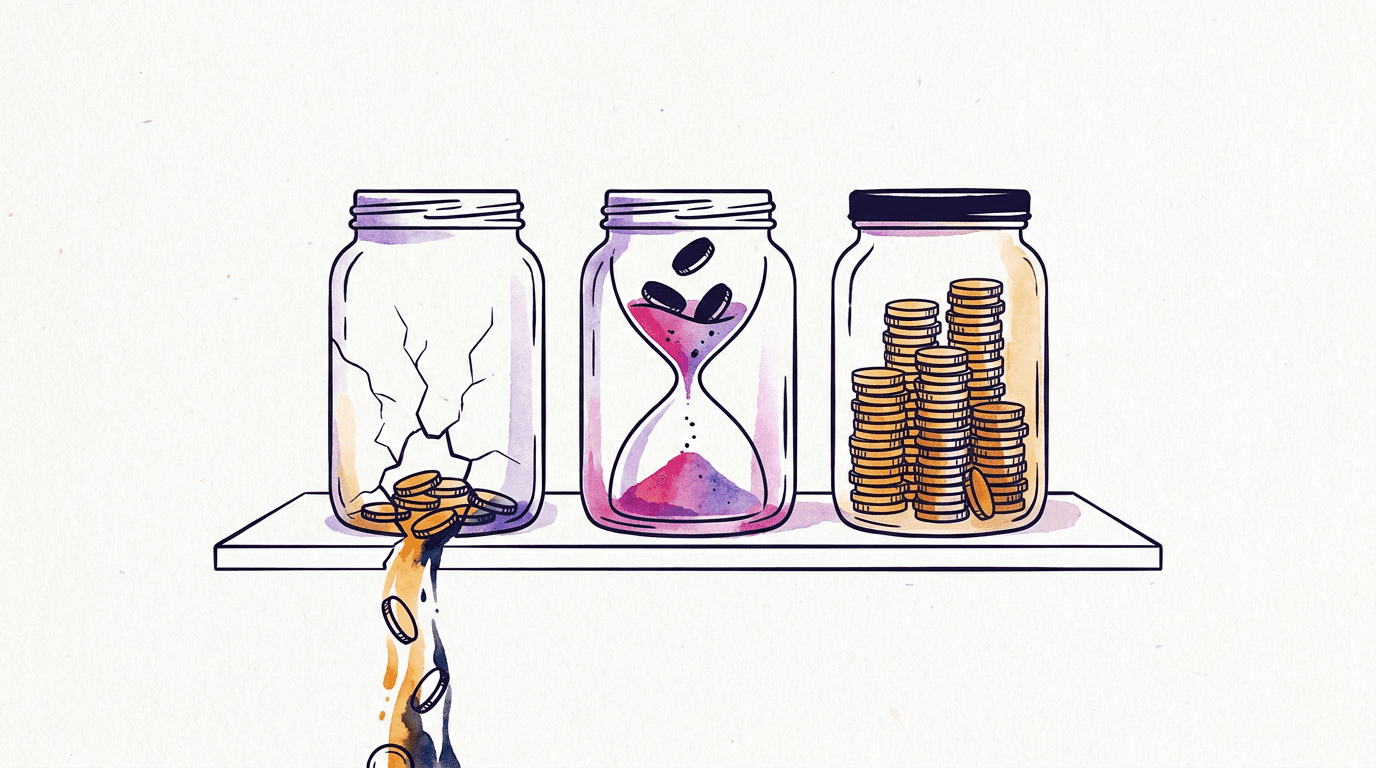
Bayar per penggunaan murni (pure pay-per-use) adalah model ketiga dan merupakan sistem yang digunakan oleh platform ini. Uang yang didepositkan akan masuk ke dalam saldo Anda. Setiap proses pembuatan gambar akan memotong saldo sesuai dengan harga persisnya. Sesederhana itu. Saldo tersebut berfungsi layaknya uang tunai di dalam laci: akan tetap tersimpan di sana sampai Anda membelanjakannya, baik itu besok maupun tahun depan. Ketika proses pembuatan gambar gagal di sisi Google, saldo akan otomatis dikembalikan secara utuh—sebuah hal penting karena API generatif sebenarnya lebih sering mengalami kegagalan daripada yang diiklankan secara publik.
Perbedaan praktisnya akan sangat terasa pada pola penggunaan Anda. Jika Anda membuat gambar secara berkala (musiman)—misalnya mengerjakan proyek logo minggu ini, lalu tidak membuat apa pun selama enam minggu berikutnya—dua model pertama akan tetap menagih biaya selama masa vakum tersebut. Sedangkan model ketiga tidak memungut biaya sepeser pun.
Bagaimana cara kerja saldo sebagai pengganti paket berlangganan?
Alih-alih paket berlangganan, saldo memberi harga untuk setiap gambar secara terpisah dan memotongnya dari uang yang sudah Anda depositkan. Tanpa kuota, tanpa tanggal perpanjangan. Di BananaBanana, seluruh alurnya cuma empat langkah:
- Isi saldo USD satu kali: kripto mulai $1, atau kartu dan PayPal mulai $20.
- Pilih model dan resolusi di generator. Harganya tertera langsung di tombol Buat, jadi Anda sudah melihat biayanya sebelum mengeklik.
- Jalankan prosesnya. Harga dipotong dari saldo Anda, dan kalau pembuatan gambar gagal, jumlah yang sama kembali dengan sendirinya.
- Unduh filenya. Tidak ada watermark, dan penggunaan komersial berlaku sama untuk akun $1 maupun akun $1,000.
Itulah seluruh mekanismenya. Tidak ada mode "fast" versus "relaxed" yang harus dijatah, dan tidak ada jalur premium khusus untuk paket yang lebih mahal, karena memang tidak ada yang memakai paket lebih mahal.
Yang sering diremehkan orang: bayar per penggunaan mengubah satuan yang Anda pakai untuk berpikir. Dengan paket langganan, Anda berpikir dalam hitungan bulan. Di sini, Anda berpikir dalam hitungan gambar: satu foto produk di Nano Banana Pro pada 2K seharga $0.11, satu draf kasar tata letak di Lite $0.03, empat draf $0.12. Kekurangannya, jujur saja? Anda melihat setiap sen keluar. Sebagian orang merasa itu lebih bikin stres daripada satu tagihan tetap yang sudah tidak mereka perhatikan lagi, dan saya paham.
Berapa biaya gambar dan video dari satu saldo yang sama?
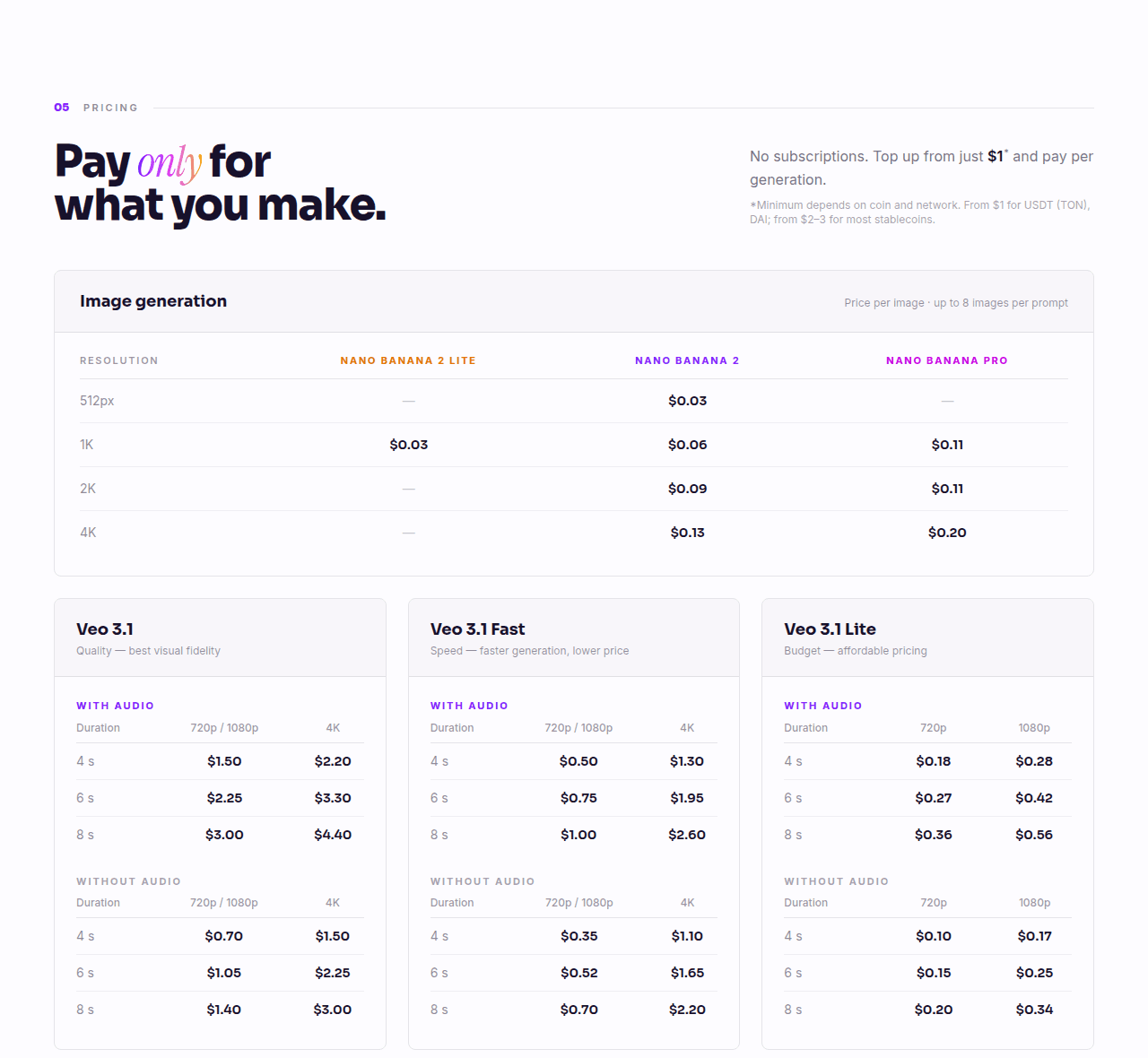
Angka riil dari halaman harga kami, per Juli 2026:
| Model | 512px | 1K | 2K | 4K |
|---|---|---|---|---|
| Nano Banana 2 Lite | — | $0.03 | — | — |
| Nano Banana 2 | $0.03 | $0.06 | $0.09 | $0.13 |
| Nano Banana Pro | — | $0.11 | $0.11 | $0.20 |
Perhitungan sederhana: pengisian saldo senilai $5 dapat membeli sekitar 160 gambar Lite, atau 83 gambar model tingkat menengah pada resolusi 1K, atau 45 gambar pada model tertinggi Pro. Bagi sebagian besar orang yang hanya menguji prompt atau membuat beberapa aset per minggu, saldo $5 bisa bertahan hingga berminggu-minggu. Kami telah mengulas detail mengenai di mana model seharga $0.03 sebenarnya sudah sangat cukup jika anggaran hemat adalah fokus utama Anda.
Pembuatan video bekerja dengan cara yang persis sama, dihitung per klip dan bukan per gambar. Klip video bisu berdurasi 4 detik pada resolusi 720p menggunakan Veo 3.1 Lite berbiaya $0.10. Klip yang sama dengan suara adalah $0.18. Tingkat tertinggi video 4K berdurasi 8 detik dengan audio menggunakan Veo 3.1 Standard memerlukan biaya $4.40, dan Gemini Omni Flash (selalu disertai suara) memiliki harga $0.10 per detik pada resolusi 720p, jadi berkisar $0.30–$1.00 per klip pada resolusi tersebut. Jadi, "generator video AI tanpa langganan" bukanlah produk terpisah di sini; semuanya menggunakan satu saldo yang sama, sehingga Anda dapat menggunakan saldo $2 hari Senin untuk gambar dan hari Selasa untuk klip video.
Satu hal yang ingin saya tekankan sebagai seorang praktisi: penagihan per gambar mengubah cara Anda menulis prompt. Ketika draf awal hanya berbiaya $0.03, Anda dapat melakukan iterasi secara bebas pada model yang ekonomis dan hanya membayar harga model Pro untuk hasil akhir (final render). Sebaliknya, model langganan dengan fitur "unlimited relaxed mode" cenderung mendorong kebiasaan buruk dengan memaksakan puluhan variasi gambar secara acak karena terasa gratis.
Kapan model langganan bulanan sebenarnya bisa lebih murah?
Mari bersikap adil: pengguna aktif harian dengan volume tinggi bisa mendapatkan keuntungan lebih besar pada model paket bulanan tetap.
Ambil contoh Higgsfield, karena mereka menawarkan beberapa model yang sama dengan kami. Paket Ultra mereka seharga $129/bulan untuk 3,000 kredit bulanan, atau $99/bulan dengan komitmen tahunan; Nano Banana Pro membutuhkan 2 kredit per gambar di sana, sehingga pemakaian penuh dalam satu bulan menghasilkan biaya setara $0.07–$0.09 per gambar Pro, menurut halaman harga Higgsfield (diperiksa kembali pada tanggal 16 Juli 2026; penawaran mereka sering kali berubah). Harga tersebut memang mengalahkan tarif flat $0.11 kami, dan tingkat tertinggi mereka menambahkan opsi bebas akses 7 hari tanpa batas (unlimited) bergantian untuk model-model tertentu. Jika Anda benar-benar menghasilkan lebih dari 900+ gambar tingkat tertinggi setiap bulan secara konsisten, paket bulanan seperti itu jelas lebih unggul dalam hal harga satuan dan saya tidak akan menyangkal hal tersebut. Kami telah membedah perbandingan ini secara mendalam, model demi model, dalam ulasan alternatif Higgsfield kami.
Kendalanya ada pada frasa pemakaian penuh. Perhitungan keuntungan model langganan hanya berfungsi jika volume pemakaian Anda konsisten tinggi setiap bulannya. Sisa alokasi kredit akan di-reset setiap bulan alih-alih diakumulasikan ke bulan berikutnya, akses bebas tanpa batas juga akan melambat saat server padat, dan paket dengan tingkat yang lebih kecil justru memutarbalikkan perhitungan matematika tersebut: Paket Starter seharga $19/bulan memberikan 270 kredit, setara 135 gambar Nano Banana Pro, yang berarti biayanya sekitar $0.14 per gambar. Bahkan paket tingkat menengah Plus ($59 untuk 1,200 kredit) hanya menghasilkan harga sekitar $0.10 per bulan, hanya terpaut satu sen di bawah tarif kami, dan melewatkan pemakaian satu bulan saja akan menghapus keunggulan harga tersebut di sisa tahun berjalan. Titik impas (break-even) kasar menurut saya: jika Anda menghasilkan kurang dari ~900 gambar tingkat tertinggi per bulan, atau pola penggunaan Anda tidak menentu, maka model bayar per penggunaan (pay-per-use) jauh lebih menguntungkan. Dan itu baru perbandingan dengan harga standar kami; bonus isi ulang kami (tambahan saldo 5% untuk pengisian crypto $50+, 10% untuk $100+, ditambah bonus 10% lagi dari kode promo untuk deposit apa pun, yang semuanya dapat diakumulasikan) memangkas tarif efektif kami hingga kisaran $0.09 dan menggeser garis titik impas tersebut hingga di atas 1,000 gambar. Di atas angka tersebut, dengan volume yang stabil, model langganan kemungkinan besar akan sedikit lebih murah dan saya akan menyarankan hal itu kepada Anda secara jujur.
Ada biaya tersembunyi lain yang lebih rumit: menghitung berapa biaya riil yang Anda keluarkan per gambar. Halaman harga Higgsfield mencantumkan lebih dari enam puluh tarif kredit yang terpisah—berbeda-beda untuk setiap model, resolusi, dan durasi klip video (Kling 3.0 pada resolusi 720p membutuhkan sekitar 14 kredit per klip 8 detik per pertengahan Juli 2026; sedangkan Seedance 2.0 pada resolusi 4K membutuhkan 110 kredit), harga belum termasuk PPN sebelum checkout, spanduk pendaftaran menawarkan diskon terbatas 30% yang mengikat Anda pada tarif awal yang tidak akan sama pada saat perpanjangan, dan catatan kecil di bagian bawah menyatakan bahwa akses bebas tanpa batas hanya berfungsi di aplikasi web mereka. Catatan lain di bawahnya memperingatkan bahwa model-model baru mungkin diluncurkan secara bertahap dan "not available to all users at launch", jadi model unggulan terbaru yang tertera di kartu paket tidak dijamin langsung aktif di akun Anda sejak hari pertama. Bahkan daftar penawaran mereka tidak stabil: memuat URL harga yang sama dari dua lokasi berbeda menunjukkan dua kumpulan paket dan harga yang berbeda kepada saya. Semua ini bukanlah penipuan. Ini hanya kerumitan aritmatika yang hampir tidak pernah dihitung secara riil oleh pengguna: untuk mengetahui biaya per gambar yang sebenarnya, Anda harus membagi harga paket dengan jumlah kredit bulanan, lalu membagi jumlah kredit tersebut dengan tarif model yang digunakan, kemudian menambahkan kembali komponen pajaknya. Bandingkan kerumitan itu dengan tarif flat $0.11 per gambar Nano Banana Pro, yang merupakan keseluruhan perhitungan biaya Anda.
Selain itu, ada kategori pengguna yang tidak bisa dilayani sama sekali oleh model langganan bulanan: orang-orang yang hanya membutuhkan 20 gambar satu kali saja untuk menyelesaikan satu proyek tunggal. Membeli paket langganan seharga $10/bulan untuk kebutuhan satu minggu adalah pemborosan biaya hingga 4x lipat, belum lagi risiko tagihan perpanjangan otomatis yang mungkin lupa Anda batalkan. Pengisian saldo satu kali sebesar $3 sudah cukup untuk menutupi seluruh kebutuhan tersebut bahkan masih menyisakan kembalian.

Kredit gratis harian vs bayar per penggunaan: mana yang lebih murah?
Kredit gratis harian adalah model freemium: setiap akun mendapat jatah kecil yang terisi ulang sekali sehari, dan apa pun di luar jatah itu butuh paket berbayar. Untuk yang sekadar hobi, ini tawaran yang benar-benar bagus. Kalau dua atau tiga gambar per hari memang sudah cukup untuk selamanya, nol dolar jelas mengalahkan $0.03, dan saya pun akan memilih paket gratisnya.
Masalahnya ada pada hal-hal yang biasanya menyertai jatah tersebut. Ketentuannya berbeda-beda di tiap layanan, jadi bacalah dulu, tetapi paket gratis harian umumnya:
- di-reset setiap 24 jam tanpa sisa yang terbawa, jadi minggu yang sepi tidak menabung apa pun untuk minggu yang sibuk;
- memasang watermark yang terlihat pada hasil gratis, atau membatasi penggunaan komersial;
- menaruh proses gratis di antrean yang lebih lambat, di belakang pengguna berbayar;
- membatasi resolusi, atau menyimpan model terbaru hanya untuk paket berbayar.
Lalu ada biaya yang tidak pernah dicantumkan siapa pun: waktu. Misalnya klien butuh 30 variasi banner malam ini juga. Jatah harian hanya memberi Anda sebagian hari ini dan sisanya di hari-hari berikutnya, itu pun kalau batasannya mengizinkan. Dengan bayar per penggunaan, 30 draf di Nano Banana 2 Lite menghabiskan $0.90, dan tiga render final di Nano Banana Pro pada 2K menambah $0.33. Satu sore. $1.23.
Supaya jelas soal posisi kami: BananaBanana tidak membagikan kredit harian. Akun baru mendapat saldo selamat datang satu kali sebesar $0.20 (enam gambar Lite), satu per orang, dan hanya itu hadiah gratisnya. Saldo itu ada agar Anda bisa menilai kualitas hasil sebelum membayar, bukan sebagai paket gratis. Jadi aturan praktis saya: gambar pribadi sesekali, yang watermark-nya tidak mengganggu Anda, cocok untuk paket gratis harian. Tenggat waktu, pekerjaan klien, dan apa pun yang akan Anda publikasikan lebih cocok dengan bayar per gambar, karena dengan beberapa sen saja Anda bebas dari batas harian dan mendapat file yang bersih.
Bagaimana cara membeli kredit AI di BananaBanana?
Alur prosesnya hanya membutuhkan waktu sekitar lima menit untuk pertama kali:
- Daftarkan diri menggunakan email. Anda langsung mendapatkan saldo awal gratis sebesar $0.20 (setara dengan enam gambar Lite) sebelum perlu melakukan pembayaran apa pun.
- Buka halaman profil Anda, pilih cara membayar: mata uang kripto (kebanyakan pengguna memilih USDT di jaringan TON dan Solana; BTC, ETH, SOL, serta 20+ opsi lainnya juga didukung penuh), atau kartu, PayPal, dan SEPA mulai dari $20.
- Kirimkan setidaknya jumlah minimum yang tertera pada panel ($1 untuk USDT di jaringan TON atau DAI, serta $1–3 untuk koin lainnya) ke alamat deposit pribadi Anda. Saldo akan masuk dalam USD setelah konfirmasi jaringan selesai, biasanya dalam hitungan menit. Pembayaran PayPal masuk begitu dikonfirmasi. Deposit crypto sebesar $50+ mendapatkan bonus tambahan saldo 5%, sedangkan $100+ mendapatkan bonus 10% — jalur kartu tidak mendapatkan bonus ini, meski kode promo tetap menambahkan 10%-nya di setiap deposit.
- Mulai membuat gambar atau video. Setiap gambar atau klip video yang dihasilkan akan memotong saldo sesuai harga yang tertera; jika proses gagal, saldo dikembalikan secara otomatis.
Tidak ada satu pun langkah di alur itu yang memaksa Anda memakai kartu, topik yang telah kami bahas lengkap dalam panduan tanpa kartu kredit kami — dan kalaupun Anda membayar dengan kartu, nomornya diketik di jendela PayPal, bukan di formulir kami. Jika seseorang membagikan kode promo kepada Anda, mengaktifkan kode tersebut akan memberikan tambahan saldo +10% di setiap deposit, tidak hanya pada pengisian pertama, dan bonus ini dapat diakumulasikan dengan bonus deposit volume besar: melakukan deposit $100 dengan kode promo aktif akan menghasilkan total saldo kredit senilai $120.
Bagian pembayaran kripto memerlukan jawaban yang jujur: jika Anda belum pernah menggunakan dompet kripto (wallet) sama sekali, ada kurva pembelajaran sekitar 15 menit yang harus dilalui, dan ini merupakan kelemahan nyata dibandingkan dengan sekadar mengetikkan nomor kartu kredit/debit Anda. Namun, panduan pembayaran kripto kami mengulas proses ini langkah demi langkah, lengkap dengan penjelasan mengenai biaya transaksinya. Setelah deposit pertama berhasil, pengisian berikutnya hanya membutuhkan waktu kurang dari satu menit. Dan kalau dompet kripto memang bukan dunia Anda, jalur kartu mulai $20 memangkas seluruh perjalanan itu.
Saldo Anda tidak akan kedaluwarsa, tidak mengalami konversi otomatis, dan tidak bisa bernilai negatif. Ketika saldo Anda habis mencapai nol, proses pembuatan gambar akan berhenti secara otomatis. Tidak ada konsekuensi tersembunyi lainnya. Kesederhanaan tanpa risiko inilah yang merupakan keunggulan utama dari penawaran produk kami.
FAQ
Apakah ada generator gambar AI yang benar-benar menggunakan sistem pembayaran satu kali?
Bayar per penggunaan (pay-per-use) adalah model riil terdekat yang ada saat ini. Di BananaBanana, setiap pengisian saldo adalah pembayaran satu kali saja: pengisian $3 satu kali dapat membeli ~100 gambar, dan tidak akan pernah diikuti oleh biaya berulang otomatis apa pun setelahnya. Alat dengan penawaran "lifetime deal" (sekali bayar seumur hidup) memang ada di pasaran, tetapi biasanya mereka membatasi kuota penggunaan harian atau menjual kembali model-model murah dengan margin keuntungan tinggi.
Adakah generator gambar AI dengan kredit gratis harian?
Ada, banyak alat freemium memberi jatah harian yang di-reset setiap 24 jam, biasanya disertai watermark, antrean lebih lambat, atau model yang dikunci di paket gratis. BananaBanana tidak termasuk di antaranya. Di sini tidak ada kredit harian: akun baru mendapat saldo selamat datang satu kali sebesar $0.20 (enam gambar Nano Banana 2 Lite), dan setelah itu sistemnya bayar per penggunaan mulai $0.03 per gambar, tanpa watermark dan tanpa apa pun yang kedaluwarsa.
Apakah ada minimum bulanan atau paket yang harus saya pilih?
Tidak. Tidak ada tingkatan paket dan tidak ada minimum pengeluaran bulanan: isi saldo mulai $1 lewat kripto atau $20 lewat kartu, dan setiap proses pembuatan gambar memotong harga yang tertera, $0.03 hingga $0.20 per gambar. Daftar harga lengkap per model, termasuk apa yang bisa dibeli dengan $5 atau $20, ada di halaman harga bayar per pakai.
Apakah kredit BananaBanana memiliki masa kedaluwarsa?
Tidak. Saldo berupa nominal dalam USD akan tetap tersimpan di akun Anda hingga Anda menggunakannya. Platform kami tidak menerapkan reset bulanan dan tidak memiliki tanggal kedaluwarsa.
Apakah saya juga bisa menghasilkan video AI tanpa berlangganan?
Ya, Anda dapat menggunakan satu saldo prabayar yang sama. Klip video bisu dengan resolusi 720p dimulai dari harga $0.10 (menggunakan Veo 3.1 Lite, berdurasi 4 detik), klip video disertai suara dimulai dari $0.18, dan Gemini Omni Flash memiliki harga $0.10 per detik pada resolusi 720p dengan audio yang sudah termasuk di dalamnya — $0.30 untuk tiga detik, $1.00 untuk sepuluh detik pada resolusi tersebut.
Berapa batas minimum pembayaran untuk memulai?
Mulai dari $1, tergantung pada jenis koin dan jaringan blockchain yang dipilih: USDT di jaringan TON serta DAI dimulai dari minimum $1, sedangkan opsi koin lainnya dimulai dari minimum $1–3. Sebelum melakukan deposit, saldo pendaftaran gratis sebesar $0.20 juga sudah cukup untuk memproduksi enam gambar menggunakan Nano Banana 2 Lite, sangat ideal untuk menguji kualitas gambar kami sebelum melakukan pembayaran pertama. Pembayaran kartu, PayPal, atau SEPA dimulai dari $20.
Apa yang terjadi jika proses pembuatan gambar gagal?
Saldo yang terpotong akan otomatis dikembalikan secara penuh ke akun Anda. Jika terjadi kesalahan kapasitas server pada pembuatan video, sistem akan mencoba memproses ulang hingga empat kali terlebih dahulu; sementara pembatasan sebagian akibat filter keamanan (safety-filter) akan dikembalikan secara proporsional.