Cline MCP Server: Generate Images From Your Editor
Connect Cline to a remote MCP server and generate images in Plan & Act: the streamableHttp config, auto-approve seatbelts, real quirks, prices from $0.03.

A remote MCP server in Cline is a hosted set of tools the agent calls over HTTP: you add one block to the MCP settings JSON, and Cline can do things no language model does on its own. Generating an image file is the clearest example. Cline will refactor your components, run the tests and write the migration, then stop dead at "and here's where the product photo goes".
The whole setup, for the impatient. Create a key in your BananaBanana profile, open Cline's MCP settings and add:
{
  "mcpServers": {
    "bananabanana": {
      "type": "streamableHttp",
      "url": "https://bananabanana.pro/api/mcp",
      "headers": {
        "Authorization": "Bearer bb_live_YOUR_KEY"
      },
      "disabled": false,
      "autoApprove": ["list_models", "get_account", "get_result"]
    }
  }
}
Ten tools appear, images bill from $0.03 each off a prepaid balance, video from $0.10. The type line is not optional, and the reason is a genuinely nasty failure mode that I'll get to.
Why add an image generator to Cline?
Cline's whole shape is "describe the outcome, let the agent do the passes". That works right up until the outcome includes a picture, at which point the loop breaks and you're doing manual labour: browser tab, prompt, download, rename, move into public/, come back, find your place again. Five minutes an asset, and the interruption costs more than the five minutes.
With an MCP tool the agent runs the loop instead. It writes the prompt, calls generate_image, fetches the finished file into the folder you named and updates the markup. What you review is a diff.
The economics fit Cline's audience too. Cline is bring-your-own-model, so people running it are already used to paying per unit rather than per month, and generation prices work the same way. No plan, no seat, no monthly minimum. Images from $0.03, video from $0.10, off a balance you top up when you feel like it.
The alternative is a local image MCP server, which means a Node or Python process running on your machine plus your own upstream provider key, with quotas and billing on your own account. A hosted endpoint removes both. Generation happens on our side, on the same pipeline as the web generator, and your only credential is one revocable string.

How do you add a remote MCP server in Cline?
Three routes, same result. Details below are checked against the official Cline MCP docs on August 20, 2026.
Through the UI. Click the MCP Servers icon in the Cline panel toolbar, open the Remote Servers tab, and fill in a server name, the URL https://bananabanana.pro/api/mcp, and pick Streamable HTTP as the transport. Add Server. Then go back and add the Authorization header, since the form is the fastest way in but the JSON is where the credential lives.
By editing the JSON. Same icon, Configure tab, then the Configure MCP Servers button, which opens the settings file for the extension. That file sits in VS Code's global storage, under a folder named saoudrizwan.claude-dev (the extension ID still carries the original author's publisher name, which throws people off when they go looking for something called "cline"). On the CLI it's simply ~/.cline/mcp.json, and cline mcp opens an interactive wizard that walks the same fields.
From the terminal. cline config mcp --json prints what's actually loaded, which is the fastest way to confirm your edit took.
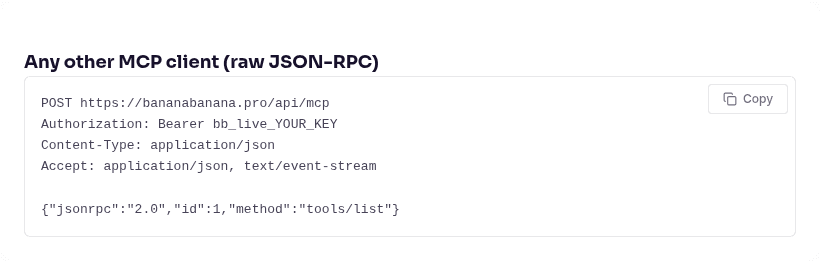
Whichever route you take, the endpoint is https://bananabanana.pro/api/mcp. Not /mcp, which is the human documentation page and returns HTML to anything that POSTs at it. Our MCP server page keeps the generic snippet and a compatibility table for the clients we've verified:
Smoke-test with a free call before spending anything. get_account returns your balance, the key's name and its daily cap; list_models returns every model with current prices. Neither charges, and both prove auth in about a second.
Use case: a batch of catalog placeholders in Act mode
This is where Cline earns its keep, and it's a different job from "make me one hero image". Plan mode first: describe the catalog, twelve products each needing a placeholder shot in one house style, and let Cline draft the loop before it touches anything. Act mode then runs it.
The house style is one clause reused on every call, with only the subject swapped. Consistency across a set comes from the invariant part of the prompt, not from the model remembering what it did a minute ago:
→ generate_image {"prompt": "A photorealistic overhead product shot of a
   small monstera in a matte terracotta pot on a pale linen backdrop, soft
   diffused window light from the left, 50mm lens, subtle natural shadow,
   generous empty space around the subject, no text",
   "model": "nano-banana-pro", "aspect_ratio": "4:5"}
← {"job_id": "…", "status": "processing", "cost_charged_usd": 0.11,
   "balance_remaining_usd": 1110.65}

Second product, same style clause, different plant and a different angle:

Twelve of those on Nano Banana Pro is $1.32. On the default nano-banana-2-lite it's $0.36, and for grid fillers that a designer will replace anyway, that's the call I'd make; our Lite guide covers where the cheap model stops holding up. I used Pro here because these two ship on this page at full size.
A batch is also exactly the situation where you want a seatbelt. Two of them exist. Each MCP key takes an optional daily USD cap in Profile → MCP API Keys, so a loop that goes wrong stops at a number you chose rather than at your balance. And multi-image calls (number_of_images above 1) behave like video: the first call returns a quote and charges nothing until the agent repeats it with confirm_cost.
Video runs from the same chat, with the same confirmation rule. Silent 720p Veo 3.1 Lite starts at $0.10 for four seconds, and Omni Flash bills $0.10 per second with sound always on, so a three-second clip is $0.30. Renders take one to ten minutes, and since generate_video returns a job id immediately, Cline keeps working on your code and polls get_result when it's ready.
Cline quirks worth knowing before you ship
Five, in rough order of how much time they'll cost you.

1. "type": "streamableHttp" is spelled exactly like that, and omitting it breaks things quietly. The docs are blunt: leaving the field out defaults to the legacy sse transport for backwards compatibility. Legacy SSE means the client opens a GET against your URL and waits for an event stream. Our endpoint is stateless Streamable HTTP, so a GET gets 405 Method Not Allowed (I checked it again while writing this: curl -i https://bananabanana.pro/api/mcp returns 405). What you see in Cline is a server that won't connect, with an error that says nothing about a missing config field. Hyphenated streamable-http fails the same way.
2. The key sits in that file as plain text. Cline's docs recommend keeping secrets in environment variables, but variable interpolation inside the remote headers object isn't a documented feature, unlike Cursor's ${env:…} or Windsurf's ${file:…}. The saving grace is location: the extension's settings file lives in VS Code's global storage, not in your repo, so there's no realistic path to committing it by accident. Still, treat it as a credential on disk. Give it a daily cap, and revoke it from the profile page the moment a machine leaves your hands.
3. Auto Approve is coarser than you think. In Cline's Auto Approve panel, "Use MCP servers" is a single toggle covering MCP tools as a category, so flipping it on approves the ones that spend money along with the ones that don't. Per-tool control lives in the config instead, in the server's autoApprove array. My allowlist is the three free calls (list_models, get_account, get_result) and nothing else, which kills the approval fatigue during a batch while every render still stops and asks.
4. YOLO mode plus paid tools deserves a moment's thought. Cline's YOLO mode auto-approves everything: file changes, terminal commands, browser actions, MCP tools. The docs label it dangerous for good reason. Our cost-confirmation step doesn't save you here, because a fully autonomous agent will happily approve both halves of the quote-then-confirm handshake. The thing that does save you is the per-key daily cap. Set one before you turn YOLO on, not after.
5. There's no marketplace install for this, and enterprise controls have their own path. Cline no longer exposes an MCP Marketplace browse-and-install surface in the SDK-backed VS Code extension, so manual JSON is the route for everyone. Admins get a different lever: remoteMCPServers in the organisation's remote configuration pushes a pre-configured remote server to every user, and blockPersonalRemoteMCPServers stops people adding their own. If you're rolling this out to a team, push it centrally and hand each developer their own key.
An honest limitation from our side, since we're listing rough edges: generate_speech returns a WAV as a signed link rather than something Cline can play in the panel, so audio means opening the file. Images come back with a small inline preview next to the URL, which is the more useful of the two behaviours. Cline added support for image content in tool results back in 2025, so on any current build the preview renders.
Does Cline support OAuth for remote MCP servers?
Not in a documented way, no, and that's worth stating plainly because the answer differs by client. Cline's MCP documentation covers stdio, SSE and Streamable HTTP, with authentication described as headers you supply yourself. OAuth isn't in it. A feature request for OAuth customisation has been open on the Cline repo since August 2025 and remains open as of August 20, 2026.
Practically, that's fine here. Our server takes either an OAuth 2.1 token or a Bearer API key, and the key path is the one Cline is built for. It's also the path I'd pick anyway: keys are free, you can hold several, and each one carries its own usage log (tool, model, cost, prompt preview) plus that daily cap. When a contractor's laptop goes away, you revoke one key and nobody else's setup notices.
If you want per-project isolation, make a key per project rather than one key for everything. The usage log then tells you what the "internal dashboard" work actually cost versus the marketing site, which is a question that comes up right around invoicing time.
What did this article's demo media cost?
Standard per-generation prices, the same figures list_models hands the agent:
| Asset | Model | Price |
|---|---|---|
| Catalog placeholder, monstera | Nano Banana Pro, 1K | $0.11 |
| Catalog placeholder, snake plant | Nano Banana Pro, 1K | $0.11 |
| Cover + 2 editorial illustrations | Nano Banana Pro, 1K | $0.33 |
| Docs-page screenshot | browser, not a generation | $0.00 |
| Total | $0.55 |
Worth knowing if you're topping up rather than testing: deposits of $50 or more add 5% to the balance, $100 or more adds 10%, and an active promo code adds another 10% of the deposit on top. Both come off the same base, so $100 with a code credits $120.
The same key works in every other client, so if you also run Cursor or VS Code, nothing new gets created: same balance, same history, one endpoint. The Cursor guide and the VS Code setup cover those two, and the use cases carry over almost unchanged. Create a key and ask Cline for the first batch.
FAQ
Does Cline support remote MCP servers over Streamable HTTP?
Yes, and it's the recommended transport in Cline's own docs. A remote server is a url, a type of streamableHttp, and an optional headers object for authentication, with legacy SSE still available for older servers. Set type explicitly: omitting it falls back to SSE for backwards compatibility, which fails against a modern stateless endpoint. Verified against the official documentation on August 20, 2026.
Where is Cline's MCP settings file?
Two places depending on how you run it. The VS Code extension keeps it in VS Code's global storage, in a folder named after the extension ID saoudrizwan.claude-dev, and the reliable way to open it is the Configure MCP Servers button in the MCP panel's Configure tab rather than hunting through directories. The CLI uses ~/.cline/mcp.json. Both take the same mcpServers object.
Do I need my own cloud account to generate images in Cline?
No. A locally-run image MCP server needs an upstream provider key with quotas and billing on your own account. The remote server runs generation on our managed key pool, so the only credential you handle is the bb_live_ key from your profile. New accounts start with $0.20 of balance, which covers six images on the cheapest model before you pay anything.
How do I stop an agent from spending too much?
Three controls, and I'd use all three. Keep autoApprove limited to the free tools so every render asks first. Set a daily USD cap on the key in Profile → MCP API Keys, which is the only one that still works if you enable YOLO mode. And let the cost-confirmation step do its job: video and multi-image calls return a quote on the first call and charge nothing until the agent repeats the call with confirm_cost set to the quoted amount.
Why won't my Cline MCP server connect?
Check in this order. Is "type": "streamableHttp" present and spelled in camelCase, since without it Cline tries legacy SSE and our endpoint answers 405 to the GET. Does the URL end in /api/mcp rather than /mcp. Is the Authorization header exactly Bearer bb_live_..., with no stray whitespace, since a bad or revoked key returns 401. If it connects but tools are missing, restart the server from the MCP panel; if you're on an enterprise plan, personal remote servers may be blocked by your organisation's configuration.