BananaBanana Guide: 13 AI Models, Prices, Features
A full tour of BananaBanana: thirteen AI models for images and video plus text to speech, prices from $0.03, no subscription, crypto or card, referrals.

BananaBanana is a pay-as-you-go AI image, video and speech generation platform that runs thirteen models from four vendors behind one USD balance: six image models (three Nano Banana tiers, two GPT Image 2.5 tiers and Qwen Image 3.0 Pro), seven video models (three Veo 3.1 tiers, two generations of Gemini Omni Flash, Wan 3.0 and Grok Imagine Video 1.5), plus Gemini 3.1 Flash TTS for voice. There's no subscription and no card on file. You top up with crypto or a card and pay per result.
The short version, if you're comparing options:
- Images cost $0.03 to $0.20 each, depending on model and resolution (512px to 4K).
- Silent video starts at $0.10 for a 4-second 720p clip on Veo 3.1 Lite.
- Video with sound starts at $0.18 on Veo Lite, or $0.20 for a 4-second 480p clip on Wan 3.0, where the soundtrack is free. Gemini Omni Flash bills by the second, from $0.03 at 360p to $0.30 at 4K.
- Speech costs $0.01 per 200 characters, 30 voices, one or two speakers.
- Deposits: 20+ cryptocurrencies and stablecoins from $1, or card, PayPal and SEPA from $20. No subscription, nothing to cancel.
- Controls: seed, negative prompt, reference images and clips, first and last frames, clip extension. Most of the raw API surface, in a web UI, and the same models over MCP for agents.
- New accounts get a $0.20 starting balance, and failed generations are refunded automatically.
We published the first version of this post on launch day, when the platform ran seven Google models and the post was six bullet points and a promise. This is the September 2026 edition: thirteen models, four vendors, and every sample below generated through our own pipeline for this article.
What can you make on BananaBanana?
Pictures, short video clips, and spoken audio, in most practical variations of each.
Images go from quick 512px drafts to 4K exports, in ten aspect ratios from square 1:1 to cinematic 21:9. You can attach reference images when a product or a character has to stay consistent across a series (up to 14 on Nano Banana 2 and GPT Image 2.5, three on Qwen). A cheap image takes a few seconds; the top models need closer to half a minute.
Video splits into three philosophies now. The Veo 3.1 family gives you control: an exact duration of 4, 6, 7 or 8 seconds, resolution up to 4K, and a soundtrack you can switch off. Omni Flash is the conversational one: always with sound, 3 to 10 seconds billed by the second, and you iterate by describing changes in plain language. The newest pair goes long or goes talking: Wan 3.0 renders up to 30 seconds in a single take, and Grok Imagine Video 1.5 lip-syncs a line of dialogue you wrote.
A quieter difference from most wrapper sites: we expose nearly the full parameter surface of each API instead of a single prompt box. Seed, negative prompt, a prompt-enhancement toggle, ten aspect ratios, subject references, first and last frames, clip extension, the audio switch. If you've ever abandoned a tool because it hid the one setting you needed, that was us too, which is why the generator doesn't.
Around the models sits the boring but important stuff: generation history in your profile, automatic refunds when a provider fails, an interface translated into 15 languages, and an MCP server so Claude, Cursor or your own agent can call the same models from the same balance.

Nano Banana image models: Lite, standard, and Pro
The three Google image models share a family and split cleanly. Lite is for volume, Nano Banana 2 is for resolution headroom, Pro is for the assets people will actually stare at.
| Nano Banana 2 Lite | Nano Banana 2 | Nano Banana Pro | |
|---|---|---|---|
| Price per image | $0.03 (1K only) | $0.03 at 512px, $0.06 at 1K, $0.09 at 2K, $0.13 at 4K | $0.11 at 1K and 2K, $0.20 at 4K |
| Speed in our pipeline | about 4 seconds | roughly 2–4× slower | 20–40 seconds |
| Strong side | drafts, bulk assets | resolution, reliable text, up to 4 images per prompt | typography, complex scenes |
Rather than describe the difference, here's the same prompt through all three models: a photorealistic bottle of banana soda on a rain-wet market counter at dusk, with a paper label reading "BANANA SODA".
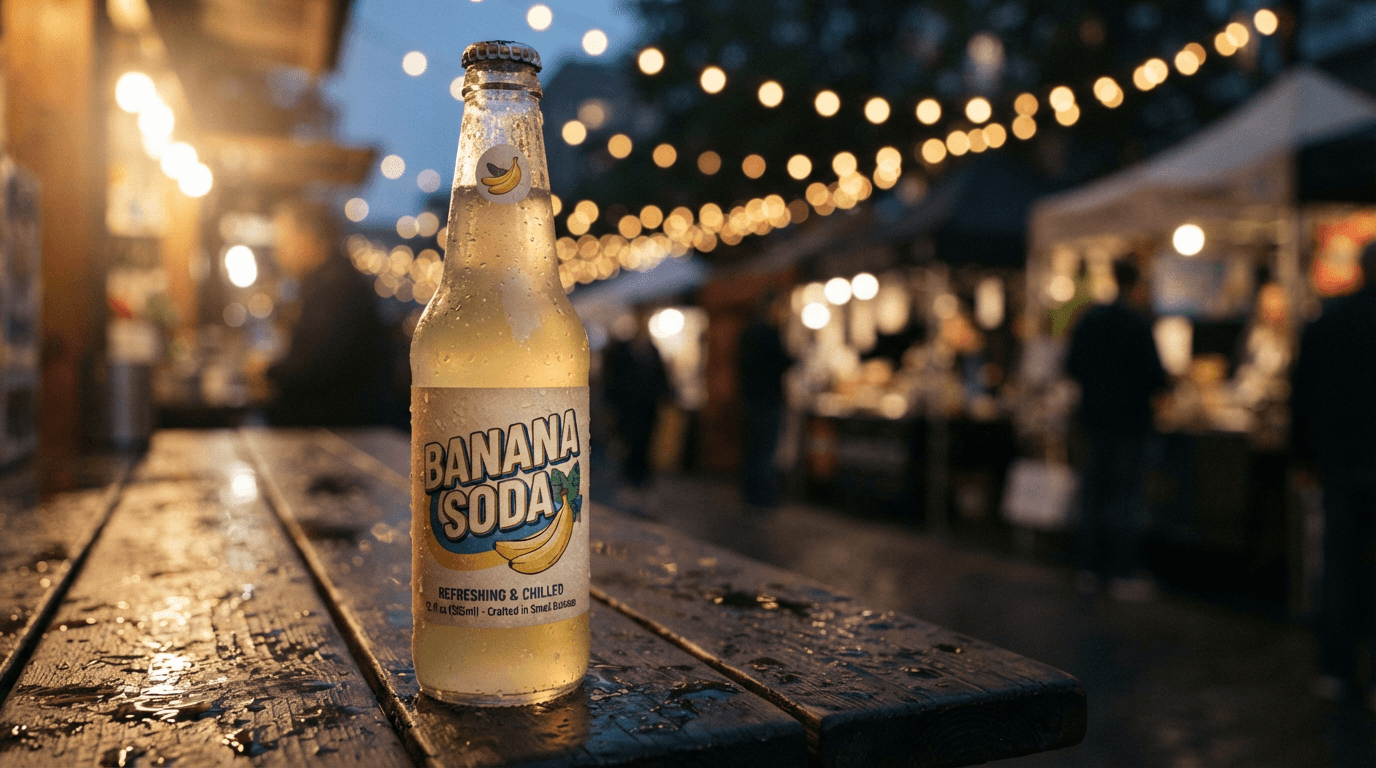
Lite ($0.03) nails the mood and the headline lettering, then quietly gives up on the fine print: the small line under the logo is decorative gibberish. For an illustration nobody zooms into, that's usually fine.
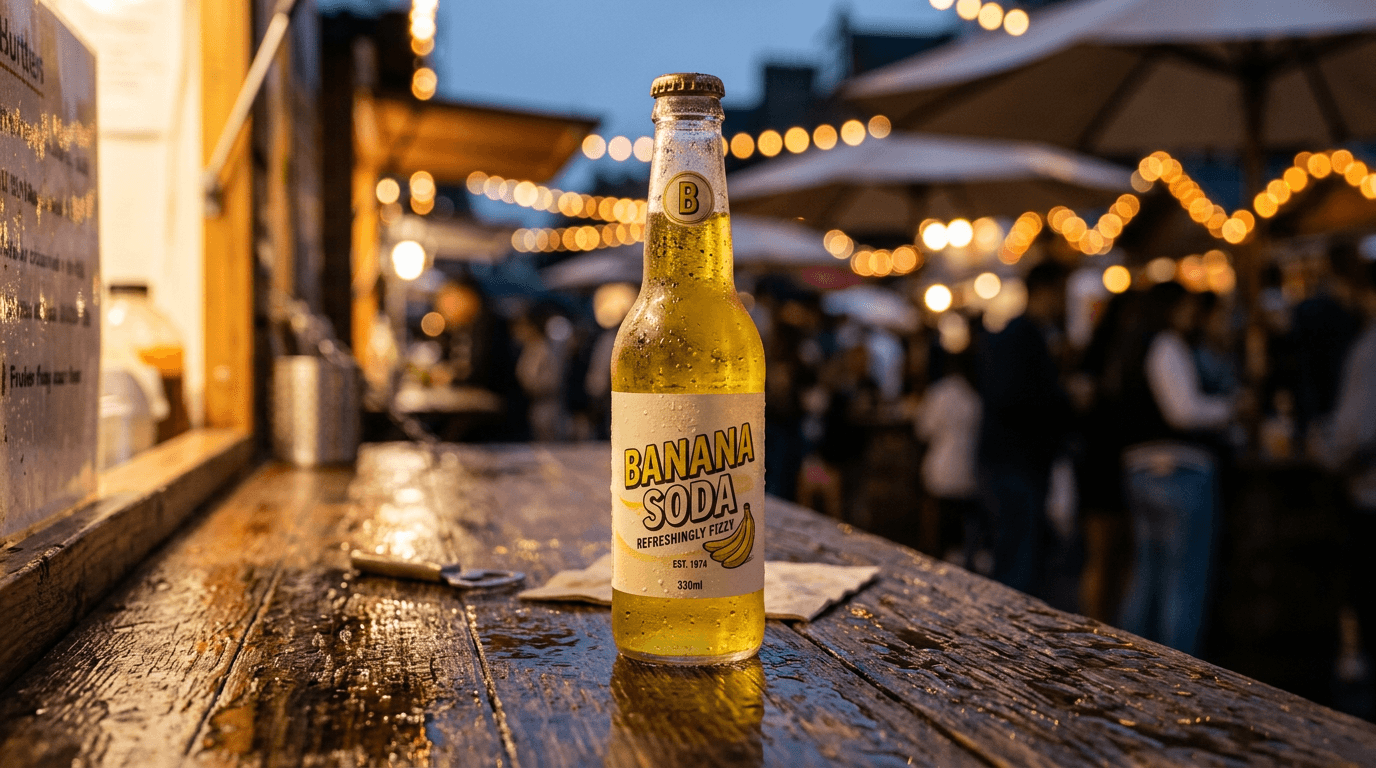
Nano Banana 2 ($0.06 at 1K) renders a fully legible label, down to an invented "EST. 1974" and a volume mark, and frames a wider street scene. The menu board it added in the background is mangled, though.
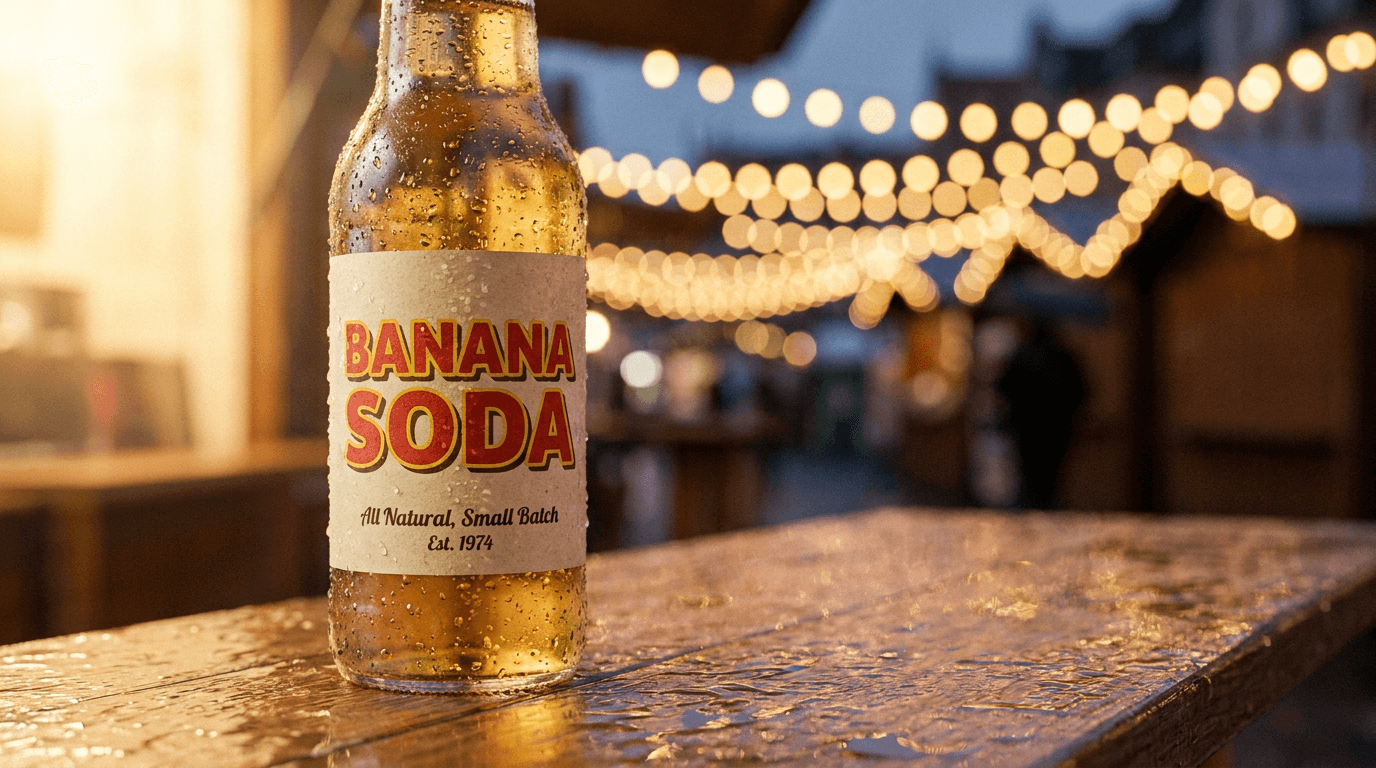
Pro ($0.11) wins on typography and light: crisp retro letters with a drop shadow, readable script underneath. Funny detail: even Pro misspelled its own invented tagline as "Small Balch". Image models have come a long way with text; proofreading is still your job.
We also ran Lite through production for a week and wrote up where the cheap model is enough if you want the budget angle in depth.
GPT Image 2.5 and Qwen Image 3.0 Pro: the other image models
Three image models come from outside Google now, and they exist because people kept asking for a second opinion on the same prompt.
| GPT Image 2.5 Flare | GPT Image 2.5 Sunburst | Qwen Image 3.0 Pro | |
|---|---|---|---|
| Price per image | $0.05 at 1K, $0.11 at 2K, $0.18 at 4K | same as Flare | $0.04 at 1K, $0.08 at 2K |
| Character | the fast tier of OpenAI's 2.5 | the precise tier, slower | Alibaba's text specialist |
| Extras | up to 14 reference images | up to 14 reference images | seed, negative prompt, 3 references, 12 languages of in-image text |
| Missing | seed, Relaxed Filter | seed, Relaxed Filter | 4K |
Same banana soda prompt, two more takes.
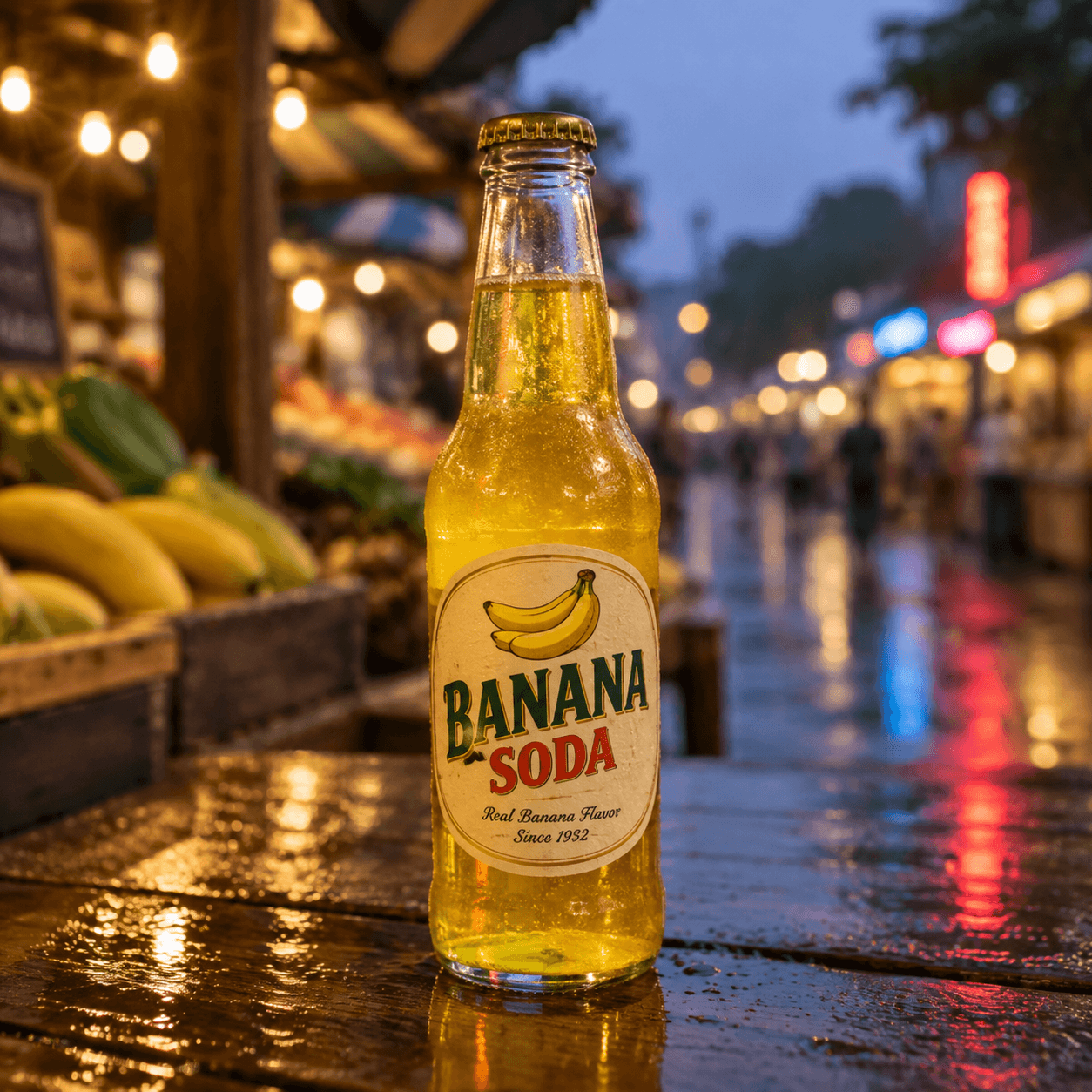
Flare ($0.05) is the only model in this whole line-up that got every word right, including the fine print: "Real Banana Flavor, Since 1932", plus a small bunch of bananas nobody asked for and a wet-market bokeh that reads as a real photo. It took 36 seconds, which is the price of that precision. Sunburst is the same model family tuned for even tighter prompt adherence; I reach for it when a layout has to match a brief, not for a first draft.
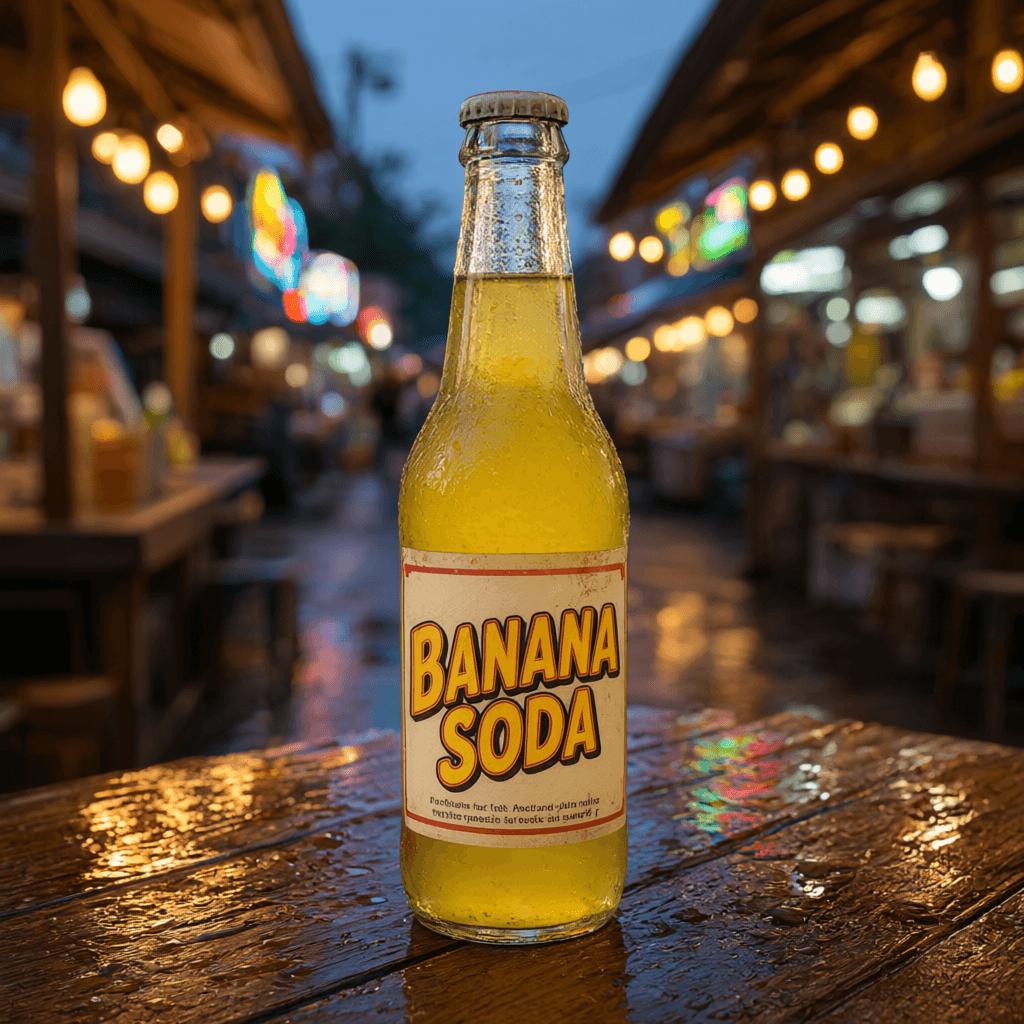
Qwen ($0.04) came back in nine seconds with the boldest headline of the five and the cleanest bottle, then did the Lite thing on the fine print: two lines of convincing nonsense. Its real strength is text in Chinese, Japanese, Korean and other scripts where the Google models still stumble, and it's the cheapest model here with a seed and a negative prompt. No 4K, though.
Veo 3.1 video: Standard, Fast, and Lite
The three Veo tiers share the same controls on our generator; the price difference buys output quality, mostly visible in physics and fine motion. According to Google's Veo documentation, the family supports native audio, image-to-video, and resolutions up to 4K, and that matches what we see through the API, with one platform note: Veo 3.1 Lite tops out at 1080p.
Prices below are ranges from a 4-second to an 8-second clip:
| Model | Silent, 720p/1080p | With audio, 720p/1080p | 4K |
|---|---|---|---|
| Veo 3.1 | $0.70–1.40 | $1.50–3.00 | $1.50–3.00 silent, $2.20–4.40 with audio |
| Veo 3.1 Fast | $0.35–0.70 | $0.50–1.00 | $1.10–2.20 silent, $1.30–2.60 with audio |
| Veo 3.1 Lite | $0.10–0.20 at 720p, $0.17–0.34 at 1080p | $0.18–0.36 at 720p, $0.28–0.56 at 1080p | not offered |
The clip above is Veo 3.1 Fast: a 6-second silent dolly-in over a breakfast table at golden hour, generated for this post. It cost $0.52 at 720p. Watch the steam and the curtain; that kind of believable motion is what separates Veo from cheaper video models, and Fast keeps most of it at a third of the Standard price.
A clip usually lands within a few minutes. When capacity is strained, the platform restarts the operation by itself and shows the retry counter while you wait. If it still can't deliver, you get the money back. Same policy when the safety filter eats results: a full block refunds everything, a partial one refunds proportionally.
My rule of thumb after months of running these: Lite for storyboards and social drafts, Fast as the daily driver, Standard when water, fabric or collisions have to look right, or when the delivery spec says 4K. Veo also has the longest reach: a finished clip extends by 7 seconds at a time, up to 148 seconds with full continuity.
Omni Flash: video with sound you edit by chatting
Gemini Omni Flash is the odd one out. Google shipped the first generation in June 2026 and Omni 1.1 in August; both run here, with 1.1 as the default. It always generates a soundtrack, runs 3 to 10 seconds at a length you set yourself in whole seconds, and bills by the second: $0.03 at 360p, $0.10 at 720p, $0.15 at 1080p and $0.30 at 4K, so a three-second draft is $0.09 and a full ten seconds of 720p is $1.00. It takes input pictures: a starting frame, an optional last frame, and up to three reference clips for a character or product. The 1.0 generation stays available at 4, 6, 8 or 10 seconds, 720p or 1080p, if you prefer its look.
Turn the sound on for this one. The pancake clip is a single Omni Flash generation: one text prompt describing maple syrup pouring onto a stack of pancakes, an explicit "single continuous shot, no scene cuts" instruction (Omni loves to edit in extra shots if you don't say this), plus an "Audio:" line asking for the soft drizzle of syrup over a quiet kitchen room tone. No separate audio work. I asked for the full 10 seconds.
One prompting lesson from making this clip: Omni keeps whatever is already happening in the first frame and quietly drops actions scheduled to start later. My first drafts asked for a pancake flip "around the middle of the clip" and got ten seconds of nothing three times in a row. The version that worked describes the syrup as already pouring in the very first frame and continuing for the entire clip. Write the action in present progressive, not as a timeline.
The feature that earns the price is editing. Every finished video gets an edit button, not just Omni ones: describe a change ("make it night, keep everything else the same"), pay for the seconds again, and the model re-renders the clip with your correction while keeping most of the original. Your own uploads work too, so a Veo clip or a phone video can be restyled through Omni; the result always comes back the same length as its source. Omni 1.1 also extends: each step appends 3 to 10 seconds to the last clip, up to about 40 seconds total. We took the model apart in a separate Omni Flash API review, and there's a dedicated page on what 1.1 changed.
Wan 3.0 and Grok Imagine Video 1.5: long takes and talking clips
These two arrived in September and cover the gaps the Google models leave open.
| Wan 3.0 | Grok Imagine Video 1.5 | |
|---|---|---|
| Duration | 4, 6, 8, 10, 15, 20 or 30 s | any whole number from 4 to 15 s |
| Price | $0.05/s at 480p, $0.10/s at 720p, $0.20/s at 1080p | $0.14/s at 720p, $0.25/s at 1080p |
| Cheapest clip | $0.20 (4 s, 480p, sound included) | $0.56 (4 s, 720p) |
| Audio | on by default, free, can be switched off | always on, with lip-synced dialogue |
| Inputs | first and last frame, up to 10 reference images, up to 5 reference clips | first frame or up to 7 references (references at 720p only) |
| Aspect ratios | 16:9, 9:16 | 16:9, 9:16, 1:1, 3:2, 2:3 |
Wan 3.0 is the only model on the platform that renders half a minute in one pass, and its soundtrack costs nothing extra, which makes it the cheapest way to get video with sound here. The catch is at the top end: 30 seconds of 1080p is $6.00, the most expensive single generation we sell. Reference clips are billed too, so a 15-second reference plus a 15-second output costs like 30 seconds.
The lantern boat is a Wan 3.0 generation for this post: ten seconds at 720p, $1.00, one prompt asking for a single continuous tracking shot along a forest stream at dusk with fireflies, and an "Audio:" line for water and crickets. It delivered the whole take without a cut, which is exactly the thing Omni has to be talked out of. The candle flame is a touch too steady for my taste. Sound on; the stream is generated, not stock.
Grok is the talking one. The barista clip is six seconds at 720p ($0.84): I wrote her line in quotes inside the prompt, and the model returned a speaking face with the mouth movements matching the words. That's the feature people build UGC-style ads on, and we have a separate guide to AI UGC video around it. Two honest notes from the logs: reference images only work at 720p (a first frame works at 1080p too), and this clip came back at 1280×704 rather than a true 720 rows. Nobody will notice on a phone. A pixel-peeping client might.
Text to speech: 30 voices, a cent per 200 characters
Gemini 3.1 Flash TTS turns text into a 24 kHz WAV for $0.01 per started 200 characters, so a 60-second read of about 900 characters costs a nickel. You pick one of 30 voices or set up a dialogue between exactly two, and direct the delivery in plain words: "warm, unhurried, slight smile", plus inline tags like [whispers] or [laughs] where you want them. It runs in the same generator as images and video, and over MCP as generate_speech.
That's one generation: about 150 characters, the Kore voice, a one-line style note asking for a relaxed narrator rather than an ad read. Cost, one cent. I wouldn't use it for an audiobook, but for a voiceover on a product clip it beats waiting for a freelancer to open their inbox.
How do payments and refunds work?
Your balance is in USD and only goes down when a generation succeeds. Crypto deposits on the web are processed by 0xProcessing: BTC, ETH, SOL, TON, BNB, LTC, TRX, XRP, DOGE and BCH, plus USDT, USDC, DAI and TUSD stablecoins across ERC-20, BEP-20, Solana, TON and Base networks. That's over 20 options, and stablecoins on cheap networks like TON or Solana are what most of our users pick in practice. There's a full crypto deposit walkthrough if you're sending your first transfer. Cards, PayPal balance and SEPA transfers go through PayPal Checkout instead, from $20 per payment.
Signing up takes an email and comes with $0.20 of credit, enough for six Lite images before you decide anything. If someone shared a promo code with you, activate it once and every deposit you make gets a +10% bonus on top. Deposit size adds its own bonus too, on crypto top-ups: 5% on $50+ and 10% on $100+, and the two stack: $100 in crypto with an active code credits $120.
Nothing stays on file
Paying by card is possible, but the card never touches our platform: you press the PayPal button and the details are entered in PayPal's own window. Nothing is stored afterwards, and nothing renews. If you've ever subscribed to an AI tool for one project and then paid for four idle months because cancelling lived three menus deep, you know exactly why this matters. A deposited balance is yours until you spend it; when it runs out, nothing keeps charging you for existing. The trade-off, stated plainly: the card route starts at $20 per payment, while crypto starts at about $1. A $10 stablecoin transfer on TON costs a few cents in fees and takes about five minutes the first time, seconds after that.
We broke down why you never need a card on file and how pay-per-image compares with subscriptions in separate posts. The refund logic is worth spelling out here, because generative APIs fail more often than anyone advertises. A generation that ends in a failed state refunds the full price automatically. No support tickets involved. Full price lists live on the pricing page.
Referral program: 5% to 15% of every deposit
You can create up to three promo codes in your profile. Anyone who activates your code gets +10% added to every deposit they make, and you earn a commission on those deposits: 5% to start, 10% once your referrals pass $1,000 in total top-ups, 15% past $2,000. The code stays attached to the buyer's account, so the bonus and your commission apply to each deposit automatically, not just the first one.
Two honest caveats. You can't activate your own code, and signups from the same network as yours don't count toward commissions; the fraud checks are strict on purpose.

FAQ
How much does AI image generation cost on BananaBanana?
From $0.03 per image (Nano Banana 2 Lite at 1K, or Nano Banana 2 at 512px) up to $0.20 for a 4K image on Nano Banana Pro. GPT Image 2.5 runs $0.05 to $0.18, Qwen Image 3.0 Pro $0.04 to $0.08. There's no subscription; you pay per image from a prepaid balance.
Is there a free trial?
Every new account starts with $0.20 of credit, which covers six images on the cheapest model or one 4-second Wan 3.0 clip with sound. No card details are needed to register, just an email.
Do I need a credit card or a subscription?
No card is needed to start: you register with an email and get $0.20 of balance. After that you top up a USD balance when you want to, with crypto from about $1 or by card, PayPal or SEPA from $20, and pay per generation. There's no subscription tier, an unused balance doesn't expire, and nothing can auto-charge you.
Which cryptocurrencies does BananaBanana accept?
BTC, ETH, SOL, TON, BNB, LTC, TRX, XRP, DOGE, BCH, and the stablecoins USDT, USDC, DAI and TUSD across ERC-20, BEP-20, Solana, TON and Base networks.
Can I generate AI video with sound?
Yes, four ways. Veo 3.1 models have an audio toggle (a 4-second clip with sound starts at $0.18 on Veo Lite), Wan 3.0 includes its soundtrack for free from $0.20, Gemini Omni Flash always generates audio from $0.03 per second, and Grok Imagine Video 1.5 lip-syncs dialogue you write, from $0.56 a clip.
What happens if a generation fails?
The full price is refunded to your balance automatically. For video, the platform first retries capacity errors on its own; if a safety filter blocks part of the output, the unfilled part is refunded proportionally.